

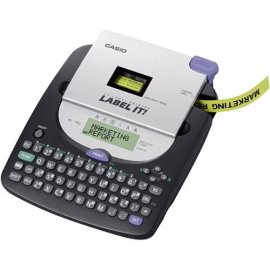
Casio KL-780 EZ Label Printer
| Casio KL-780 EZ Label Printer |
Manufacturer: Casio
UPC:
079767163716 Retail Price: $69.95 #Deals:
Avg. Rating:
|
CASIO KL-780 Portable Label Printer - 010-Digit 2-Line LCD Display Top Loading Cassette Four Tape sizes (18mm, 12mm, 9mm, 6mm) Ability to print up to 3 lines of text One built-in Font - Sans Serif Select among 24 Character sizes Convenient, easy-to-use, built-in QWERTY Keyboard Uses 6 AA size Batteries (included) or Optional AC Adapter (AD-A95100) |
Available from 9 stores - Select your deal and buy the Casio KL-780 EZ Label Printer
"Where can I buy a Casio KL-780 EZ Label Printer?" At all of these merchants listed below. Click any of the deals below to buy now on the merchant's website.
Casio KL-780 EZ Label Printer Specs:
| Product Name | Casio KL-780 EZ Label Printer |
| Manufacturer | Casio |
| Product Number MPN | KL-780 |
| Retail Price | $69.95 |
| EAN-14 | 00079767163716 |
| EAN-14 | 00797671637160 |
| UPC | 079767163716 |
| Weight | 1 lbs. |
| Deal first added on: | 15-January-2004 |

Latest 6 Reviews
Here is what people are saying about the Casio KL-780 EZ Label Printer
"Better than some other low priced label makers" | 2009-03-30 |
| - Reviewed By User: A1FPQU42FSVFC4 |
| Overall, I'm satisfied with this label maker. You can purchase different tapes for this machine giving you a variety of print and background colors. I was disappointed with the program to adjust print density. Other reviewers have reported the same problem. No matter where you set the print density the lettering remains rather dense. |
| |
"Tape keeps getting caught" | 2009-03-19 |
| - Reviewed By r_corley |
I have a Casio label maker for the office and like how they build their stuff and so bought this one for home use. After using the printer for about one week it consistently started failing. The label gets caught up as it is printing and feeds back into the unit. When it does this, the tape often wraps around the feeding mechanism and requires opening of the top and removal of the entire tape cartridge. This happened about 25% of the time with different label cartridges. I am returning it and looking to buy a differnt Casio product.
|
| |
"Works Great!" | 2007-02-06 |
| - Reviewed By User: AWZSUAVQL8K75 |
| Cheap and effective. It came with everything I needed to start labeling. Extra tapes are cheap and available at most office supply stores. |
| |
"A Step Back?" | 2006-10-17 |
| - Reviewed By squidwardtentacles |
The earlier version of this label printer (KL-750) would allow you to print two lines on 9mm tape. This "upgrade" apparently does not. The 750 would automatically reduce the font size when you pressed the carriage return. I can't believe Casio would take away functionality like that. It can print two lines, but only on 12mm tape.
At least the number of batteries required is down from 8 to 6 (AA), but the price of the adapter is absurd.
Also, the space between labels is more like 1.5"!!! Ridiculous! You really notice when you print out multiple labels without cutting them. My son blurted, "What a rip-off!"
With the price of labels vs. the price of this printer after rebate, it's cheaper to buy a new printer after the labels run out.
Despite these complaints, this is a very nice label printer. Better type and nicer labels than the Dymo I was using. It is also quieter than the 750.
|
| |
"Great Product - Cartridges expensive!" | 2006-01-28 |
| - Reviewed By User: A3DPE9NAT4N93R |
I've used a couple inexpensive label machines - and like this one by far. Full keyboard, pretty common sense function.
I was just shocked at the cartridge replacement price - $30 to $37 for two cartridges ($15/ea!!).
The review mentioning wasted tape (machines print a lot of blank tape to go with each label) is right on - but haven't found any that don't! |
| |
"Nice but" | 2005-11-20 |
| - Reviewed By tj500 |
First off the price is nice on this unit and the labels are very nice. lots of text choices etc, etc.
Cons are: As with all printers low prices means price gouging on replacement ink, and in this case replacement labels. I have had a few labelers including the "P-Touch Home and Hobby" and this one is larger and has a few more functions is all. I would go with the labeler with the cheapest replacement labels and best price.
I HATE THAT THESE LABELERS WASTE SO MUCH LABEL TAPE WHEN THEY PRINT!! There is a HALF inch of blank label that prints before AND after the text. If you were to type a 3 letter word, you will get a label 3x larger than you need. (the way around this is to print all your labels at once and cut them up rather than printing a bunch of small ones that all have waste edges.)
EDIT 12/14/06: After about a year of using this printer I have another problem I think I should mention. If you ever have to take the tape out before it's finished because of a jam it is very likely to jam up over and over again wasting the remainder of the tape. (it winds up on the feed gear for some reason) It has happened 3 times out of 4 replacement tape rolls. TOO MUCH. This tape is already almost too expensive to use without all the waste. |
| |
Last updated: Nov 24, 2009 at 01:50 EST. Pricing information is provided by the listed merchants. GoSale.com is not responsible for the accuracy of pricing information, product information or the images provided. Product prices and availability are accurate as of the date/time indicated and are subject to change. Any price and availability information displayed on amazon.com or other merchants at the time of purchase will apply to the purchase of this product. As always, be sure to visit the merchant's site to review and verify product information, price, and shipping costs. GoSale.com is not responsible for the content and opinions contained in customer submitted reviews.

