

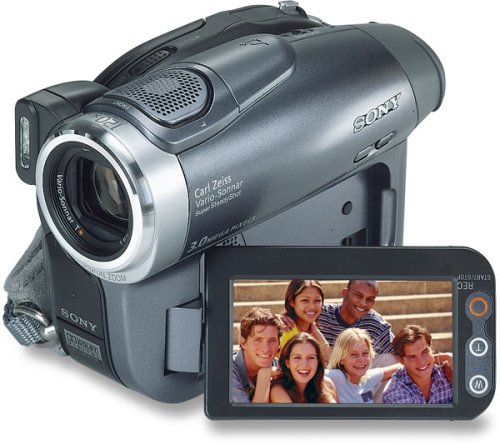
Available from 3 stores - Select your deal and buy the Sony DCR-DVD403 DVD Handycam
"Where can I buy a Sony DCR-DVD403 DVD Handycam?" At all of these merchants listed below. Click any of the deals below to buy now on the merchant's website.
* Shipping estimates are based on Ground shipment within the contiguous U.S. If you notice a problem, you can report a pricing error or problem.
Overview of current deals for the Sony DCR-DVD403 DVD Handycam Camcorder w/10x Optical Zoom:
1 merchant is offering Free Shipping.
1 merchant offers International Shipping or Worldwide shipping.
3 merchants have Express Shipping options.
Sony DCR-DVD403 DVD Handycam Camcorder w/10x Optical Zoom Specs:
Product Name
Sony DCR-DVD403 DVD Handycam Camcorder w/10x Optical Zoom
Manufacturer
Sony
Product Number MPN
DCRDVD403
Retail Price
$1099.99
EAN-13
0027242670075
EAN-14
00027242670075
UPC
027242670075
Dimensions
5.2 x 3.7 x 2.4 in.
Weight
4 lbs.
Deal first added on:
2-May-2005
Tags
Find other products that have similar tags to the Sony DCR-DVD403 DVD Handycam Camcorder w/10x Optical Zoom
video battery Sound Digital Zoom DVD surround analog camcorder Sony optical wide Disc RW DVD player Megapixel record 10x Optical Zoom Interface CCD Handycam highly recommend low light BUYER BEWARE Sony discs DCR-DVD403 Auto Lens Sony DCR-DVD403 DVD Handycam non-Sony media Sony DCR-DVD403 analog NTSC video Editing videos QUICK FIX mpeg2 component time coding
Latest 6 Reviews Here is what people are saying about the Sony DCR-DVD403 DVD Handycam Camcorder w/10x Optical Zoom
"It's alright"
2009-02-09
- Reviewed By User: AT4S516XMKUMA
We've recently replaced this camcorder with a Sony SR12 hard drive camcorder. The hard drive camcorder is the way to go. This DVD camcorder is nice and simple to use, but the 30 minute DVDs is too much of a headache to keep changing in and out, especially when you're right in the middle of capturing an event.
If your intention is to simply capture videos that are less than 30 minutes, then this might be the camcorder for you. But if you don't want the hassle of changing out tapes and DVDs, then go to a hard drive camcorder instead.
WARNING: do not install the USB driver that comes with the Sony 'Picture Perfect' software included with this camera - it made my Windows XP system unbootable; could not boot even in 'safe mode'. This Sony software is more evil than any virus or trojan I have ever encountered. Fortunately, I was able to restore my C: drive from my automated daily backup image.
I have used this camera for 3 1/2 years without needing to install the software drivers and have been happy with the video and general usability of this camera. Rather than trying to use Sony's horrible software, the preferred method of transferring data is simply to: 1. Finalize the DVD, in the camera 2. Insert the mini-DVD in your computer's DVD drive and manually copy the files to your hard drive
If you need to edit the video on the DVD, the best way I've found is to open the .VOB files with VideoReDo Plus.
The video and battery life are excellent. I haven't had any problems so far except for the following complaints about design:
1. MICROPHONE - The microphone picks up way too much wind noise, making it difficult to shoot outdoors. Even a small breeze will create so much ugly noise that it makes watching the video annoying without turning off the sound completely on playback.
Unfortunately, there is no good workaround for this problem since Sony did not include an external microphone input jack.
2. ZOOM - is far too sensitive. It really takes two hands on the tiny zoom lever to get anything other than a rapid or jerky zoom, although, with practice, improved my ability to do it with my thumb. Not easy.
RECOMMENDED OPTION: I purchased a clip in spot light that solves the problem of graininess in low light situations.
Though I purchased this camera partly due to its low-light performance, compared with other cameras, I found that the resulting image quality too dark and grainy for my taste.
I have had this camcorder for quite some time and it is a thing of beauty. I will now pass it on to my brother with some sadness, as I hate to see it go. Very easy to use. It turns on and off quickly. Comfortable to hold. Image stabilization is very good. Sound quality and video is very nice.
The very best part about this camcorder is that it records to mini DVD that I could pop out and play right in my DVD player without having to convert or connect using wires. The only downside for me was the disc only recorded about 20 minutes worth of footage. I had to carry a small stack of discs with me when I went on vacation.
I have owned four camcorders and this is my hands down favorite.
I've used this successfully with Maxwell, Panasonic, Sony and other mini DVDs in -R and -RW formats.
However I have not had any success with Memorex Duralayer +RW DVDs.
In the 3 years? or so that I have had the camera it has functioned well. I have had to replace the battery with a larger capacity model and to replace the charger when it cooked.
I've owned this camera for about 18 months now. I wanted a camera that could shoot both decent video and stills, and would do mpeg2 encoding to save me the work of converting DV-AVI files to mpeg2 myself. This camera largely met those goals but has lots of annoyances too.
1. The lens cover. If you read the reviews here you'll be well aware that the lens cover on this camera is very prone to failure. In my case the lens cover will not close. There was no apparent reason for the sudden failure; I have always taken good care of the camera and only use it lightly.
2. The PC software is truly appalling. Forget about doing anything useful with it. I use it in its first couple of steps just to get it to extract the individual mpeg2 files out of the DVD VOB files it creates, and then manually rename each one with the date and time, then I copy them out of the temp directory and quit the app. It's way more tedious than it need be just to do this, and useless beyond this basic task (and it crashes and/or hangs frequently so often requires several attempts).
3. If you use non-Sony media the camera complains, and you cannot access the non-Sony media on your PC until it is finalized. This is pure evil manufacturer lock-in BS; I don't believe there is any technical reason for this as non-Sony media support multi-session writes.
4. The still camera works great in good light but not in low light. The pictures are more reminiscent of CMOS sensors than a CCD.
5. It's a Sony. That means don't expect any of these issues to be fixed or even acknowledged. Once Sony have your money you're dirt.
The Sony DVD403 Handycam takes great pictures and is easy to use, but beware! The software that comes with it messes up your computer BIG TIME! We have had to rebuild our computer and leave the software off. I have been told that "Sony is aware of this problem and is working on it" but I am very disappointed that they did not notify me of the problem. They could have easily done so since I registered the camera with them. If you have been experiencing problems with your computer not wanting to shut down and/or 'blue screen' and you have the software for this camera installed - that could be your problem.
Last updated: Nov 22, 2009 at 01:55 EST. Pricing information is provided by the listed merchants. GoSale.com is not responsible for the accuracy of pricing information, product information or the images provided. Product prices and availability are accurate as of the date/time indicated and are subject to change. Any price and availability information displayed on amazon.com or other merchants at the time of purchase will apply to the purchase of this product. As always, be sure to visit the merchant's site to review and verify product information, price, and shipping costs. GoSale.com is not responsible for the content and opinions contained in customer submitted reviews.