

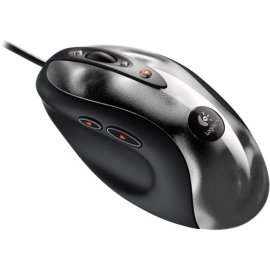
Available from 8 stores - Select your deal and buy the Logitech MX518 Gaming Optical
"Where can I buy a Logitech MX518 Gaming Optical?" At all of these merchants listed below. Click any of the deals below to buy now on the merchant's website.
Latest 6 Reviews Here is what people are saying about the Logitech MX518 Gaming Optical Mouse - Metal
"Good Gaming Mouse"
2009-11-07
- Reviewed By User: A2MXX2CKC147I5
I love the MX 518 gaming mouse from Logitech. The only reason why I did not give it a 5 star overall rating is that this is now the third one I have had to buy. The mouse seems to just "die" and stop working after a year of use. The first one I "killed" worked wonderfully until the main Left and Right buttons stopped working after about 13 months of use. My second one, the optical tracker stopped functioning after 11 months of use. So, enjoy this mouse, but expect for it to "die" on you.
"My favorite form factor."
2009-11-04
- Reviewed By User: ACWALJSGXQIRI
This mouse has the classic MX 5XX form factor that's so comfortable to the hand with 8 total buttons placed in excellent locations. In a definite improvement over the old MX 500 model, the 518's "feet" (sliding surfaces) are hard plastic and large enough to not easily wear away. For me, this 518 was replacing a well-loved old 500 that my son had peeled away the decals that made up it's "feet." It's one of the few changes and one of the only ones that needed to be made. Fantastic mouse.
"A great mouse!"
2009-10-25
- Reviewed By User: AGAPPZUPF2EW5
I had been looking for a new gaming mouse and I read thousands of reviews online. I LOVE Logitech products so I knew I wanted to stick with a Logitech mouse. I had it narrowed down to the MX518 and the G500. I chose the MX518 because it was on sale but I'm glad I did! I'm not disappointed at all. It is taking some getting used to because it is quite speedy. I have been fiddling around with the settings to find the best set-up for normal computer use and for use in games. I'm sure I'll find the perfect settings after playing around with them a little more.
The mouse comes with the Setpoint software which I highly recommend. The version shipped with the mouse is older so go to the Logitech web site and download the most recent version instead. Windows XP, Vista and 7 versions are all available in 32 and 64 bit. Setpoint lets you change dozens of features on the mouse so you can find the perfect combination.
I also like the way the mouse feels in my hand. After a few hours of gaming, the mouse is still comfortable. The black colored portion of the mouse is some sort of rubber with a nice feel to it. The rubber makes gripping the mouse very easy and it won't fly out of your hand if your hands are sweaty.
My only complaint is a very minor one. I'm not a huge fan of the silver portion of the mouse, strictly on an appearance basis. The silver part would have looked much better if it was smooth and didn't have that 'dented' look. I know it's VERY minor and a matter of personal taste so I was almost hesitant to mention it. I decided to mention it because it's the only reason I didn't give this mouse a 5 star rating.
Overall, it's a fantastic mouse. Once again, Logitech has created a winner in the field of gaming mice.
"OpticalGamingMouse.com MX 518 Review"
2009-10-22
- Reviewed By User: A17XKYZIDVUUNR
[...]
It's apparent that Logitech checked out the Razer Diamondback when they designed and built the MX518. Like the Diamondback, the MX518 offers configurable resolutions and configurations that you can assign to specific games. Although the MX518 doesn't have a cool name like the Diamondback, it definitely compares with its performance. Unlike the Razer mouse, the MX518's ability to change resolutions on the fly is built into the hardware, there are no custom drivers needed which means a.) less headaches and incompatibilities and b.) faster response time.
The MX518 is comfortable and works quite well as a standard mouse. Precisely selecting sections of images and tracing while photo editing was a breeze with its high 1600DPI resolution. Perhaps the only thing better would be a pen and tablet.
The MX518 was created to give the gamer a step up versus the competition, it surely proved itself. The MX518 is made for a right hander, no lefties here as there is really no way to be able to properly use this mouse if you're a lefty. There are a couple concerns about ergonomics. Users with short, stubby fingers will have to reach a bit harder to press the (+) button. Frequent shifting in a game could tire the forefinger.
The MX518 ships with three built-in DPI toggles. As we noted, it defaults to 1600DPI. Pressing the (-) button once lowers to 800DPI; pressing a second time gets you to 400DPI. As mentioned before, this is built into the hardware so it makes life easy for Linux gamers.
Users can change the default DPI settings, and even add more granularity in the Advanced Game Settings panel by allowing you to assign up to five DPI toggles. These settings override the default hardware DPI settings. In the Advanced Game Settings panel you can also assign speed and acceleration settings to work on a per-game customization level. The stock mouse feet on the MX518 are worth mentioning. Although they aren't teflon, they are made of a very slick plastic which seem durable and will be able to plow through those crumbs from your jelly toast without sacrificing a kill. The MX518 is light, responsive, and offers a level of control over its features that few other mice can match. Logitech's designers have clearly thought through the design issues and come up with a winner in the game of mice. Although one of the older "modern" gaming mice, the MX518 has passed the test of time and today is a great value.
Specifications:
* Mouse type: Wired gaming mouse
* Number of buttons: 8 buttons
* Wheel type: Scroll wheel
* Sensor type: 1600 dpi optical sensor
* Maximum speed: n/a
* Extra features: Adjustable sensitivity
* Software: Logitech SetPoint
* Warranty: Three years
"GREAT MOUSE!"
2009-10-03
- Reviewed By User: A2Z4I179IIWJJ5
Best gaming mouse I ever had. Enough buttons to fit my needs. Its bulky so it fits really nice in my hand. The sensitivity is really high and accurate, (I use the lowest DPI).
It worked straight out the box, just plugged it into the USB and 2 seconds later I had my Logitech MX518 working. I bought a SteelSeries QcK Mousepad with it and its so nice!
"buttons and comfort"
2009-09-28
- Reviewed By User: A26ZKNC3C3PBRD
This mouse is easily the best mouse I've ever used. It fits the hand so well, you could use it for hours (which I do) and never even notice it. The button placement is also great for any game that requires the use of extra mouse buttons. another great feature is the speed changing ability in the mouse. The + and - buttons speed up and slow down the pointer speed, which can be helpful in just everyday browsing or in shooter games when you want to go from panic mode to sniper mode. All around great mouse.
Last updated: Nov 21, 2009 at 18:23 EST. Pricing information is provided by the listed merchants. GoSale.com is not responsible for the accuracy of pricing information, product information or the images provided. Product prices and availability are accurate as of the date/time indicated and are subject to change. Any price and availability information displayed on amazon.com or other merchants at the time of purchase will apply to the purchase of this product. As always, be sure to visit the merchant's site to review and verify product information, price, and shipping costs. GoSale.com is not responsible for the content and opinions contained in customer submitted reviews.

