"perfection" | 2006-12-31 |
| - Reviewed By rvron78 |
| Works perfectly. Great look and feel. Easy to use. The buttons are raised to allow use by feel. The display is attractive and functional. It appears to work just as it is designed to.
The instructions for programming and use are simple and easy to follow. In no time at all I was able to toss 5 remotes in a drawer and enjoy my new sleek looking single remote.
I like it so much I've just ordered another one for our second home's system.
I'd recommend to anyone who wants the best. |
| |
"Almost perfect - a few flaws" | 2008-10-06 |
| - Reviewed By j_wiz |
I have three different Harmony remotes -- I'm a big fan. This one is the most expensive of the three that I own, and it definitely has some benefits over its less expensive brethren. It's not completely without flaws, thoguh.
First, as I indicated above, I'm a big fan of Harmony Remotes. You can program them to do everything that any of your devices' IR remotes can do. In general, the dedicated buttons on the remote are enough to handle the tasks that you do 90% of the time. Less frequently used functions can be configured to appear on the LCD screen, which displays 8 items at a time, and can scroll. For really seldom-used functions, everything that a device's original remote can do is accessible in "Device" mode.
I have never had any trouble with the website's programming applets. Some folks hate them, but I'm not one of them. There have been occasions where I have had to try a configuration, and go back to tweak it, because it wasn't working exactly the way I wanted it to. I would rather do this on my computer, using the website's huge database of devices and IR codes, than to try to program it manually, the way I used to have to do with older universal remotes.
I also do not have the problems that some other folks complain about where the device state gets out of sync. I always program my devices using what they call "discrete codes", where there's a different command for "On" and "Off", instead fo a single "Toggle Power" command, and different commands for TV input selection. I never have to try to find the discrete code settings, even if they're not provided by the device's original remote, because Logitech's online device database already has all of the discrete codes for all of my devices stored and ready for me to use.
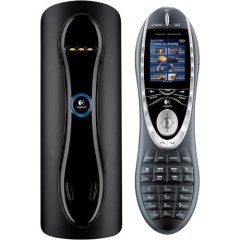
The Harmony 880, in particular, is really nice. I like having the dedicated charger stand, not only becuase I don't have to change the batteries, but because I always know where to find the remote. The charger stand itself is not without its wrinkles. As others have mentioned in their reviews, sometimes the remote gets a little finicky about precise positioning. This has gotten worse in the years since I bought the remote, to the point where I ended up talking to customer service about it. They have inidcated that I will be able to get a replacement cradle which corrects this issue, although the promised call back has been a little delayed in coming.
One other issue with this particular model is that the buttons are fairly smooth and flush to the body of the remote. This can make it a bit of a challenge to find the right button in the dark. The remote does have a motion-sensitive backlight feature, which makes the button-finding problem tolerable - if you pick it up (or sometimes shake it a bit), it lights up.
The button layout itself is fine. Buttons are right where they ought to be, seldom used buttons are smaller and out of the way. This model has all of the buttons that I need for the room where I use it, which includes a DVR.
Overall, this is a solid remote, at the expensive end of the awesome Harmony line. I've recommended Harmony remotes to everyone who's faced remote problems. If it weren't for the problems I've mentioned, I'd give it 5 stars. As it stands, it's just a bit short of perfect. |
| |
"Excellent Timesaver!" | 2008-10-04 |
| - Reviewed By User: A9GAYJHYXARI2 |
I purchased this Harmony 880 remote after talking with many of my technophile family members and friends. I wanted something that would work with all my a/v equipment and still be user friendly and easy to use. This remote is AWESOME! This remote takes just a few moments to program online (you have to enter all your equipment make/model numbers), then just follow the prompts, upload the data to the remote and viola! I also purchased the NYKO BluWave remote so I could use my Harmony 880 with my Sony PlayStation 3. Works like a charm.
Special thanks to other reviewers for all the helpful hints on how to set things up, troubleshoot some issues and how to fix them. I encourage everyone to read as many of the reviews as possible, because they include quite a lot of helpful information and fixes.
Bottom line: This Harmony 880 Universal Remote really is Universal. I now have ONE remote which operates EVERYTHING instead of SIX! Color me HAPPY! |
| |
"Changed my life..." | 2008-09-29 |
| - Reviewed By User: A2JH0DDS0V4YP2 |
| I will never go back to a normal remote again. We had four remotes and an infant at home. Needless to say it was hard to keep track of them all. Not only is this remote ridiculously easy to configure, I did not lose any functionality that the other remotes provided. The play button sticks sometimes, but I believe it has more to do with my child eating peanut butter sandwiches and handling the remote, rather then the poor quality of the remote. Good remote though I really like it. |
| |
"I replaced FIVE remotes with ONE Harmony 880" | 2008-09-29 |
| - Reviewed By User: AFK892KY3M57U |
| A heard about Logitech Harmony when a friend visited my home and saw 5 different remotes on my coffee table. It's amazing what I had to go through to juggle them all and get my HDTV, DVD player, DVR, tuner, and VCR to work, but I just accepted it...and incurred the frustration (and wrath) of my girlfriend and other guests when they would try to make everything work.br /br /So I finally broke down, spent the money, and...it's magic. Just write down the model # of each component, enter it into the simple interface on your computer that's connected to the web (it worked PERFECT on my Mac, thank you very much!), upload the new info to the remote via a USB cable, and VOILA! Your remote is programmed to work with your unique set up. It's amazing how it makes the daily task of watching TV and/or DVD, listening to music, or radio SO simple. It "knows" what to turn on, what to turn off, and how to connect. I had to do a little bit of tweaking to the settings, and the software makes this process easy. br /br /My only quibble would be with the physical design of the remote itself. The number buttons are too low on the controller, making it almost impossible to hold the remote and press them with one hand. The buttons also don't have a lot of 'feedback' to let you know, by touch, if you've pressed it or not. I would also flip the FWD/REV buttons with the REPLAY/SKIP to put them one row higher. I use the FWD/REV more often, and it would be much more convenient to have them next to the PLAY button. But this is minor compared to all of the hassle this ingenious remote has saved me. Truthfully, I wish I would have bought it sooner!br / |
| |
"Extremely Delicate" | 2008-09-29 |
| - Reviewed By victor8636 |
I dropped this remote off my lap, caught it between my calfs, then it fell the rest of the way to the floor. It cracked - totally dead. I sent an email to Logitech Harmony asking for their advice, since the repair on electronics is often more than the cost of a new one. After many emails asking for more and more numbers Logitech Harmony said to send it to them and they will let me know how much a repair will cost, but not to send it UPS. So the cheapest I could find to get it from California to Ontario was $25. Considering that all I would get for my $25 would be an estimate, I am tossing it in the garbage instead. I won't miss it. Never used it much. The human interface was bad -- small buttons, hard to read, needed multiple clicks even to do what you programmed. I guess it appeals to people who are used to the clunky world of the PC. As a Mac user I expect a TV remote that is also user friendly. Hope I can find one. |
| |
"Nice remote but doesn't last" | 2008-09-27 |
| - Reviewed By User: A2QNAZ2QOVGQOI |
| Well I am finally done with this remote. It works great, but the build quality is very low. br /br /My second remote died today (this is my 3rd Logitech remote to die) and I refuse to purchase another. br /br /The programability is great an if spending this kind of money every year on a replacement remote is okay with you then go for it. However I am not.br /br /I also second that the charging base for this is stupid. It is a real pain to get the remote to sit in the cradle properly to charge. |
| |
"Harmony 880 brings Harmony to my house" | 2008-09-23 |
| - Reviewed By User: A2VN1BLJZO0QC3 |
| This is a super universal remote. This is the ticket to control all of your AV needs. Very easy to use and set up.br /br / |
| |
"Best home theater investment I've made so far ..." | 2008-09-21 |
| - Reviewed By User: A1F7VPW3RVLHPY |
| I've spent a lot of money and a lot of time putting together a righteous home theater, but I always had a dream to control everything with one remote control. I've purchased several so-called universal remotes, and yet my dream of total automatic control eluded me. Finally, I carefully researched all of the Logitech remotes and chose the Harmony 880 to fulfill my dream. Well, folks, mission accomplished at last!!! This remote is fantastic, and I have no doubt that the more expensive models are even better. This is a great product! I now control my 62" Sony Bravia KDS60A2000 HDTV, my Sony STR-DG710 A/V receiver, my Scientific Atlanta Explorer 8240-HDC hi-def DVR cable box, my Mac Mini computer (iTunes Frontrow), my Sony PlayStation3/Blu-ray player, my coffee maker, and even my lights with this single remote. The setup and programming has taken a couple of days to get just right, but was not overly complicated or difficult. I love the fact that you configure everything online with your computer, and can even customize labels and the background picture on your remote. And the "Activities"-oriented functions really give you a lot of different ways to set up everything you like to do. I never have to explain to guests how they need to push this button on one remote, followed by that button on another remote, and then another button on another remote just to switch between cable, computer, radio, game console, etc. Nope, none of that. Now they just push the button labeled "activities" and every option is a single button mash away! For those who use their media center/home theater in a variety of ways, this remote is the answer. For example, sometimes I like to listen to the radio while I'm browsing online on the computer or checking email. No problem, because an activity can be created that sets the A/V receiver on radio tuner while the TV gets tuned to the PC input. Want to listen to music on your computer while playing a video game on the PS3? No problem, just create an activity called "Game + Music" --or whatever you want to call it-- and now you can listen to Sepultura while killing aliens in Resistance. Want the lights in your living room to dim slowly and then fade to off when you press Play on your PS3/Blu-ray movies? Easy. Just customize your setup and make some popcorn! Truly the best addition to my home theater, and one of the least expensive. |
| |
"THE COOLEST THING I OWN!!" | 2008-09-21 |
| - Reviewed By User: A1W0NWDZHPEXLR |
| I've recently upgraded my entire entertainment system and when you do that, you realize that you really need to have a high performance universal remote. Well, of all the cool stuff I recently bought, this is by far THE coolest of them all!!br /br /Look, everyone else has said it and it operates just like it promises, so I won't waste your reading time on its features... just know that it works! I have 5 remote controls in a box now (I bought the sound system after getting the Harmony 880 and its remote never came out of its plastic!)... not to mention 10 spare batteries! Noteworthy: The codes are extensive, which includes my 15 year-old Samsung VCR and XBox 360.br /br /Okay, here's a valuable consumer tip: If you have young kids, see if there is an "armored" version because it WILL break if not treated with constant respect. Not a remote that you can toss across the coffee table or mash on its buttons! I would estimate that it would not withstand a drop of 5 feet onto a hard surface. Other minor "glitches" come up once in a while, but nowhere near to a point of annoyance and very easy to manage.br /br /I am serious... using more than one remote control is officially a joke with products like the Harmony 880 on the market! |
| |
"Great idea, poor quality" | 2008-09-19 |
| - Reviewed By User: AEVCSG88D0RFF |
| I loved the simplicity and the ease of use so much, I also bought one for my parents. While not without the occasional quirks, this remote is amazingly simple to program. That being said, I do have a few major complaints. The sensor that turns the remote on when you pick it up broke almost immediately on both my remote and my parent's remote. I've also had troubles charging it almost since day 1. I have to wiggle it in the cradle to get it in exactly the right position that makes it happy. I also had some pretty serious software problems for Mac (though, in Logitech's defense, their phone support was excellent and able to solve the problem without too much trouble). Finally, my parents' remote just stopped working after only 6 months.br /br /Overall, I would say this is probably the best remote on the market in the price range, but a number of quality issues hold it back from being perfect. |
| |