

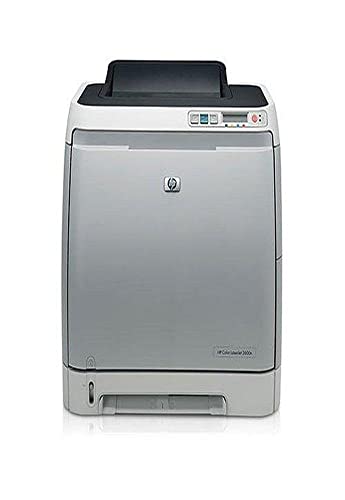
HP Color LaserJet 2600N Printer
HP Color LaserJet 2600N Printer

Manufacturer:
Hewlett-Packard

UPC:
829160809366

Retail Price:
$502.00

#Deals:

Avg. Rating:

Available from 3 stores
Click any of the offers below to purchase and view accessories on the merchant's website.
StoreRatingBase PriceShipping Your PriceAvailabilityBuy Link
PalmTreePC
[Store Info & Reviews]
Covered by A-Z Guarantee
5 Star Rating
188 Reviews
$444.11
New
$29.49
Expedited Shipping Available Expedited Available
$473.60 In Stock. Usually ships in 1-2 business days
8 Available
Best value -- includes full toners -- a $320.00 value! -- not just "starter" toners. not offered by other sellers. includes full toner cartridges. brand new and genuine hp, in original, hp factory-sealed box. brand new; never opened. not remanufactu
Buy from PalmTreePC
from PalmTreePC
talkutalkme
[Store Info & Reviews]
Covered by A-Z Guarantee
5 Star Rating
2432 Reviews
$449.99
New
$29.49
Expedited Shipping Available Expedited Available
$479.48 In Stock. Usually ships in 1-2 business days
3 Available
Brand NEW sealed in retail package with manufacturer warranty. Ship fast.
Buy from talkutalkme
from talkutalkme
fastfriendlyservice
[Store Info & Reviews]
Covered by A-Z Guarantee
5 Star Rating
2296 Reviews
$445.97
New
$29.49
Expedited Shipping Available Expedited Available
$475.46 In Stock. Usually ships in 1-2 business days
4 Available
Usually ships out the same business day payment is received!!
Buy from fastfriendlyservice
from fastfriendlyservice
* Shipping estimates are based on Ground shipment within the continental U.S.
   To report a pricing error or problem, Click Here.
Overview of current deals for the HP Color LaserJet 2600N Printer:
  • 3 merchants have Express Shipping options.

Product Specifications
Product NameHP Color LaserJet 2600N Printer
ManufacturerHewlett-Packard
Product Number MPNQ6455A#ABA
Retail Price $502.00
EAN-130829160809366
EAN-1400829160809366
UPC829160809366
Dimensions20.6 x 23.5 x 19.6 in.
Weight50 lbs.

Tags

Find other products that have similar tags to the HP Color LaserJet 2600N Printer
HP Color Electronics Printers Office Scanners Mac Software Black Computers Memory PC jets 8 inkjet cartridges Laser Mono HewlettPackard printer Packard Hewlett 16MB LaserJet 2600N ppm 43212105 Hew 50854c hq6455aaba 88953a 10410524 hewq6455a q6455a hewq3702a g26743 td655lla 5334393 hpclj2600n hpdq6455a 829160809366 1052192 8ppm rich104888 Ethernet port good value new printer black cartridge toner consumption color cartridges HP Color LaserJet 2600n HP 2600n black prints automatic two-side printing feature HP Solution printer itself inkjet printing Q6455A#ABA 250Sheet
Similar Products
SanDisk SDCFH-1024-901 1 GB Ultra II CompactFlash CardSanDisk SDCFH-1024-901 1 GB Ultra II CompactFlash Card349.99$22.58Check Prices on SanDisk SDCFH-1024-901 1 GB Ultra II CompactFlash Card
at 4 stores
Memorex 700MB/80-Minute 52x Data CD-R MediaMemorex 700MB/80-Minute 52x Data CD-R Media19.99$9.22Check Prices on Memorex 700MB/80-Minute 52x Data CD-R Media
at 12 stores
Linksys WRT54G Wireless-G RouterLinksys WRT54G Wireless-G Router99.99$49.88Check Prices on Linksys WRT54G Wireless-G Router
at 6 stores
HP LaserJet P1006 PrinterHP LaserJet P1006 Printer232.00$82.90Check Prices on HP LaserJet P1006 Printer
at 8 stores
HP LaserJet 1020 PrinterHP LaserJet 1020 Printer257.05$99.99Check Prices on HP LaserJet 1020 Printer
at 2 stores
HP Color LaserJet 1600HP Color LaserJet 1600393.00$164.89Check Prices on HP Color LaserJet 1600
at 8 stores
Brother IntelliFAX 2820 Laser Fax Machine and PrinterBrother IntelliFAX 2820 Laser Fax Machine and Printer349.99$139.75Check Prices on Brother IntelliFAX 2820 Laser Fax Machine and Printer
at 13 stores
SurgeMaster Superior Series w/Tel 8 Outlet, 1770 Joules, 12' Cord ( $150K CEW)SurgeMaster Superior Series w/Tel 8 Outlet, 1770 Joules, 12' Cord ( $150K CEW)44.99$18.72Check Prices on SurgeMaster Superior Series w/Tel 8 Outlet, 1770 Joules, 12' Cord ( $150K CEW)
at 11 stores

Accessories
Canon Photo Paper Plus 4x6 GlossyCanon Photo Paper Plus 4"x6" Glossy19.95$1.99Check Prices on Canon Photo Paper Plus 4x6 Glossy
at 5 stores
CTG 2 Meter USB 2.0 A/B Device CableCTG 2 Meter USB 2.0 A/B Device Cable37.00$0.01Check Prices on CTG 2 Meter USB 2.0 A/B Device Cable
at 7 stores
CTG 3 Meter USB 2.0 A/B CableCTG 3 Meter USB 2.0 A/B Cable11.99$0.01Check Prices on CTG 3 Meter USB 2.0 A/B Cable
at 10 stores
Hewlett Packard Color LaserJet Transparency Film 50 SheetsHewlett Packard Color LaserJet Transparency Film 50 Sheets47.43$19.95Check Prices on Hewlett Packard Color LaserJet Transparency Film 50 Sheets
at 5 stores
HP BLK PRINT CART COL-LASERJET 2600 SERIES ( Q6000A )HP BLK PRINT CART COL-LASERJET 2600 SERIES ( Q6000A )106.00$65.99Check Prices on HP BLK PRINT CART COL-LASERJET 2600 SERIES ( Q6000A )
at 10 stores
Borderless Photo Paper Pro - 1029A014Borderless Photo Paper Pro - 1029A01411.95$1.25Check Prices on Borderless Photo Paper Pro - 1029A014
at 6 stores
Hawking USB Internet Print ServerHawking USB Internet Print Server129.00$38.10Check Prices on Hawking USB Internet Print Server
at 13 stores
Samsung HPR4252 42 Flat Panel HD-Ready Plasma TVSamsung HPR4252 42" Flat Panel HD-Ready Plasma TV3799.99$901.95Check Prices on Samsung HPR4252 42 Flat Panel HD-Ready Plasma TV
at 1 stores
Reviews
3 Star Rating  "Caveat Emptor"2008-08-10
- Reviewed By bpolhem
First, in general this has been a great printer, worthy of the venerable HP name.

Now, on to the caveats.

First, this printer is essentially "Windows only." I do not have a Mac but I can tell you that there is no way in the world to get Linux to print to this machine. For the majority of people that's not an issue, but if you're browsing for a low-cost reputable color laser and you DO use Linux, be aware that this one isn't for you.

Second, and worst of all: I have fried the fuser roller on mine recently because I - stupidly, perhaps, but understandably - tried to use HP photo-glossy paper in the printer. It melted the glossy layer of the paper onto the roller, and I now have a very large doorstop instead of a printer.

I hope these remarks will be helpful to someone.
 
4 Star Rating  "Excellent, affordable color laserjet (4+ stars)"2008-08-01
- Reviewed By strandline
Sometimes it amazes me at how affordable color laser printers have become, and this HP printer is an excellent example of such a printer. Perfect for home or small business use, it prints professional-looking, crisp color sheets at a decent rate, although not as fast as a higher end model should. (It takes about 30 seconds from turning the power on to printing the first, full-color page; a ten page job takes approximately 2 1/2 minutes.) The resolution of the printed pages was even better than I had expected.

This particular model comes with full-size color toner cartridges. Given the price of replacing them, it adds real value since most printers come with 1/2 full toner. The display on the front shows how much of each toner remains, a helpful feature if you're about to print a big job. Drivers are available for Mac OS X and different versions of Windows. This is a non-PostScript printer.

The only problem I had was printing from a Adobe PDF document on my Mac. I can print the same flier from a Word document, but once I convert it to PDF, it loses the font graphics. The same PDF document prints fine from a Windows machine, so it has something to do with the Adobe Reader for Mac. If you use a Mac and expect to print a lot of PDF files, you should be aware of this potential problem. Because I can print using Word, I deducted only a half star for this.

I don't recommend this as a solo printer if you print a lot in black-and-white since the cost of toner and the slower speed makes it inefficient for simpler tasks. Use this as a supplement for times when you need high resolution color that is more colorfast and glossy than an inkjet. For a good quality, low cost black-and-white laser printer, I recommend Brother HL-2040 Monochrome Laser Printer.
 
3 Star Rating  "Slow and not great at printing envelopes"2008-07-15
- Reviewed By User: A1DWOTG6ROY3YL
I have had a hard time printing envelopes - this is after three weeks of daily use of the printer. This is my fourth HP printer in 20 years and I have never had any problems before with envelopes.
 
5 Star Rating  "Perfect for the Mac and Small Biz!!"2008-07-15
- Reviewed By info39092
We have owned this printer for close to 3 years now. We switched from inkjet to laser with this machine. Our office is 100% Mac based. From day one this printer has been great. Super easy to network with multiple Mac machines through standard 10/100/1000 ethernet router and the reliability has been superb! No complaints at all. We don't print a lot since most of our documents are converted to PDF and just after 3 years we are shopping around to replace the original toner that came with the printer. If you are expecting for this printer to give you professional looking graphic and photo prints, then look somewhere else like the Minoltas; but if you are looking for an awesome document and good looking graphics printer then this is it. Don't forget that even though is HP it works great with any Mac.
 
2 Star Rating  "HP 2600n"2008-06-17
- Reviewed By User: A2F4HPVAFW9W57
This printer is a primary network printer. It has issues when connected directly to one PC. If using Windows Vista, a Printer Spooler Error occurs. HP has no supporting drivers to fix this. Microsoft has no Windows patches to fix this. This error is famous as several forums exist to attempt and hack both the Windows spooler and the HP 2600n. Fought this problem for two solid days with Tech calls, internet chats and promises of return calls with a solution. I have yet to hear from either group. However, the pages that managed to print were of the finest quality I've ever seen from a home office printer. I'm sure it will be the best printer I'll ever own once it works.
 
5 Star Rating  "Worth it - Ships with full tanks of toner (vs 1600)"2008-05-15
- Reviewed By rfheat
I have had this for over a year, and am very fairly with it. I have yet to buy any toner/ink for it, and would have spent perhaps $100 on inkjet cartridges with my old printer.

Note that this printer comes with FULL tanks of toner. When I was comparing it with the HP 1600n, I found that the 1600 came with HALF-FULL tanks of toner, so the 2600 gives you the equivalent of 2 more tanks of toner, so it was clearly worth it to go with the 2600n. It also came with an Ethernet port, which allowed me to put the printer anywhere in my house.

One downside is that the original black cartridge (still going) makes makes a faint line across every page :( so I am almost tempted to replace it.
 
5 Star Rating  "HP 2605dn vs HP 2600n - Features vs Toner Consumption"2008-05-05
- Reviewed By ultraj1004
When it comes to purchasing a printer, I look for three things: reliability, features and toner consumption. I have had both 2605dn and 2600n for a year now and I can say that when it comes down to features and memory, the 2605dn comes out shining, but in toner consumption, the 2600n is the king. Both printers have Toner Limit Override, which allows you to keep printing after the cartridge reaches its "limit" giving you hundreds of extra prints. But only the 2600n has the option of printing color in 600dpi and true black without using some color in the prints. The 2605dn prints color only in 2400dpi and always uses a bit of color on its black prints even for you set it for 600dpi (600dpi applies only for black prints in the 2605n). I can honestly tell you that the difference in toner consumption is INSANE. I can print FOUR TIMES more color prints with the 2600n than with the 2605dn, and you cannot tell the deference in quality between the two. Yes the 2605dn is faster, has more memory, can print both sides of the paper automatically and handle heavy paper better, but for me toner consumption is too much of a deference to not notice it. Oh, and my 2605dn burned down on its first birthday. Here are some more details if you are interested:

2605dn -
Pros: Fast, excellent quality. The automatic two-side printing feature is awesome and saves you a lot of time. Can print on transparencies, and cardboard paper. Easy to load toners. Can upgrade memory. It is HP Solution Center compatible, which gives you a run down on how many prints are left, etc. without the need of accessing the internet.

Cons - Costs $200 more that its 2600n sister. No low quality color printing option available. Black prints will always use color. When printing pictures this printer will burn even the HP Photo Color Laser quality papers, believe me, it's a mess.

2600n -
Pros - Cheaper than the 2605dn. Excellent quality. Fast and reliable. Over the top toner consumption when using the low quality color option, which in fact prints as good as the higher quality option. This option has given me over two thousand more prints per cartridge which is incredible. Can also print on transparencies and cardboard. Just be sure to set the printer correctly or it will smudge. It can print both sides of the paper manually.

Cons - A bit slower than its sister and less memory. After using the automatic two-side printing feature this printer seems outdated. It's not HP Solution Center compatible, so you get no nice software with it. Will also burn photo quality paper even if it is made from HP.

Bottom line - The features on 2605dn may be cool but when it comes to saving 75% more toner on the 2600n, I go with the underdog. Too bad the 2605dn does not have the option to print low res in color. Both are bad for photo printing. Well there it is; the table is set and you as the customer must make your move.
 
3 Star Rating  "Nice, but expensive in the long run"2008-04-17
- Reviewed By User: A1O3AM1W8HSG7V
First, the good news. The HP 2600n works well. Setup over the network was simple and it produces nice looking documents.

But, there's not so nice news.

First of all, it's slow. Really really slow, slowest laser printer I've ever owned.

Second, it has problems with handling stiff cardstock. It appears to bump the paper against some internal mechanism so that a horizontal line of text will appear smeared. Not every card, but about half of them.

Finally, it's expensive. Not the printer itself, I caught it at 50% off one day, so I only paid two hundred. The toner costs look like they'll be hefty. So far, my printing with very little "color" is using all four toners cartriges evenly, which works out to 10 cents per page (about five times the cost of my normal lasers).

According to HP's documentation, the printer uses all four toners even when producing black (to control a color cast in the black toner?). I've been told that the "grayscale only" option only affects the color rendering, not the toner use. There is another "neutrals greys, black only" option, I'm going to try that and see if it effects usage.

I've also been told that the other three toner carts spin no matter if they're being used or not, so there's wear from wiping the drums and the printer counts pages evenly across all four toners.

I only use it for limited items that need color, for the speed issue alone I'd prefer using my other lasers instead. It's great for occasional use, but I can't imagine having it as my primary printer.
 
3 Star Rating  "Nice, but sssslllllooooowwwwwww"2008-04-17
- Reviewed By User: A1O3AM1W8HSG7V
update: After owning the printer for several months, I'm happy to report that toner usage is nowhere near as bad as I had initially feared. I've removed those comments. Make sure you find the "black only" option for printing grays. I would update the rating to a four, but Amazon won't let me change it.

------------------------------------------------

First, the good news. The HP 2600n works well. Setup over the network was simple and it produces nice looking documents.

But, there's not so nice news.

First of all, it's slow. Really really slow, slowest laser printer I've ever owned.

Second, it has problems with handling stiff cardstock. It appears to bump the paper against some internal mechanism so that a horizontal line of text will appear smeared. Not every card, but about half of them.

Overall, pretty happy. Especially since I caught it during a 50% off sale.
 
4 Star Rating  "good value for the price"2008-04-12
- Reviewed By User: A25EPPLGXV9P1G
This is probably the cheapest color laser jet you can find. and it does its job well!
 
Quick Links


Pricing information is provided by the listed merchants. GoSale.com is not responsible for the accuracy of pricing information, product information or the images provided. As always, be sure to visit the merchant's site to review and verify product information, price, and shipping costs. Product and merchant reviews are submitted by online shoppers. GoSale.com is not responsible for the content and opinions contained in these reviews.
© 2008 GoSale.com (S2)


Home > Computers > Printers > Printers > Laser Printers

