When I was graduating from community college and moving on to a four year university my parents decided they'd get me a gift for graduating with honours. I decided that I wanted some sort of handheld device to keep me organized and save on paper (I'm a compulsive list maker).
After reading tons of reviews on this very website, reading product specs and even visiting office max a few times I decided on the Palm TX. It has the same calendar, address book and to do list features as every other handheld I've seen. I use them all regularly. The reason I picked this one was the things that made it different from all the other handhelds. I was drawn to the WIFI, which was a major selling point for me. So was Documents To Go, as I am an avid reader and writer of fanfiction.
Well, it was over a year ago that I finally choose my TX, so I feel I'm armed with enough info to write a review now.
I use the WIFI all the time, at home and at school, (and even a few times at coffee shops or McD's). I've found it indispensable. When I bought this handheld, it was the only make and model that offered WIFI, though more might have come out since. The only time I use the BlueTooth is when synching my Palm to my computer, which is not very often. I prefer to plug it in to the wall to charge it. I know you can also go online using Bluetooth if you have a web-enabled phone, but I don't, so I've never used this feature.
My computer has a Vista operating system, and the version of Docs To Go that came with my palm has trouble synching with Vista. The easy way around that is to buy a memory card, and transfer docs manually. There's a new version of Docs To Go (I believe it works with Vista) but I'm a poor college student, and a memory card was cheaper. Since it's been a year, the newer version might even come preloaded on the Palm.
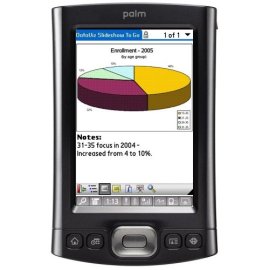
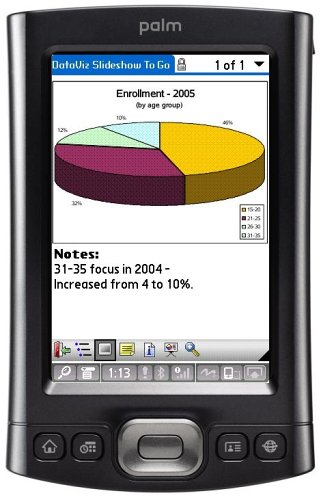
I found the to-go version of PowerPoint helpful for studying. Since many profs include PowerPoint in lecture, this made having the palm nice (some images won't display, but the words all work). I also made slides myself and used the palm as a kind of electronic flashcards for studying. The only annoying bit is that you can't edit the to-go version of PowerPoint slides on the Palm, so you have to edit them on a computer and transfer them over. Still very worth it, and the Word and Excel files CAN both be edited on the palm itself.
The battery life is good and still going strong. I've found that using WIFI and BlueTooth drain the battery pretty quick, so I turn them off when they're not needed. When just playing games, reading fanfic, or using any of the typical handheld features, I'm just having to plug it in overnight once every week or two. I'd estimate I average about 2-4 hours of use a day.
A few recs on accessories I've found crucial: 1. A 1 gig SD card - to transfer files to the palm if they won't work when synching
2. A Krusell Orbit Multidapt leather case - has slots for debit/credit cards, IDs, and two SD cards and has kept my palm looking pristine, comes with a belt clip.
3. The CheckBook app from the palm website - I don't even use my paper ledger any more, and since so many places no longer take checks, why carry a check book? I just stick my CheckCard and drivers Licence in the case and use it as a wallet. It's too bulky for a guy to wear in his back pocket, but I'm a girl and either hold it in my hand like a clutch, stick it in my backpack, or put it in a purse when I carry one. Plus, there's always that belt clip. |
When I first got this device, I absolutely loved it. It did everything I wanted it to do, and there were only a few things that bothered me at first: It froze up occasionally and the web browser (called "Blazer," which is ironic considering how slow it is) will not load up most pages (more often than not it gives an error message "This page is too large to be displayed"). Even the freezing didn't bother me much because it usually happened when I used third-party programs that I knew to be unstable. There was, however, something more sinister looming on the horizon (and you can skip to the end of the review if you want to know what that is immediately-- It's the section that starts with the **).
There were several things about it that I noticed, including several things about it that I love, and I'll list the most important characteristics (good and bad):
--The default video program is terrible, requiring a long and tedious process of converting every single video to a Palm compatible format before it can even be transferred to the device, but I installed a program called TCPMP that does a great job playing DivX and XviD files without conversion directly from an SD card. Quick, easy, effective.
--The music player (PocketTunes) is pretty good, though it takes some getting used to because it's so heavily playlist-based instead of library-based (there's a library, but it's effectively useless). Of course, it doesn't play DRM-ridden files you'll find on iTunes or Walmart.com, but I would suggest avoiding such files at all cost anyway (as a side note, Amazon has DRM-free mp3s for the same price as iTunes DRM nonsense). I found that adjusting the volume inside the program was annoying and I therefore got some headphones with an in-line volume control, but since getting those I've had pretty much no problem listening to music, and I see no need to get a separate portable mp3 player.
--Though Adobe Reader for Palm is pretty bad, a free third-party program called PalmPDF is very good (even though it can be fairly slow).
--Documents-To-Go, the included Office Suite, though limited, is absolutely fantastic, and that's pretty much one of the biggest reasons I went with Palm instead of Apple, Symbian, or Blackberry (though now DTG is available on Symbian and Blackberry). It won't do any fancy formatting, but you're probably not going to be doing any of that when you're on-the-go anyway (at least I don't). I use this program all the time and I love it. More formatting can be done with a pay upgrade to a better version, but I have no personal experience with it so I don't know about the upgraded versions. --With the version that comes with this device, though, you can edit Word Documents, Excel Spreadsheets, and Powerpoint Presentations (though presentations are viewable only in outline mode). (.docx, .xlsx, and .pptx files are not supported out-of-the-box but require a pay update to the program, because the edition of Docs-To-Go that comes with this model was released before Office 2007.) --You can use a file format native to DTG or you can edit .doc and .xls files directly from an SD card (not PPT files, though; those you must edit in the native DTG format, not sure why).
--The native web browser is pretty bad. It's unbearably slow and 90% of web pages come up with an error saying "This page is too large to be displayed," including Palm's own homepage. It's not useless by any means, though. I use it to check my email, run through Facebook, and maybe catch a news headline or two. Once in awhile I'll even browse Amazon. But I have to view almost all pages in the "mobile version." This basically means the "nearly useless version." It's the same as browsing on a cell phone that you get for free when you sign a contract. To be fair, though, it's easier to browse on the T|X than a cell phone since you can use a touch screen, making scrolling easier, but most mobile sites are nearly useless. Not all pages have a mobile version available, however, and in this case, assuming it actually does load, you do a looooooot of scrolling and you have to view what's normally bizarre distortions of what the page is meant to look like. Of course, there's no flash. It's not uncommon for me to click on a link and it'll just bring me to a completely different page... I have no clue what's causing that! Web browsing is, in my opinion, the ONLY significant thing that Apple has over Palm, but they've got it WAY better than Palm. --There is a free third-party program made by the same people who make the famous Opera browser for PC, Mac, and Linux, and this program is called Opera Mini. It is, however, worse than Blazer. Though it will load some pages that Blazer will not, it runs the pages through Opera's servers before sending them to you, making the page smaller in size so that the mobile devices can handle it. This means that you can barely see most pictures (and it's not uncommon for pictures to just not load at all) and that most features in web pages are nonexistent. (Take, for example, Amazon's drop lists-- On a computer you simply hold your cursor over it and a drop list comes down. In Opera Mini, using these drop lists require reloading the entire page.) But what's much worse than this, though, is the fact that Opera Mini is unbearably buggy. It, more than all other programs combined, causes the T|X to abruptly restart without warning. It freezes up constantly. It'll take five minutes to load a simple page (no exaggeration). It brings up an annoying message every time you boot the program asking your permission to use the WiFi. If you turn off the screen while using the program or if the screen automatically turns off (which happens quite often during the long periods of user inactivity you spend waiting for the pages to load), then the entire program freaks out and you have to exit and restart the program. I used Opera Mini exclusively for quite some time before finally going back to Blazer, though now I switch back-and-forth between the two. --(As a sidenote, if browsing is that important to you, then you may want to research a fantastic mobile browser called Skyfire that is available for Windows Mobile and Symbian, but NOT Palm. As I write this, it is currently in the beta stages and therefore it's hard to get your hands on it, but it even includes flash support.)
--I could not get the email client, VersaMail, to work correctly with my gmail. As I mentioned before, I use the browser, Blazer, to check my email, and the reason for this is because VersaMail just doesn't want to cooperate with gmail.
--The 3.5mm (standard headphone) audio output jack is kind of annoying, but workable.
--There's a fairly good amount of first-party and third-party software (some free, some not, some from respected companies, some from guys in their moms' basements) that you can find online. I myself frequently use a Bible program from a company called OliveTree (that also includes many classic religious eBooks), a calculator program called "EasyCalc" that, though not very user-friendly, would rival a TI-84+ in functionality (as a Math major, I find this very useful, and it eliminated the need to carry a calculator with me everywhere I went), and GoogleMaps (possibly the most incredible mobile application ever created, but it requires you to have an internet connection). Of course, what I listed in this section is just aside from the other programs I list elsewhere in this review, and there's plenty more software for Palm OS.
--With a standard SD card and SD card reader/writer, you can transfer files quickly and easily from any computer (even a Linux computer). --If you have a Word Document or Excel Spreadsheet, you can put it right on the card and start working on it on the Palm without even dealing with hotsync! --Like I said before, you can also copy video files and view them using the third-party program TCPMP (though not with the default program). --You can copy PDF files directly to the card and read them using the third-party PalmPDF (though not the default Adobe program). --You can put mp3 files directly on the card and listen to them via PocketTunes (that one actually IS the default program). --You can also add some files through hotsync (mentioned before in this section, "hotsync" is how you synchronize the device with the computer), but using an SD card reader/writer is much more effective (an SD reader/writer is not included with the device). Hotsyncing files takes longer, and for some reason doesn't always work. More importantly than that, however, is that hotsyncing will not transfer PDF files, video files, or most other files without converting them to some annoying format first (see the sections on PDF files and video files). You can also hotsync Docs-To-Go, which seems like it would be convenient because a file that you work on on your Palm will be updated on the computer, but it's easy to accidentally modify one then modify the other before the next hotsync, so I just use the SD reader/writer to put the files directly on the card. This can't be done with .ppt files, though (again, not sure why).
--And, of course, it's a fantastic organizer. Task lists, Calenders, Alarms, etc. The most important function of hotsync is to synchronize the Palm's organizer software with the Palm Desktop software on your desktop computer,
**But here comes the surprising, sinister side of this device. There is something that made this device unusable after about eight months of use. The hardware falls apart due to something called "digitizer drift." It starts out with the touchscreen not being able to calibrate properly, so you tap one place and it'll think you tapped in another. That can be fixed with a third-party payware program called PowerDigi, but then it gets worse. Eventually, the touchscreen develops dead spots, so that it will not detect input at all in certain places. This is not on the side of the screen where you would rarely use it: This mostly occurs where you write, and these spots get bigger. Eventually entering text into the device becomes impossible, even by the on-screen keyboard alternative. It's gotten so bad on my device that I can't even backspace to correct the incorrect text. Instead, I'll move the stylus from right-to-left in the text input area, and it'll spit out three periods. I'll write one thing and it'll say I wrote nothing or something completely different. For example, this is what it said when I wrote "The quick brown fox jumped over the lazy dog." -- "T.. ............. .........dv . .. . .....d.d." That is copied and pasted, and unedited. This is not me not knowing how to input the data (it worked great when I first got it), this is hardware falling apart. A temporary fix is to move the input area to another place, but then the dead spots just develop there, too. Do you have any idea how much panic this induces when you discover it while frantically trying to write down something important?
After some research, I find that this is a common problem among this device. If you contact Palm support, they send you a refurbished (not new) replacement device, and as a result you lose any payware third-party software that you may have. And the replacement device that you receive soon develops the same problem because Palm doesn't seem to care to fix it. I've come across stories of people who have gone through four or five devices (and each time having to pay for shipping).
There is an alternative to Palm's warranty, though. You can get a replacement part, a glass digitizer ($45-$80, depending on where you get it) that fixes the problem entirely. The problem, though, is that you either have to send it off to a professional to install it or install it yourself. If you install it correctly, it works but you've voided your warranty. If you install it incorrectly (which seems to be very easy to do), you ruin the device and void your warranty, in which case you have a $250 paperweight because Palm will do nothing to help you.
Therefore, once this problem starts, you have the agonizing choice of playing Palm's warranty racquetball game (paying for each return by postage), shelling out money to send it to a third-party repairman, or repairing it yourself and praying you don't screw it up. I'm facing that problem now, and reluctantly choosing to play racquetball for the time being.
Hopefully you see what I mean. I absolutely loved this device, but this digitizer drift is ludicrous. I am personally extremely disappointed in Palm for not recalling this, and not even attempting to make amends to its customers, and continuing to produce and sell products that are known to be faulty! |