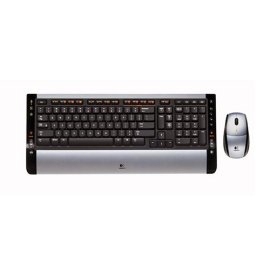
"Logitech s510" | 2009-10-27 |
| - Reviewed By User: ALIHWIU9H7S5E |
| I received this keyboard and mouse a couple of weeks ago. Though I have not used it a lot, it seems to work great. It is easy to hook up and looks and works good/well. The only reason I gave it a 4 out of five is because I havent had it long enough to tell how durable and how long the batteries last. |
| |
"Great!" | 2009-10-13 |
| - Reviewed By User: A16U98H3BC61X7 |
| I purchased this keyboard about 6 months ago and I could not be more pleased with it. It not only looks amazing but it works wonderfully. Would recommend to anyone! |
| |
"Mediocre keyboard, clunky mouse, but YEP, IT's WIRELESS" | 2009-10-06 |
| - Reviewed By User: A2TLJK59CINFKX |
The only thing going for this keyboard is it is wireless. The key layout is non-standard, so why bother? NEVER move an important key like the DELETE KEY, Logitech. TO DO SO IS NOT SMART! Others have pointed out its somewhat poor ergonomics, but I would add the fact that it is crippled by the typical thin and plastic prop stand that essentially all keyboards use, only these props on the back of the keyboard are very small and very short. Key action is overall fair or poor. THERE IS NO NUMBER LOCK LED or CAPS Lock LED on the keyboard; they are on the transmitter. This Keyboard is heavier than it looks.
The batteries in the keyboard are AAA, and don't last very long. Connecting wirelessly can be hit and miss, so get used to pressing the red connect button a lot and watching the stupid lights blink on the transmitter. And did I mention those stupid lights are tiny and odd?
Some of the feature keys work without software, like volume, which is nice since I don't have time to always install Logitech software... just one more thing running in the background. I ditched this and got a nice Logitech keyboard that is backlit and I love it because of standard key layout.
The mouse is pretty pathetic. Weird way to open it to get to batteries, which are AA (thus bigger than the keyboard's power). I found the mouse too clunky to use on a normal basis, but from what I did use, it (again) had only one thing going for it: it's wireless.
It all smacks of being a first generation wireless product. Try a later or better model than the S510. It's like using a keyboard or mouse from 12 years ago... just wireless. |
| |
"Good wireless keyboard/mouse" | 2009-09-07 |
| - Reviewed By User: A2TXMZOTH2TEGZ |
I bought this product one week ago and before I had a Logitech Cordless Desktop EX110 (967561-0403).
The mouse now has power on/off switch, great feature to save battery life when you're not using the computer. (The EX110 mouse power switch is missing, a battery waste)
I use Ubuntu Jaunty Jackalope and the first use is simple, just plug the receiver, press "Connect" on both mouse and keyboard and you are ready. You don't need the included CD (I never opened it).
The compatibility with special keys is good but some of them are not working: Rotate, Zoom + -, 100% and Shuffle. Even if you try to configure it with "Keyboard Shortcuts" window, anything happen when you press them.
Also keyboard has 4 programmable keys, can be set with Keyboard Shortcuts to whatever you want. Keys are smooth and noiseless compared with another keyboards.
Something I don't like, on some keys front-side is printed the label of what to do when press CTRL + key (like on 'S' is printed "Save") so if you want to change to Dvorak or another layout, this labels can be confusing.
About the mouse: the optic is invisible, comfortable and mouse wheel has left/right scroll to move the cursor when you write on text areas on websites, text editors and open office documents.
Something I complain (and personal opinion) is why to include Windows logo key on every keyboard/brand, I know that the key can be configured to do whatever the user want independently the OS. Another OS call this key "Super", but why brands put the Win logo instead of something generic?
A recommended keyboard! |
| |
"Logitech S510 Keyboard/Mouse" | 2009-08-31 |
| - Reviewed By User: A1R91S8O7FBWST |
| I use the S510 at work so I got another one for home to replace an older cordless Logitech. The S510 has a plain, rectangular, thin keyboard and what seems to be a fairly short and soft stroke on the keys which is what I like. The mouse works fine and the wheel has the left/right push "buttons" which I find useful with Microsoft Visio. |
| |
"I love it!" | 2009-08-14 |
| - Reviewed By User: A25XLW2QAD68BC |
After testing this keyboard at Best Buy and looking at all the reviews, I decided to buy this on amazon. I just got this today (and am using it right now)! It is awesome. The keyboard and mouse work great!
I'm not sure why some people are getting range problems. However, I plan to use this keyboard close to my laptop. I only wanted to get a wireless mouse & keyboard since I was so used to a desktop and wasn't used to the feel of the laptop keys and mouse touch pad area. Plus it's better and feels more comfortable for my wrists and fingers to type with a regular desktop type keyboard.
For this price, it's great! The keyboard and mouse are light and easy to carry around. One thing that attracted me to this keyboard was that it was so thin! There may be better keyboards out there but I really liked how thin this keyboard was. The keys push down nicely so you feel like you're typing with a regular keyboard.
It's very convenient to not have to deal with wires all over the place. :) |
| |