"It's Helping Me Learn How to Locate Celestial Objects" | 2009-09-10 |
| - Reviewed By User: AFVJIS8BN2VHT |
I also ordered "The Night Sky" star finder by David Chandler to learn how to use a sky chart so when I am ready to purchase my first telescope for astronomy, I won't have to spend additional $$$ for a Go-To package. The Celestron SkyScout is a good complement to the star gazing gear I'm putting together (which includes a simple compass people use for camping & hiking). You might need a compass or some GPS gadget that can accurately tell you if you're facing north or south. So far, I've only used my Skyscout twice since the replacement arrived yesterday. I also got this error message when I powered up the first one: "Error: GPS hardware problem detected. Please contact Celestron Technical Support". I called Celestron Tech Support. Then the headphones went bad later on in the night. The same happened with the replacement unit. Fortunately, my old Sony Walkman headphones work on the SkyScout.
Celestron Tech support helpful. They didn't try to rush me through the checks. We checked to see if my SkyScout had the latest firmware version (which I did). Tech Support provided information for the longitude/latitude based on my location, and also provided the offset. The offset can also be found in the instruction manual. And if you search your location on Google Earth, you'll have your latitude/longitude. Well, long story short...Celestron also sent an email suggesting that I send the first one back to the dealer "The gps is the issue. The fastest way to get replacement is to try the dealer you purchased from. If they can not assist you then we can create a return authorization and have you send in the Skyscout to us for replacement". Amazon promptly addressed the issue so I didn't have to contact Celestron again. I got the replacement from Amazon within the next business day. Amazon used a different carrier this time. The first night I took it outside, I got interference and weak Sat signals. I then drove out to the lake where I have a larger clearing with no metal objects around me. My Skyscout picked up weak Sat signal, displayed strange longitude/latitude settings, and targeted the wrong celestial object in the night sky. I wanted to locate Andromeda galaxy but it pointed to Sagittarius constellation. This is when The Night Sky star finder and a compass become useful. I realized I forgot to adjust the offset for daylight savings time (see user manual). I didn't have a telescope with me so I had to rely on a sky chart (star chart) to confirm the celestial object. On my second night out, it was cloudy with some light rain. The SkyScout worked perfectly. I was out on the lake again. Sat signals strong. No obstruction. No interference. It located Andromeda spot on - twice! So far, I'm happy with it. Can't wait to use this at a dark sky site.
|
| |
"Great idea, poorly executed" | 2009-09-08 |
| - Reviewed By tdgvrr |
I thought this would be a quick and helpful way to make my stargazing sessions more efficient. In theory, if the device worked exactly as advertised, I suppose it would meet that goal, but using mine is a struggle.
First, the good news.
With the latest patches applied, the unit is fairly reliable and contains a wonderful wealth of information. When it's properly configured and used, its truly amazing at the speed you can find nearly any visible object in the sky. This is indeed impressive.
Now the bad news...
As others have suggested, the GPS is somewhat suspect, taking a long time to acquire satellites, and sometimes even reporting wildly incorrect coordinates. Luckily, I know my local coordinates well (you can get them on Google Maps if not) and it's not the end of the world to input the time and location manually.
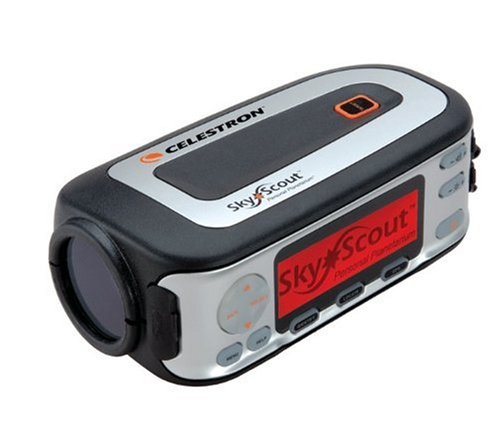
My other usability gripe is the display, being difficult to read in the dark due to small type and poor contrast. Better would have been a black screen with orange text, or a way to see the text inside the finder. As it is, I find I need to carry a small magnifier to make out the writing on the display.
Initially, the battery meter scared me a bit, showing about half way consumed batteries after only about an hour's use. Seems this is the meter though...the unit apparently needs 2.4 volts to operate correctly, and some of the calculations on the meter are suspect.
A fresh new pair of batteries is often 2.7-2.8 volts, but many types of battery drop voltage fairly quickly at first, then run at this lower voltage for a considerable time before dropping again. The SkyScout seems to think that if a battery pair goes from 2.8 to 2.7 volts, it is 25% depleted (25% of the way to 2.4 volts, I guess). Moral of the story: don't trust the meter.
Finally, there's the magnetic interference issue.
I live in a semi-rural area, certainly no large metal structures within several thousand feet of my location, and yet I almost always get the magentic interference indicator. About the only metal object within a hundred feet of the unit is - you guessed it - a Celestron telescope and mount. But, I have to say, even when the unit complains about interference, it seems to be more than able to find the objects I'm scanning for, assuming the rest of the setup worked.
Overall, cautiously recommended if you don't mind fighting with it from time to time.
|
| |
"No 64-bit support, SD cover does not close" | 2009-09-06 |
| - Reviewed By pieter727 |
I just bought the SkyScout IYA 2009 edition for my parents.
The only difference between the normal edition and the IYA edition is the inclusion of an SD card with celestial events for 2009.
Problem 1, when the SD card is inserted, the rubber SD card cover no longer fits.
Problem 2, when you try to fit the rubber cover, the SD card becomes un-seated, and the skyscout no longer boots.
Problem 3, the SD holder is a standard spring-loaded type as found in many devices, but this one does not properly release the card, it has to be pried out with a screwdriver.
Problem 4, there are no USB drivers for 64-bit Windows operating systems, so you must run the updater utility on a 32-bit system.
It is a little difficult to aim and target objects, specifically finding the object in the viewfinder is tricky, but with a bit of practice we did manage to target and identify. |
| |
"Stargazer" | 2009-09-04 |
| - Reviewed By User: A1VCC5PNZQLHFA |
| This unit is amazing with it's pinpoint accuracy and the information on the stars and planets it provides! |
| |
"Pretty good, no real complaints" | 2009-08-06 |
| - Reviewed By User: ALWBCCRZMZNIK |
| After my kids had a lot of fun with one of these on a cub scout campout I figured it would make a good gift for the family. I will agree with other reviews that this is a pretty cool device but is not perfect. At the current price I would say the SkyScout is a good product though. My only "issues" I've had have all been correctable. Initially I was having problems getting a GPS lock on startup but I discovered if I left it lying still on the ground vs. holding it in my hand (and moving it around) I had no problems. Only once have I gotten the interference icon but sure enough when I looked up I was standing right under power lines (duh!). The overall accuracy is good though I've noticed when using it to locate objects it isn't perfectly precise and tends to wander. For example with the moon, it will locate it precisely once in a while but it often can be slightly (randomly) off the viewfinder when it shows the "locked on" ring. Still I would say the SkyScout has been a great help and has been really fun for my family. My kids don't want to put it down and they are actually learning a lot by using it. |
| |
"AWESOME FOR SKY GAZERS" | 2009-07-30 |
| - Reviewed By User: A2BDSVQZWXHTX |
| Really a fun and interesting product for anyone interested in the stars. Easy to use and only requires a clear sky and 2 AA batteries. |
| |