"help recharging harmony 880" | 2008-05-30 |
| - Reviewed By txbomer1 |
| I have really no problems with the remote 880 except i can't figure out the icon which tells you how to recharge when the battery is low can anyone help me out?
txbomer1@hotmail.com |
| |
"Good Features but Poor Ergonomics and frustrating software." | 2008-10-05 |
| - Reviewed By User: A2I4HM7D89DDG |
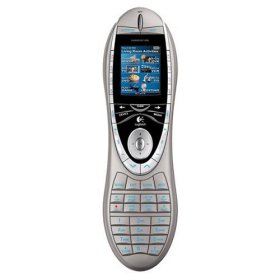
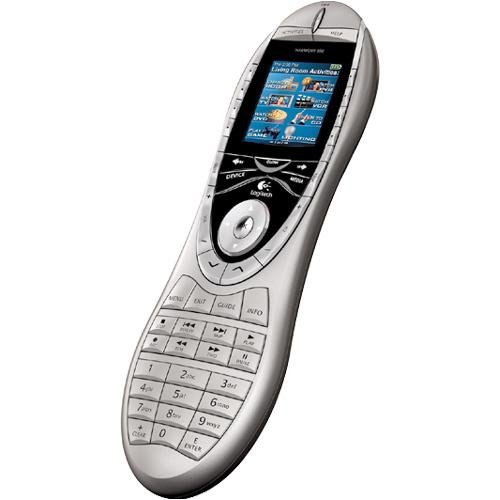
| The features of this remote are well documented and some are quite good but want to comment on why I chose not to keep this remote. br /br /First, I found the button layout to be very hard to use without looking at the remote. My ideal remote is one that I can use without looking at the buttons. The button shapes and sizes in the Harmony 880 and 890 are too similar and too close together to easily locate by touch. I tried to adapt to it for almost a month before giving up. The key buttons for me are volume, mute, skip forward, fast forward, skip back, play, and pause. When I watch something on Tivo those buttons are the ones I use most. Because of the location and similar shape of those buttons in the 890, I frequently pressed the wrong one unless I looked at the remote.br /br /The second issue I have with the 890 is that one cannot make any changes to the remote without first updating the RF module. Even if one only wants to rename a button, he must first disconnect the RF module from the power supply and all the IR blasters, connect it to his computer and update it. Only then will the Logitech software allow one to update the remote. It is very frustrating to have to go through all that to make simple changes to the remote.br /br /I decided I really did not need an RF remote so I replaced my 890 with the newer Harmony ONE. I am very happy with the Harmony ONE because all the important buttons are centrally located and are of different shapes. The Harmony One is very easy to use without looking at it.br /br /If you really need an RF remote, I recommend you look at the ones made by Universal Remote Control (URC) before buying the 890. If you don't need the RF feature, get a Harmony ONE. |
| |
"Awesome remote! Worth the upgrade!" | 2008-09-29 |
| - Reviewed By chee-saw1 |
| Just got the Harmony 890 remote a couple of days ago, and it's AWESOME! I upgraded from the Harmony Xbox 360 Remote because of the RF capabilities of the 890, and I must say that it's been great! My home theater is set up so that the components are behind me, and being able to control them all, without having to contort my self to aim the remote behind my back is HEAVENLY!br /br /The only cons that I've experienced with this remote are:br /br /1. The documentation that comes with the remote is beyond useless. I had to figure out, on my own, how to update the firmware in the RF receiver, as it's not mentioned on the quick set up poster (just so happens you just plug the receiver into a USB port and click "Update Remote". Go figure.)br /br /2. The trial and error of getting everything to work correctly took a LONG time, and can get frustrating. Updating both the remote AND the receiver when you discover something doesn't work correctly gets REAL tedious when you're initially setting the thing up. When you're done, it's worth it, though!br /br /Other than that, I have no complaints with the remote. No, it doesn't power on or off the PS3, but that's because of Sony deciding to use Bluetooth instead of infrared or RF (like ever OTHER device in the world!) It DOES control the other functions of the PS3, if you use the Nyko Blu Wave Remote PlayStation 3 Blu Wave Remote, which is very cool!br /br /Also, the people complaining about having to use the internet to setup the remote... we should welcome them to 2008! Is it even feasible to expect a remote to operate the MILLIONS of different electronic devices in the marketplace WITHOUT downloading codes from the internet? What about newly released electronics? Should it just "know" all of these codes too? Crazy!br /br /All I'm saying is, if you've got a little time (and a wee amount of patience), then this remote is great! If you're actually sick enough to ENJOY configuring electronic devices to work exactly as you wish (like yours truly!) then you will LOVE it! |
| |
"Value for the money. " | 2008-09-28 |
| - Reviewed By captbossa |
| 890 works great for a one room one zone unit. For more zones choose the Pro. I own both. Good support. |
| |
"Be patient, take your time -- and it's well worth it!" | 2008-09-08 |
| - Reviewed By christophernyck |
I'll admit it. After the first hour trying to set up and configure the Harmony 890, I almost decided to box it back up and send it back to Amazon. In today's world of Macs, iPods and iPhones, you have a reasonable expectation for things to work right out of box, with little or no configuration necessary. So forgive me for my naivete in thinking the Harmony 890 would instantly feel as if I discovered a magic wand from another dimension. It *is* indeed a magic wand of sorts, but it takes a fair amount of configuration and testing to bring the magic alive. But once you do, you will be awe at how much more simple your life has become. You will immediately think of all the times you looked at the product description online over the last year but always chickened out of buying it. And you'll wish you had bought it sooner.
Difficult product to configure? Or lack of intelligence on the configurer?
I'm no idiot. I'm a techie, and I should have known that a product like this would require some up front time to configure. But I wasn't exactly prepared for the amount of time I ultimately had to put into it. I also have several devices:
Pioneer Plasma TV Scientific Atlanta PVR Sony A/V Receiver Sony DVD Apple TV Nintendo Wii
All of these devices are in the massive equipment database that Logitech maintains and updates daily, and for that I was thankful. But after setting up all the devices and configuring all of the activities, things were just off a bit. For one, I could not get the PVR to turn on from the off position while sending all the other signals that controlled watching TV. I adjusted the timing of the PVR several times, adding a delay to allow the PVR signal to fire after all the others finished firing. No configuration seemed to work, so my only option was to leave the PVR on at all times, which is no big deal.
My biggest gripe about configuration is that any time you need to tweak the settings, you have to disconnect the RF extender and update both it and the actual remote -- both of which take a few minutes each time. (And you can only update the RF extender and the remote one at a time.) This added considerable time to the overall process, given how many rounds of tweaking I was doing.)
I also found that some of the signal mapping in the database seemed off. For example, the A/V receiver commands that control the surround sound settings were not working properly when controlled by the Harmony 890. But this too was solved simply by taking the original A/V remote and having the Harmony 890 "learn" the commands directly. This is done by holding the two remotes about 2" apart, pressing the command on the legacy remote, the signal of which is then picked up and stored by the Harmony remote. Believe it or not, this worked like a charm. So much so, that to be absolutely sure things would work exactly the way I wanted them to, I took the time to teach the Harmony 890 all of my favorite commands from each of my remotes. This was mostly an unnecessary step I'm sure, as the Logitech database seems impressively comprehensive. But once all was said and done, and all the devices were updated, I had full control of everything from the Harmony 890. And the feeling of reaching that zen state makes the purchase worth every penny.
You know, previously I was trying to figure out why a universal remote like this has to cost almost $300. The hardware is cheap, and the software that controls it is fairly basic. But after slogging through the configuration process and seeing the total number of technical support hotlines that Logitech maintains globally just for the Harmony, not to mention the work that must go into keeping the database and support forums up to date, I can see why they need to charge such a pretty penny for this device.
But like I said, be patient, and take your time setting it up. No matter how frustrated you may get by the perceived complexity of the configuration process, you will be able to tame the beast and turn it into your very best friend. I did, and I love it. |
| |
"GREAT REMOTE!!!!!!!!!!!!" | 2008-09-07 |
| - Reviewed By User: A2TO7Q1M0K4RP9 |
| I have the older model harmony 720 and up graded to this one. We love it! The features to customize what you want the remote to do are wonderful! I would buy this again and would tell anyone to buy one also!! GREAT PURCHASE!!!! |
| |
"A bad waste of good home theatre money" | 2008-09-03 |
| - Reviewed By User: AOHD67CJXPEY3 |
We own two Harmony 890 remotes. At first we thought we liked the original one we'd purchased -- programming it was a bit of a pain, but usage was fairly user-friendly. So we bought a second 890 for our bedroom theatre, as we had just upgraded the home theatre receiver and set up a better package in our bedroom.
Whereupon we found that the original 890 will no longer program. It refuses to "talk" with any computer after just 10 months of use. Contacting Logitech was worse than useless -- they have NO idea what customer service is, nor do they appear to have any clue about the products they sell. And unfortunately, my husband drug his feet in trying to resolve the problem and we can no longer return the second remote (that one, obviously, is our fault). And the second remote, while it will talk to the computer, refuses to recognize two of our listed products (the receiver and the projector, both of which had worked previously). At first I thought it was operator error, as they say, but after walking through it with my husband I realize his frustration in that the programming keeps glitching and the remotes fail to work.
I should have known that something would go wrong with a remote this pricey, but this has soured me on Logitech in general. |
| |
"User Friendly" | 2008-08-29 |
| - Reviewed By dakotajoe2007 |
| We chose to buy this through Beach Camera where it was significantly less in price. We were worried once we got it that it would be difficult to set up. It was not! It is very user friendly...very easy to set up and we even set up a button for Vudu which we love. This is a great product and sure beats having 6 different remotes! It is reliable and we put it in a rechargeable cradle every night. We would highly recommend this remote! |
| |
"Expensive, but worth every penny." | 2008-08-28 |
| - Reviewed By User: A1RIIPM74Q5EWM |
| I found the Logitech Harmony 890 Remote to be easy to set up, easy to operate and trouble-free. Although expensive, its outstanding design and the interactive setup software support the old adage, "You get what you pay for." I highly recommend it to anyone who wants to control components that are kept out of view. If you components are all line-of-sight, permitting IR control, don't waste your money. It is the 890's superb RF capability which sold (and continues to sell) me. |
| |
"This the MAN Remote guys have been awating for." | 2008-08-18 |
| - Reviewed By jusreallydesireable |
This is the remote that your father would have wanted. First thing I would say is, Update the remote as soon as you get it.
I heard people complain bout incompatiblity and its mains due to their remote not being upgrade. Contacting was a breeze. It recognised my old stereo system without any problems. The only hang up was the configure under the activies didnt always work to power it off, but after a couple of "Did this fix the problem" the problem hasn't risen again.
The different activies button make it a god sent.
My only complaint is that its not bluetooth compatible, but I live with that. If you have RF systems this is a no brainer. Its still a tad pricey but for the comfort of having everything easily controlled by one device, its worth the price. |
| |
"Average Set up" | 2008-08-11 |
| - Reviewed By thomas_e_haynes |
| Took a while to set up. Software kept telling me to unplug, then re-connect USB cable. Tried calling Logitech support line. Gave up after 30 minutes on hold. Ended up fixing on my own. Works as I expected. Easy to use software. Works great overall and I recommend, but still just an overpriced remote control. Glad I bought on sale. |
| |