"Very good home-office printer" | 2008-09-16 |
| - Reviewed By mikegat |
| After about 4 months with this MF Printer I am very happy with it. Paired with an Axis 1650 network adapter I picked up used, it gives this unit the ability to do network scanning as well as printing. The prints come out very fast compared to my last printer (a Samsung 1200 series laser printer) and the print quality is very good. No complaints about this unit at all. |
| |
"Superb multifunction printer/scanner/fax for the price!" | 2008-04-27 |
| - Reviewed By mr_keem |
I would have deducted one star because it does not have an automatic paper feeder and it does not take 11x17 paper, but given the low price this is a fantastic printer for home use.
The software is easy to install and easy to use.
I loved this printer so much I bought a second unit!
Bravo Canon! |
| |
"Decent printer with lots of quirks..." | 2008-03-28 |
| - Reviewed By trikatw |
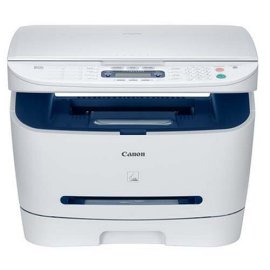
| The Canon MF3240 is a decent printer for the home user and small business users. I got my Canon MF3240 at a pretty low price so initially I was quite happy with it. When I received it, the look of the printer seemed old fashioned and not good looking at all. The printer is fairly large, but it is typical for most decent multifunction printers. The print quality for this laser printer is excellent and it prints quite fast. The usability of this product is good although some tweaking is needed here and there. I found the lack of a power button to be extremely annoying. The software was much better than my old Epson multifunction printer, but it still is a bit annoying here and there. I also could not find a way to stop printing when I had numerous sheets printing, except by unplugging the printer. It seems like that stop/reset button is nearly useless under normal circumstances. The scanner works great although it can be a bit slow to start. The manual multipurpose tray works good with envelopes. Printing double sided (duplex) is extremely annoying as when the odd pages are printed, the heat curls the paper. Even the slightest curl will cause a paper jam when it is loaded back in to print the even pages. This is a huge flaw that makes double sided (duplex) printing almost impossible. I absolutely cannot give the MF3240 anything more than 3 stars due to the amount of little quirks and the constant paper jamming for double sided (duplex) printing. |
| |
"A good product for home/ home office use" | 2008-03-18 |
| - Reviewed By User: A3UVIVIVH4W99I |
This product is great for the price. Cons - noisy, no auto document feeder, not network enabled Good - printout quality, energy efficient, good software(it might take a while for you to explore all the features), value for money I already had a router with USB print server, hence networking is not an issue for me. Overall, if you are not looking to spend a lot of money but still want to own a multi function printer, this would be a good choice.
|
| |
"Prints Good But Features Can Be Better" | 2008-03-12 |
| - Reviewed By User: A1GMRI6VLH8X03 |
It prints great. If I were to change anything, it would just be to make it duplex. Since it doesn't have duplexing, at times I would print the odd pages first, turn over the prints and print the even pages which leads to plenty paper jams because after the first print, the heat from the laser curls up the paper.
Sometimes I'll have problems with the paper size and have to spend a long time to fix the paper size error. So I find myself hardly changing the paper size.
And I thought that the toner finished pretty quick. But maybe that's because it was the first time use toner.
Oh, I don't like that it doesn't have an "On/Off" button. So to turn it completely off, you have to plug it out from the power.
But the prints itself? The quality is great. |
| |
"looks good but I need to fax more than one page at a time" | 2007-11-24 |
| - Reviewed By ab-ships |
Just returned this all in one machine, it is probably a good printer and scanner, and if you need to fax something directly from your computer it will probably do so, but if you had some printed papers ( more than one)that you signed or had a cover page for one( a kind of a very basic feature in Fax machines worldwide) ,then this fax is not for you |
| |
"Not MAC compatible" | 2007-11-13 |
| - Reviewed By nathanjhale |
This might be a great printer, I wouldn't know. It's 2007 and this thing's not Mac compatible, a fact that is very hard to determine from the product description and the box. There is a Windows Vista logo, but that's it. I buy tons of Canon products, thay are uniformly compatible with all systems.
I've gone to the Canon site, and researched sveral message boards--this puppy don't work with Apple. Time to box it back up....grrrr |
| |
"Cannon" | 2007-10-20 |
| - Reviewed By User: A1AIOUBR1SQNE2 |
| On time delivery. Good transcation. Will do business again.Canon imageCLASS MF3240 Black/White Laser Multifunction Printer with Copier/Scanner/Fax (0989B001) |
| |
"Excellent Product & Excellent Service for a Nominal Price" | 2007-10-10 |
| - Reviewed By User: A34NP0J406DU6S |
I ordered this printer on September 4th and it was delivered on September 6th.Excellent Service by Amazon,very fast truly amazing.Keep it up.
This printer is easy to install and easy to use. Print quality is simply superb. Fax,Scan and Copy features all are functioning excellent and more than what I expected.This Printer was connected to Windows Vista machine and I got the driver software along with the printer.
Canon exceeds my expectations... amazing product for unbelievable price. |
| |
"quick scanner/copier" | 2007-09-27 |
| - Reviewed By kk_tool |
This multi-function does the job as advertised. quick copying, and scanning. Only minus would be the entire unit is a bit large, but other than that one issue, everything else works great. Very good quality printing. Plus you can't beat the price. An auto-doc feature would be nice, but since I fax very few documents it doesn't matter to myself. I 100% recommend the product as advertised. |
| |