

SanDisk 4 GB Cruzer Micro with U3
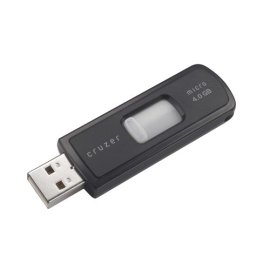
SanDisk 4 GB Cruzer Micro with U3

Manufacturer:
SanDisk

UPC:
619659025397

Retail Price:
$319.95

#Deals:

Avg. Rating:

Available from 6 stores - Select your deal and buy the SanDisk 4 GB Cruzer
"Where can I buy a SanDisk 4 GB Cruzer?" At all of these merchants listed below. Click any of the deals below to buy now on the merchant's website.
StoreRatingBase PriceShipping Price + ShippingAvailability
Media Mart LLC

[Store Info & Reviews]
Covered by A-Z Guarantee
5 Star Rating
79 Reviews
$5.75
New
$5.95
Expedited Shipping is available Expedited Available
International Shipping is available International Available
$11.70Buy from Media Mart LLC
In Stock. Usually ships in 1-2 business days
738 Available
New in Retail Package
Buy SanDisk 4 GB Cruzer Micro with for $5.80
[Store Info & Reviews]
Covered by A-Z Guarantee
5 Star Rating
5021 Reviews
$5.80
New
$5.95
Expedited Shipping is available Expedited Available
International Shipping is available International Available
$11.75Buy from Digital Media Source
In Stock. Usually ships in 1-2 business days
416 Available
ChiTek

[Store Info & Reviews]
Covered by A-Z Guarantee
5 Star Rating
1135 Reviews
$7.49
New
$4.50
Expedited Shipping is available Expedited Available
$11.99Buy from ChiTek
In Stock. Usually ships in 1-2 business days
2163 Available
CCMACCESSORIES

[Store Info & Reviews]
Covered by A-Z Guarantee
5 Star Rating
2445 Reviews
$12.22
New
$0.00
Expedited Shipping is available Expedited Available
International Shipping is available International Available
$12.22Buy from CCMACCESSORIES
In Stock. Usually ships in 1-2 business days
19 Available
Brand new Kingston 4GB Cruzer Micro in retail package.
ABX ProTECH

[Store Info & Reviews]
Covered by A-Z Guarantee
5 Star Rating
3059 Reviews
$7.70
New
$4.99
Expedited Shipping is available Expedited Available
$12.69Buy from ABX ProTECH
In Stock. Usually ships in 1-2 business days
9448 Available
Standard Shipping Takes 3-5 Business Days to be delivered with USPS First Class Service! Expedited Shipping Takes 2-4 days with USPS Priority! New Sandisk 4 GB Cruzer U3 usb 2.0 Flash Drive in Retail Packaging.
Bostic Outfitters

[Store Info & Reviews]
Covered by A-Z Guarantee
5 Star Rating
371 Reviews
$21.95
New
$6.48
Expedited Shipping is available Expedited Available
$28.43Buy from Bostic Outfitters
In Stock. Usually ships in 1-2 business days
5868 Available
Brand new and retail sealed.
* Shipping estimates are based on Ground shipment within the contiguous U.S.
   If you notice a problem, you can report a pricing error or problem.
Overview of current deals for the SanDisk 4 GB Cruzer Micro with U3:
  • 1 merchant is offering Free Shipping.
  • 3 merchants offer International Shipping or Worldwide shipping.
  • 6 merchants have Express Shipping options.
SanDisk 4 GB Cruzer Micro with U3 Specs:
Product NameSanDisk 4 GB Cruzer Micro with U3
ManufacturerSanDisk
Product Number MPNSDCZ6-4096-A10
Retail Price $319.95
EAN-130619659025397
EAN-1400619659025397
UPC619659025397
Dimensions2 x 0.75 x 0.3 in.
Weight1 lbs.
Deal first added on:4-July-2006

Tags

Find other products that have similar tags to the SanDisk 4 GB Cruzer Micro with U3
Micro Flash drive 20 USB 4GB SanDisk Cruzer
Similar Products
Cables To Go - 29557 - USB 2.0 52-in-One Memory Card ReaderCables To Go - 29557 - USB 2.0 52-in-One Memory Card Reader41.06$17.50Check Prices on Cables To Go - 29557 - USB 2.0 52-in-One Memory Card Reader
at 11 stores
SanDisk 2 GB SD Memory Card  ( SDSDB-2048-A10 )SanDisk 2 GB SD Memory Card ( SDSDB-2048-A10 )199.99$3.26Check Prices on SanDisk 2 GB SD Memory Card  ( SDSDB-2048-A10 )
at 5 stores
2GB Data Traveler USB Drive2GB Data Traveler USB Drive65.99$7.78Check Prices on 2GB Data Traveler USB Drive
at 8 stores
SanDisk 2 GB Cruzer TitaniumSanDisk 2 GB Cruzer Titanium189.95$12.99Check Prices on SanDisk 2 GB Cruzer Titanium
at 4 stores
Corsair 16GB Flash Voyager USB Flash DriveCorsair 16GB Flash Voyager USB Flash Drive299.00$34.99Check Prices on Corsair 16GB Flash Voyager USB Flash Drive
at 10 stores
SanDisk 2 GB Cruzer Micro with U3SanDisk 2 GB Cruzer Micro with U3199.99$6.49Check Prices on SanDisk 2 GB Cruzer Micro with U3
at 4 stores

Accessories
Premium-grade Minidv VideocassettePremium-grade Minidv Videocassette24.95$9.69Check Prices on Premium-grade Minidv Videocassette
at 7 stores
SanDisk SDSDM-2048-A10M 2 GB Mini SD CardSanDisk SDSDM-2048-A10M 2 GB Mini SD Card99.99$24.99Check Prices on SanDisk SDSDM-2048-A10M 2 GB Mini SD Card
at 1 stores
100-Pack 48x CD-R Disc Spindle - 3202-4581100-Pack 48x CD-R Disc Spindle - 3202-458139.99$11.99Check Prices on 100-Pack 48x CD-R Disc Spindle - 3202-4581
at 10 stores
Seagate FreeAgent Go 160 GB USB External Hard Drive ST901603FGA1E1-RKSeagate FreeAgent Go 160 GB USB External Hard Drive ST901603FGA1E1-RK189.99$90.00Check Prices on Seagate FreeAgent Go 160 GB USB External Hard Drive ST901603FGA1E1-RK
at 5 stores
Latest 6 Reviews
Here is what people are saying about the SanDisk 4 GB Cruzer Micro with U3
5 Star Rating  "Great USB Flash Drive!"2010-01-27
- Reviewed By TTruong from Westminster, CA USA
I just love Sandisk USB flash drives. Very durable and reliable. U3 software was annoying but only took a few seconds to remove. After that, the drive just worked fine. It's fast enough for my purpose. I did not take time to do some performance measure to see how fast the data transfer rate is though.
 
5 Star Rating  "Good, cheap USB Drive"2010-01-09
- Reviewed By Atur Patel
This USB is durable, cheap, and works great. The fact that its retractable makes it a great buy, you don't have to worry about losing end caps anymore.
 
5 Star Rating  "Complete Review for the Sandisk Cruzer 4gb with U3"2010-01-05
- Reviewed By Aaron D. Fridley from Waterloo, NY
Excellent. Better than my previous flash drive. However I suggest purchasing the 8gb (even if you dont need the 4gb for storage, the extra 4gb can be used as ram for windows readyboost and speed up your computer (explained below). Whats most important to me about this flash drive is how the USB is contractable (slides in and out) instead of sticking out and having a cap to it. I had a flash drive that used a cap, it was a hassle putting the cap somewhere (getting lost), or if having the flash drive plugged into your usb port permanently having the cap just linger around on your desk. After half a year of moving around from box to box, the USB eventually broke off! Keep in mind a flash drive contains very important information (could be your lifes work done on the computer). And for it to break like that? Its the reason why you have a flash drive in the first place ... in case your computer crashes, its backup. What do I need backup for my backup now? That is good advice though I'll mention it and that is to purchase two flash drives in case one gets lost or broke. So anyway, on to the Sandisk Cruzer 4gb ...
After researching Amazon on best usb drives, I came across this, it was on my to buy list, somebody got one for me christmas and I was happy and surprised to see it was the Sandisk Cruzer. Im very specific on the items I want, if I ask for a specific set of tools, I dont want just any set of tools. Im specific in the USB flash drive I want ... and this is it. However I received the 4gb, I would rather have the 8gb. All well we'll see how long 4gb will last before getting maxed out.

Not only does the Sandisk Cruzer here have the retractable usb, but also an orange led light when plugged in. Lets you know its working at least and its pretty. Fast blinking means its communicating (being accessed, or transfers from/to), slow blinking means its plugged in the usb.

There is also two nice surprises that may make your life more enjoyable ...

Upon opening the box it comes in, inside was a little sheet that says "50 FREE SONGS". You get a 14-day free trial [...]. Give them credit card information (I used a pre-paid visa). Download 50 songs, and cancel before 14 days expires and your card wont be charged. Simple as that, keep the 50 free songs. After 14 days, depending on the subscription you chose (basic for example) its $11.99 per month and you can download 24 songs. So its 50 cents for each song. You can get pricing down to 41 cents. I thought songs cost $1.00 so Im happy with Basic and paying 50 cents although the 50 free songs may be plenty for me.

AND the Sandisk Cruzer has something known as U3 applications. As quoted from their Introduction from Help and Support, "U3 Smart Drives are special - here's why
The U3 smart drive is a new standard that takes world of flash drives a big step forward. It enables USB flash drives to be much more than just a storage device. U3 smart drive technology enables you to carry your applications on the flash drive right along with your data."
On my previous flash drive, it was there just to store my files I type out. With this U3, the flash drive can store much more than that. You can store games, internet stuff (browsers, emails), music and videos, protection like mcafee, I even have a portable microsoft openoffice. Here is a list of the following programs you can downlopad on to the usb drive ... (it takes up 596mb, and you'll have 3.08gb left)

(Games)
Mystery Case Files - Huntsville
Atlantis
Magic Vines
Sudoku
Mahjong Towers Eternity

(Internet)
YouSendIt
Mozilla Firefox for U3
Thunderbird
Trillian

(Music/Video)
Vioh Web Player ... installation failed the first time, completed the second time
Winamp

(Utilities)
DMailer Sync
Launchpad Tour
OpenOffice ... took awhile to install this. If it looks like the download stalled on you, just leave it and it'll pick up eventually
Evernote
Signup Shield
McAfee VirusScan USB ... free for 1 month. Buy for $4.99. Takes 20 minutes to scan.

Before installing these you'll be asked if you want to make the flash drive U3 capable or to use your flash drive for files only. I clicked more info to understand more about what U3 is and was sent to a website with a quick video on what U3 is. I think the short video was excellent. Much nicer than having to read about it. I liked this U3 stuff so yes, I want U3 on my flash drive. Installation of all the above applications took about 10 minutes cause the OpenOffice "stalled", and the Vioh Web Player failed to install. After installing these (you can install some, all or none of the above just checkmark the box), you have the option to receive updates by email about U3 programs and other SanDisk products (give them your email addy) and you can offer them your feedback so you can help them improve the product. I offered to give them my feedback but received a "general error message" so was unable to. I clicked finish to go back and install the Vioh Web Player. In the bottom right corner of my desktop theres an application that says "Cruzer". Click on it once and you get the Sandisk Menu (as big as your windows start menu). Very user friendly and easy to understand. When you unplug the Sandisk from the usb drive, it'll go away so its a temp icon, not a permanent desktop icon. On the left are the U3 Smart Programs you have installed. On the right there is the following ...

"Explore Drive G:" ... when clicking on this you're able to view whats on the flash drive. Theres "Documents" and "Launch U3". In the "Documents" folder, theres 4 sub-folders: Downloads, Music, Pictures, Videos. This is where you can organize your files. When opening the "Launch U3" it brings you back to the Sandisk Menu. The Sandisk Menu and U3 programs are whats installed on the flash drive, aka "Drive G" which is the USB port its plugged into. So you have an organizational folder, and the new U3 programs on your flash drive.

"Settings" ... Theres a couple you may want to do here so dont overlook it. Click once on settings and you can go to U3 Launchpad Settings (come here) or Programs Settings (come here also). U3 Launchpad Settings ... most is default stuff you dont have to worry about. 1) Preferences (leave as is) => Language (English), Smart Drive Name (Cruzer), reset all "Do Not Show again" checkboxes ... 2) Automatic Updates (leave as is) => Automatically check for updates of the U3 Launchpad (already checked) ... 3) Autorun (come here to install launcher) => Autorun U3 Launchpad (already on autorun, keep it like that unless you want to manually find the flash drive when you plug it into a usb drive, if manually, double click "LaunchU3.exe" when prompted, Launcher => "If the U3 Launchpad does not autorun on this computer when a U3 smart drive is inserted, you can install a small program on the computer to detect the insertion of a U3 smart drive and run the U3 Launchpad." Go ahead and Install the Launcher. It may not need to be installed but it may prevent a future problem if the U3 programs dont load correctly. It installed instantaneuosly, there was no file to download but it takes up 1.28 MB on your computers hard drive. It can be removed here in U3 Launchpad Settings, or uninstalled through your Control Panel ... 4) Capacity => Total: 3.77GB (hey I thought it was 4GB!), Free: 3.08 GB (if you install all the U3 programs it offers when you first plug it into the usb) ... 5) Uninstall (leave as is) => Uninstall U3 Launchpad ... 6) Security (come here to enable security if you want this flash drive to be password protected) => Enable Security "use password protection to restrict acces to your U3 smart drive. Password protection will be enabled the next time your U3 drive is inserted". If you have user accounts on your computer that are password protected, it would be wise and a good idea to click Enable here. I highly advise doing this because flash drives being as portable they are and storing important personal information, anybody can just pull it out of the usb drive and have access to your personal data. Two warnings: If you forget the password you will be unable to recover your data. I've never forgot my password have you? lol And highlighted in red is the following "NOTE: If the USB drive is locked, it can only be unlocked on a Windows PC (Vista, XP, or 2000). Unlocking the USB drive on a MAC or Linux OS is not possible." What it means to lock a usb drive is to password protect it. In order for somebody to USE that usb drive, they must enter the password. This is good if you dont want somebody to plug their own flash drive into your computer and transfer all your files to it. You are already protected if you have a user account that requires a password at windows startup. If you want free software to lock your usb drives, [...] If you want to pay $19 - $39, check out [...]. Type in your password, retype it, then type in a password hint (in case you half forget =P). Next is PROGRAM SETTINGS (come here) ... these are the U3 programs you installed. You're giving the option to start a certain program upon insertion of this flash drive. There are three that are checkmarked for this by default, these would be: Evernote, SignupShield Passwords, and McAfee VirusScan USB. Leave as is if you want, or uncheck all three. Feel free to uncheck SignupShield Passwords, its protection for your password, come on now what my password needs a password? Theres also Add Programs (come here if you want to check out more U3 stuff. I found a couple I was interested in.) => U3 Download Central, Cruzer Program Wizard, and Install from My Computer. Feel free to go to U3 Download Central and view what else is available to you. LOTS of stuff, here are some categories: Games for your PC, U3 Audio Video, U3 BackUp & Sync, U3 Business, U3 Design and Photo, U3 Education, U3 Email, U3 Games, U3 Internet, U3 Security, U3 Utilities, U3 Web Browser. Some are Free, some are Trial. Im not too impressed with their additional selection. They only offer 5 games for your PC (your computer, your instant messenger, yahoo, or pogo offer much more games and for free). The trials for some U3 programs are expensive costing you 7 euros a month, or 55 euros a year. Some U3 programs are incompatible with Windows Vista (updating the launcher can eliminate that problem, and theres a Microsoft U3 update for Vista (KB940199) I got that from wikipedia. You may find a couple you'll like so feel free to browse through. I recommend Weatherbug. I use that on my PC here for weather forecast, temperature, weather alerts. Go to U3 Internet => Weatherbug for U3 => Free => theres pricing at the bottom for a subscription to rapidshare where you'll be downloading. Click on free user. They punish you by making you wait 60 seconds for not being a premium user before you can download. (LOL) OR you may have to try again in 2 minutes because many people are downloading from their server right now and you are not a premium member. Kind of discouraging for this U3 service (I'll have to try again tomorrow) ... Cruzer Program Wizard => skip it if you installed all the U3 programs, or go back to it if you would like to install more. Go to the website [...] for additional U3 programs ... Install from My Computer => (please wait while I play a game of Solitaire that I moved to the flash drive). ooh I won it =). Im using Windows Vista, not sure if it made a difference but I was unable to locate the already-installed games on my computer. I had to go to start menu => programs => games => solitaire, right-click => send to => Cruzer (G:). I now have solitaire on my flash drive and can play it on anybodys computer. It would be a lot easier to do option B of right-clicking the file or game you want then sending it to the Cruzer instead of going through the Launchpad, Settings, My Computer and locating the file route.

"Add Programs" ... explained above.

"Help and Support" ... if needed

"Sandisk U3 website" ... if wanted

"Enable Security" ... encouraged

"Games for your drive" ... games you can purchase [...]. Play free for one hour, then buy for $6.99 each (I looked at another site offering downloadable games, $6.99 seems to be the going rate). I saw a couple Id be interested in playing and I'll be purchasing a couple soon. Having a detailed game on a usb flash drive would be pretty neat, why not put a couple on there and carry them wherever you go. Much better than Solitaire, and youre not able to copy a cd-version game like SimCity on it lol. So $7 for an adventurous game on a usb drive, very cool. You may be able to transfer the game to other computers and share your games like that, I dont know yet but Im sure its doable.

When removing the Sandisk Flash Drive ... I had just pulled it out, I plugged it back in and after typing my password (if you enabled security) received a message called Unsafe Eject: "During the last use, this U3 smart drive was not properly ejected. This may result in data loss. Use the eject button in the U3 Launchpad to safely eject the U3 smart drive before unplugging from the computer." I dont know how important this issue is but Im sure data loss will only occur if you pull it out while in the middle of transfering a file. My last flash drive didnt give me a hard time of pulling it out when not being used lol.

As mentioned above there are (3) U3 programs that by default will open when you start the launchpad here. They are SignupShield Password (signup with them if you want, I chose cancel cause Im satisfied with the security I have now, a password is enough, I dont need to protect my password!), McAfee VirusScan USB (the pop up asks me to register with McAfee so this USB device is protected from the latest threats. Feel free to do so, its very quick registration, give name and email, opt in or out of their "newsletter", then it starts scanning the files on the Sandisk). Evernote asks you to open a free account, or to log in. Choose a screenname, a password, and type in the confirmation code they give you through email. You can log in online. If you dont want the SignupShield Wizard, go to the Launchpad => Settings => Programs Settings => SignupShield Passwords => uncheck Start on Insertion.

And thats my review. I want to mention when you get the AutoPlay and you have the option to speed up your system using Windows ReadyBoost ... of the reviews I have read online about it, it will help so feel free to install it. Ready Boost will help for online games you play, as well as loading your desktop (instead of 45 seconds it can take 15 seconds for example). Your computer initially has probably between 512 MB and 2 GB RAM. The flash drive you're using (this one for example, is 4 GB of memory). What Windows Ready Boost actually does is use your memory stick as RAM to speed up your computer. When it asks "Space to reserve for memory speed", if you intend to use your memory stick, dont use all. Instead reserve between 1,000 and 2,000 MB for general use of the memory stick. An idea of how much 1,000 MB is (1 GB), this review here if copied and pasted in wordpad and saved to the flashdrive is only 16 kb. A 37-page pdf file (Adobe Acrobat) is 450 kb. A webpage is usually between 20 kb and 1 mb. Amazons homepage is 760 kb for example. A picture taken from a camera (from mine anyway) is between 1.5 and 2 mb. And a 4-minute song is about 7.4 mb. An indepth game would be between 3 and 50 mb (solitaire, freecell, or minesweeper are a measly 2 kb). The u3 openoffice is 219 mb! So at the expense of 1,000 mb you can store 50 songs, 200 photos, 4 big games, 50 webpages, and all the notes / typing you can do. If you're big on multimedia (need storage for music, photos, or movies) you should go for a 300+ gb external hard drive anyway. Of this 4gb ram stick / flash drive / u3 smart drive / usb thingy (so many names for it why cant they just use 1) I opted to use 2000 MB of the 3070 MB thats available. Purchase the 8gb Sandisk Cruzer, use 2gb for yourself and use the other 6gb for additional ram to speed up your computer. When you put 2000 mb towards readyboost, it will show up in your flash drive as 2,048,001 KB in use. If you want to "uninstall", right click and delete it from your flash drive. It is not a program that is installed on your computer.
 
4 Star Rating  "Good for the price, convenient for backing up and transferring files, not very fast transfer speeds"2009-11-20
- Reviewed By film lover, philosophy professor from Florida
I've used this mostly on my Mac, but also to transfer files between my Mac laptop at home and PCs at work. It works fine for all of that and I haven't had any problems with it in the 4 months or so I've had it.

It's not quite as fast as some other (more expensive) thumb drives I've used - but if all you are using it for is mostly as convenient storage and as a secondary backup for important files you transfer between computers, it works just fine.

To give a sense of the speed of the drive, I compared the time it took to upload and download a 1GB video file, to and from this thumb drive, to and from another thumb drive I have (a PNY Attache 4 GB USB 2.0 Flash Drive), and to and from my desktop external hard drive that I use for backup (a Seagate 1TB USB 2.0 External Desktop Hard Drive).

Here are the speeds I recorded, for downloads from my computer and uploads to my computer of my 1GB video file:

The Cruzer - downloaded 2min, 40s; uploaded 45s

The PNY Attache - downloaded 1min, 27s; uploaded 56s

The Seagate - downloaded and uploaded in about 35s

Bottom Line: I know this isn't really a scientific test, but gives a rough rule of thumb for this thumb drive: it's a bit slower than some out there, but works fine and well enough for many purposes. For day to day ordinary use, 4GB of storage at this price is a pretty good deal. I'm quite happy with it.
 
4 Star Rating  "U3 software is no big deal"2009-09-11
- Reviewed By CW from Midwest
So far so good with this compact flash drive. I wanted to use the drive for copying photos off SD cards but did not want to spend more for an external hard drive. Box pops up asking if you want to use U3 or just use the drive for storage. When you click "just storage" the drive reconfigures in about 15 seconds. Many have discussed this in their reviews and it is really no big deal at all. I can also reload U3 later if I choose.

The only reason I give 4 not 5 stars is I am not completely sold on the way the usb slides out. Wish it snapped into place more firmly. Seems like it might stop sliding smoothly at some point. Only time will tell.

Overall a decent amount of storage at a reasonable price.
 
5 Star Rating  "Great product great price"2009-08-21
- Reviewed By Clay A. Knapp
I don't know what else to say really. It works fine, and its a good price for 4gb of easy, portable storage.
 
Quick Links


Last updated: Mar 16, 2010 at 21:07 EST. Pricing information is provided by the listed merchants. GoSale.com is not responsible for the accuracy of pricing information, product information or the images provided. Product prices and availability are accurate as of the date/time indicated and are subject to change. Any price and availability information displayed on amazon.com or other merchants at the time of purchase will apply to the purchase of this product. As always, be sure to visit the merchant's site to review and verify product information, price, and shipping costs. GoSale.com is not responsible for the content and opinions contained in customer submitted reviews.

© 2010 GoSale.com (S2)


Home > Computers > Computer Add Ons > Drives & Storage > USB Flash Drives > All USB Flash Drives
