

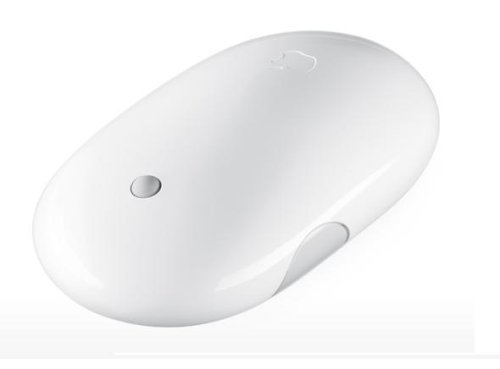
Apple Bluetooth Wireless Mighty Mouse
Apple Bluetooth Wireless Mighty Mouse

Manufacturer:
Apple

UPC:
885909087594

Retail Price:
$76.98

Avg. Rating:

The Apple Bluetooth Wireless Mighty Mouse is no longer in stock at any of the 20,000 stores listed on GoSale.
Below is a list of possible auctions for this product. Be sure to view the auction details carefully to verify the model and condition of the product.
Auctions
ImageItemPriceShippingTotalTime RemainingBuy/Bid URL
Apple Mac Wireless Bluetooth Mighty Mouse (MA272LL/A)Apple Mac Wireless Bluetooth Mighty Mouse (MA272LL/A)$19.50
2 bids
$6.99$26.49
  6      29  
hours  min
Bid on Apple Mac Wireless Bluetooth Mighty Mouse (MA272LL/A) Now
Apple Bluetooth Wireless Mighty Mouse MA272LL/AApple Bluetooth Wireless Mighty Mouse MA272LL/A
Brand New | Power Seller | Trusted | Retail For + $69
$39.95
4 bids
$0.00$39.95
26     9
 days  hours 
Bid on Apple Bluetooth Wireless Mighty Mouse MA272LL/A Now
Apple Mighty Mouse Wireless MA272LL/A New Sealed Apple Mighty Mouse Wireless MA272LL/A New Sealed $20.50
11 bids
See Auction Details
  10      41  
hours  min
Bid on Apple Mighty Mouse Wireless MA272LL/A New Sealed  Now
Apple Bluetooth Wireless Mighty Mouse MA272LL/AApple Bluetooth Wireless Mighty Mouse MA272LL/A$32.89
1 bid
$3.89$36.78
26     19
 days  hours 
Bid on Apple Bluetooth Wireless Mighty Mouse MA272LL/A Now
Apple Bluetooth Wireless Mighty Mouse MA272LL/AApple Bluetooth Wireless Mighty Mouse MA272LL/A$7.98
$0.00$7.98
2     0
 days  hours 
Bid on Apple Bluetooth Wireless Mighty Mouse MA272LL/A Now
Apple Bluetooth Wireless Mighty Mouse MA272LL/A Apple Bluetooth Wireless Mighty Mouse MA272LL/A $60.00
$0.00$60.00
29     0
 days  hours 
Buy Apple Bluetooth Wireless Mighty Mouse MA272LL/A  Now
Apple Bluetooth Wireless Mighty Mouse MA272LL/AApple Bluetooth Wireless Mighty Mouse MA272LL/A$7.98
2 bids
$0.00$7.98
2     0
 days  hours 
Bid on Apple Bluetooth Wireless Mighty Mouse MA272LL/A Now
Apple Bluetooth Wireless Mighty Mouse MA272LL/AApple Bluetooth Wireless Mighty Mouse MA272LL/A$7.98
$0.00$7.98
2     2
 days  hours 
Bid on Apple Bluetooth Wireless Mighty Mouse MA272LL/A Now
Apple Bluetooth Wireless Mighty Mouse MA272LL/AApple Bluetooth Wireless Mighty Mouse MA272LL/A$45.00
$0.00$45.00
19     22
 days  hours 
Buy Apple Bluetooth Wireless Mighty Mouse MA272LL/A Now
Apple Bluetooth Wireless Mighty Mouse MA272LL/AApple Bluetooth Wireless Mighty Mouse MA272LL/A$7.98
$0.00$7.98
2     2
 days  hours 
Bid on Apple Bluetooth Wireless Mighty Mouse MA272LL/A Now
Apple Wireless Bluetooth Mighty Mouse (MA272LL/A)Apple Wireless Bluetooth Mighty Mouse (MA272LL/A)$59.99
$6.99$66.98
19     3
 days  hours 
Buy Apple Wireless Bluetooth Mighty Mouse (MA272LL/A) Now
Apple Bluetooth Wireless Mighty Mouse MA272LL/AApple Bluetooth Wireless Mighty Mouse MA272LL/A$7.98
$0.00$7.98
2     2
 days  hours 
Bid on Apple Bluetooth Wireless Mighty Mouse MA272LL/A Now
Apple Bluetooth Wireless Mighty Mouse MA272LL/AApple Bluetooth Wireless Mighty Mouse MA272LL/A$45.00
$0.00$45.00
17     5
 days  hours 
Buy Apple Bluetooth Wireless Mighty Mouse MA272LL/A Now
Apple Bluetooth Wireless Mighty Mouse MA272LL/AApple Bluetooth Wireless Mighty Mouse MA272LL/A$7.98
$0.00$7.98
2     4
 days  hours 
Bid on Apple Bluetooth Wireless Mighty Mouse MA272LL/A Now
Apple Bluetooth Wireless Mighty Mouse MA272LL/AApple Bluetooth Wireless Mighty Mouse MA272LL/A$7.98
$0.00$7.98
2     5
 days  hours 
Bid on Apple Bluetooth Wireless Mighty Mouse MA272LL/A Now
Apple Bluetooth Wireless Mighty Mouse MA272LL/AApple Bluetooth Wireless Mighty Mouse MA272LL/A$45.00
$0.00$45.00
12     11
 days  hours 
Buy Apple Bluetooth Wireless Mighty Mouse MA272LL/A Now
Apple Bluetooth Wireless Mighty Mouse MA272LL/AApple Bluetooth Wireless Mighty Mouse MA272LL/A$7.98
$0.00$7.98
4     17
 days  hours 
Bid on Apple Bluetooth Wireless Mighty Mouse MA272LL/A Now
Apple Bluetooth Wireless Mighty Mouse MA272LL/A Apple Bluetooth Wireless Mighty Mouse MA272LL/A $49.99
$0.00$49.99
10     22
 days  hours 
Buy Apple Bluetooth Wireless Mighty Mouse MA272LL/A  Now
Apple Bluetooth Wireless Mighty Mouse MA272LL/AApple Bluetooth Wireless Mighty Mouse MA272LL/A$7.98
$0.00$7.98
4     20
 days  hours 
Bid on Apple Bluetooth Wireless Mighty Mouse MA272LL/A Now
Apple Bluetooth Wireless Mighty Mouse MA272LL/AApple Bluetooth Wireless Mighty Mouse MA272LL/A
Best Buy Liquidation | New Condition | Lowest Price |
$37.95
$0.00$37.95
26     9
 days  hours 
Buy Apple Bluetooth Wireless Mighty Mouse MA272LL/A Now
Apple Bluetooth Wireless Mighty Mouse MA272LL/AApple Bluetooth Wireless Mighty Mouse MA272LL/A$7.98
$0.00$7.98
4     22
 days  hours 
Bid on Apple Bluetooth Wireless Mighty Mouse MA272LL/A Now


Apple Bluetooth Wireless Mighty Mouse Specs:
Product NameApple Bluetooth Wireless Mighty Mouse
ManufacturerApple
Product Number MPNMA272LL/A
Retail Price $76.98
EAN-1400885909087594
UPC885909087594
Weight1 lbs.
Deal first added on:28-July-2006

Tags

Find other products that have similar tags to the Apple Bluetooth Wireless Mighty Mouse
Apple Wireless Mice Mac computer Windows Mac OS Track Ball mouse Squeeze Scroll Button finger OS mighty Page Bluetooth launch wireless mouse Mighty Mouse Dashboard MacBook Pro exposã Scroll Ball side buttons wireless Mighty Mouse Apple Bluetooth Wireless Mighty ever used Scroll Ball button launch Dashboard scroll wheel Laser Tracking AA batteries right clicking
Similar Products
Apple Magic Mouse  with Multi-touch Technology (MB829LL/A)Apple Magic Mouse with Multi-touch Technology (MB829LL/A) $78.99Check Prices on Apple Magic Mouse  with Multi-touch Technology (MB829LL/A)
at 7 stores
Microsoft Wireless Notebook Optical Mouse - SlateMicrosoft Wireless Notebook Optical Mouse - Slate42.34$13.50Check Prices on Microsoft Wireless Notebook Optical Mouse - Slate
at 6 stores
Razer Naga MMOG Laser Gaming MouseRazer Naga MMOG Laser Gaming Mouse79.99$75.98Check Prices on Razer Naga MMOG Laser Gaming Mouse
at 6 stores
Logitech VX Nano Cordless Laser Mouse for NotebooksLogitech VX Nano Cordless Laser Mouse for Notebooks69.99$41.60Check Prices on Logitech VX Nano Cordless Laser Mouse for Notebooks
at 9 stores
Logitech V470 Bluetooth Cordless Laser Mouse for Notebooks - BlueLogitech V470 Bluetooth Cordless Laser Mouse for Notebooks - Blue49.99$32.99Check Prices on Logitech V470 Bluetooth Cordless Laser Mouse for Notebooks - Blue
at 12 stores
Logitech Cordless TrackMan WheelLogitech Cordless TrackMan Wheel49.95$35.99Check Prices on Logitech Cordless TrackMan Wheel
at 11 stores
Logitech 931073-0403 Optical Notebook Mouse PlusLogitech 931073-0403 Optical Notebook Mouse Plus23.95$8.92Check Prices on Logitech 931073-0403 Optical Notebook Mouse Plus
at 12 stores
Logitech Cordless Optical TrackmanLogitech Cordless Optical Trackman59.95$49.05Check Prices on Logitech Cordless Optical Trackman
at 12 stores

Accessories
Apple MA073LL/A AirPort Extreme Base StationApple MA073LL/A AirPort Extreme Base Station196.35$164.95Check Prices on Apple MA073LL/A AirPort Extreme Base Station
at 1 stores
Apple Mac OS X Leopard 10.5.6Apple Mac OS X Leopard 10.5.6 $229.00Check Prices on Apple Mac OS X Leopard 10.5.6
at 2 stores
Apple MacBook Pro MA895LL/A 15 Notebook PC (2.2 GHz Intel Core 2 Duo,  2 GB RAM, 120 GB Hard Drive, DVD/CD SuperDrive)Apple MacBook Pro MA895LL/A 15" Notebook PC (2.2 GHz Intel Core 2 Duo, 2 GB RAM, 120 GB Hard Drive, DVD/CD SuperDrive) $2635.83Check Prices on Apple MacBook Pro MA895LL/A 15 Notebook PC (2.2 GHz Intel Core 2 Duo,  2 GB RAM, 120 GB Hard Drive, DVD/CD SuperDrive)
at 1 stores
Apple iPod Hi-Fi Home StereoApple iPod Hi-Fi Home Stereo $999.99Check Prices on Apple iPod Hi-Fi Home Stereo
at 1 stores
Sony NV-U70 nav-u GPS Portable Vehicle Navigation SystemSony NV-U70 nav-u GPS Portable Vehicle Navigation System549.99$260.00Check Prices on Sony NV-U70 nav-u GPS Portable Vehicle Navigation System
at 2 stores
Latest 6 Reviews
Here is what people are saying about the Apple Bluetooth Wireless Mighty Mouse
3 Star Rating  "Nice look & hand feel but otherwise bad design"2009-09-05
- Reviewed By User: A1OG12AYRR4SC7
The mouse looks great and feels good in the hand, but there are several design flaws, which are serious if you are used to 3-button work.

1. Right-clicking is imprecise.
2. The scroll ball is flimsy. Up-down works well, left-right only intermittently. (I have been lucky with being able to clean the scroll ball so far -- running it upside-down over paper.)
3. The middle-click (on the scroll ball) is impossible without scrolling at the same time.
4. The batteries are hard to extract. (There is no recharging station setup, of course.)
5. There is only one additional button (the side bar).

Functionally, my old Logitech mouse was much better -- but I do like the look of this one better. Can't there be good looks with brains, too?
 
2 Star Rating  "Apple Wireless Mighty Mouse not so mighty"2009-08-25
- Reviewed By User: ACP5CQC6JVPPS
I regret I did not buy from Amazon--then I could have returned it. I don't know why I bought it from online from Apple . . . .

The Good:
Easy installation with Bluetooth. The scroll wheel works very well. I don't remember any difficulties keeping the scroll wheels of my three previous Apple USB mice clean.

The Bad:
Too much effort to "click." I play timed Klondike in the Solitaire for Macintosh suite. It keeps a record of high scores. The mouse slows me down noticeably. It's frustrating to get hung up on a card when you're trying to move it, clicking and clicking, with the card jiggling around and not quiteApple Bluetooth Wireless Mighty Mouse moving!
The mouse very rarely loses its Bluetooth connection, but when it does I have to find the old USB mouse to restart and reprogram Bluetooth.

I should have got a Logitech mouse at Amazon.com, like my wireless keyboard. Maybe I will "eat" the mouse and go Logitech.

I mentioned in my review of the Apple Bluetooth Wireless Mighty Mouse that it took too much effort to "click." I have developed wrist and finger pain when using the mouse. I've used Apple mice on three successive iMacs with no problem. The wireless mighty mouse did me in in two months! I decided to check on the guarantee in the papers that came with it. Couldn't find any. Tried searching Apple's site, couldn't find one there either. I've hooked up the old wired Apple mouse and have been trying to use it with my right hand, which is impaired from a stroke. (The lead is too short to use with my left.) Some good may come out of this. Forcing me to use my right hand to play Klondike is a kind of rehab! I would give it one star today. Later, depending on its rehab value, I might reconsider.
 
4 Star Rating  "Bluetooth Mighty Mouse Maintenance, Battery Life, Working Environment and Design."2009-08-18
- Reviewed By User: AXH4H04TAP1UA
I've owned 2 of these Wireless Mighty Mouse already for quite a while. I've bought the 1st one in Sep 2006 together with my MacBook and the 2nd in 2007. I learnt to take care of it somehow the hard way. This is because I bought the 2nd unit thinking I wouldn't be able fix the rolling ball. Eventually I could manage to make it work again (thanks to the Apple Forums). Since then I have an extra mouse which is not that bad. Now I don't have to carry the mouse with me when I go with the laptop to the Fac. This is what I learnt from this bad experience: to get a consistent cleaning you'd better soak a paper towel or similar in alcohol stretch it on a flat surface and then holding the mouse upside down firmly push against the towel so that you can sequentially spin the ball in different axes. Trying this with dry towel can transciently unstuck the sensors that detect the ball motion but it won't last for long (still a provisional or emergency solution if you can't find alcohol on hand at the moment the ball stops working) whereas with alcohol it will work smoothly for weeks or even months. Alcohol won't damage the mouse (at least it hasn't done it in any of my two mice for the last year and a half). Alcohol is better solvent for the fatty dirt that comes from your hands so you can remove the dirt easily quicker. Unlike water, alcohol will evaporate from the inner cavities in a few seconds without leaving residues as it is much more volatile in when exposed to air than water, therefore minimizing the risk of short circuits. Alcohol isn't highly corrosive with metal and plastic surfaces either. Besides you can also 'kill' all of those nasty swine flu virions if you efficiently rub your hands soaked in alcohol.

On regard of the battery life, this mouse can fit 2 large capacity AA batteries, what I really appreciate (I hope AAA type would left aside in any portable device since they run out of charge much sooner and AAA rechargeable batteries usually range from as expensive to far more expensive). Even so my impression is that this mouse runs out of charge in just a few days, I daresay it uses up the batteries in no more than 50 hours of activity. This is a good reason to use rechargeable batteries as I've always done. I moved to rather expensive 4000mAh rechargeable batteries but I didn't notice a big improvement. Therefore my advise is to stick with cheap low-end ones and buy a few more spare batteries for replacement. It could also be that my battery charger doesn't fully recharge the batteries, I should check that but it would mean purchasing another charger. Even so, unlike the 2500mAh, I can use the 4000mAh with my cheap Coolpix digital camera for long, so my guess is that the charger is filling the 4000mAh batteries. Even with the 4000mAh the Mighty Mouse runs out of charge rather soon.

I'd like to comment two additional issues: unlike many other optical mice in the market the laser of this mouse is too sensitive to the surface becoming very, very imprecise. You will probably require a good hard mousepad. A cheap one doesn't help much. Paper sheets don't work either. If you finally find an adequate surface the pointer will move with precision and smoothly along the screen. This handicap can make the Mighty Mouse not a very good option to travel with unless you are wiling to carry your mousepad with you. By the way, I've found that on plastic placemats sold as Disneyland souvenirs the mouse performs also quite well, while being much larger than the regular mouse pads.

The 2nd issue isn't directly related with the mouse but with the Mac OS X. Tracking at maximum speed is still slow in Mac OS X Tiger and Leopard. It needs a lot of movement of the hand what means you can easily surpass the limits of a small-sized mousepad, what as I said above in my opinion is almost a need for this model. In contrast, I don't have this problem working with Windows XP. The mouse tracks quite fast and is still precise. Most times I have my laptop attached to a 1920x1200p display what is probably worsening the problem. Even so, working with Win XP with the same computer and display gives much better results. I think Apple should widen the tracking speed range in the future, although at this point I'm pessimistic since in the last three years has done nothing to improve that feature.

Finally I'll revise two common problems attributed to this mouse: the 1st is that the right button is unreliable and often pressing it is interpreted as having pressed the left one. It is true that is not 100% effective, but in my personal experience it can take weeks or months to get a wrong shot. So for me this is not an issue. I suppose it will strongly depends on how you are holding the mouse. The 2nd is about the side button(s). I've read that some users complain to be to stiff while others claim they can be accidentally pressed. I'd agree with the former. The side button(s) of my two Bluetooth Mighty Mice are too stiff to press and get response. I guess Apple tried to fix this issue in later releases going to the opposite extreme. Probably they aren't placed in the best place either.

What could be improved:
the omnidirectional wheel is the best extra, although the mouse would benefit if Apple replaced a mechanical wheel for a light device as it occurred with the bottom ball. In case it was technically unfeasible it could be nice a touch sensitive surface similar to the former iPod wheels, which works nice. It wouldn't be necessarily a hemisphere at all. A mid-sized circle centered in the same place in which now is placed the wheel would do the job and would prevent any dirt to get in. The mouse bottom edge which directly touches the surface becomes also dirty quickly. Fortunately this doesn't disrupts the mouse functions. Even so it could be redesigned to minimize this problem. Some users has suggested to place the battery lid at the rear end instead of the bottom. They argue it can easily get open if the mouse falls off the mousepad. My 2 mice never got accidentally open. However, in a few occasions I had problems closing the lid again after a battery replacement. If the lid accidentally gets stuck in the middle of its way you'll really get hard to remove again while risking to get the lid broken trying to get it free from its locker. It'd be great a safer locker system.
The plastic outer cover seems flimsy, It's seems it could break like an egg shell it it fell down to the ground. A tougher plastic would be welcome. White is OK but I've seen other Apple mice with better looks. A transparent previous model was really very original although less ergonomic than this white one since the rear half was as thick as the front one. It'd be really nice Apple 'copying' the OWC's transparent HDD enclosure looks (borrowed from Apple at its time), so you can see all the electronics of the mouse innards. However, I think that Apple will eventually redesign the mouse in silver to clutch with the aluminum unibody laptops, keyboards and so on. IK find laptops aluminum cases an improvement while less prone to scratches than the plastic stuff. Nevertheless, aluminum in a mouse would increase the price and can be hardly justified.

I think this mouse shouldn't deserve more than 3 stars. I give an additional one since it is the only mouse I know so far with an omnidirectional wheel (aka the rolling wheel). Unfortunately, this feature doesn't work with Windows. I'd like that Apple should have include at least within the Boot Camp drivers the side motion for the ball since with many Windows mice you can get side motion once their drivers are set up.
 
5 Star Rating  "Awesome mouse."2009-07-11
- Reviewed By alhambra_ttp2
This is a great mouse for your mac. The battery life is beyond great, it syncs fast right on start up and is very comfortable to use. The scroll ball also works great with very sharp precision. I laugh when I see uneducated reviewers posting things like "Great if I could right click" this statement makes them look dumb to anyone who is computer literate. All you do on any mac to enable right click is go to system preferences and click mouse then select whatever you wish for the mouse buttons. Button one is primary, then set second button to secondary and wow magic you have right click, plus you can customize it however you want. This is a great mouse, very crisp controls and very durable, I would recommend it to anyone, plus it looks sharp with any mac.
 
1 Star Rating  "Frank Lloyd Wright of Mice - Avoid it"2009-07-09
- Reviewed By User: A1Z4WWNXWY2TM4
This mouse is the Frank Lloyd Wright of mice. Form over function. It looks cool. Its sleek. It doesn't work well.

The blue tooth constant looses connection and instantly recovers. Functionally it isn't too bad - visually expect to see the mouse dropped connection graphic on your screen a lot.

Its only a 3 button mouse. Left and right click are available via software and its smart enough to determine which side of the mouse you're clicking on.

The center button is horrible. Its the tiny mouse ball on top. Lot of reviews say it gets filled with crud and you cannot clean it out. The 4th button visually looks cool on the sides - however, they are the same button. They are very awkward to use.

I am much happier with my Logitech MX-10 that I brought over from my PC days. Logitech makes a Mac driver for that mouse that gives you a world of config options. It works wonderful. Its ergonomic where as this apple mouse may look sexy - but it under performs in about every way possible. Avoid it like the plague.

I thought - well perhaps I can make it a single click mouse and give it to my 3 year old for her games. She struggles with it as well.

Hopefully Apple with come out with an external touchpad for iMac's like the MacBook Pro has.
 
2 Star Rating  "Poorly Designed Product"2009-05-08
- Reviewed By User: A1MZI2FNAT16MW
Do not buy this mouse. For one it's $80?? I paid the money when I first bought my MacBookPro because I wanted everything wireless and typically Mac products are high quality. So I forked over the $80. It is not worth it. Mainly because the little scroll ball constantly get disabled due to lint. And I'm not talking about a lot of lint. I keep my desk pristine so whatever lint is getting inside of it is from the air or whatever. I'm getting rid of this mouse. It's one of the poorest designed products that Mac has. By-the-way, my friend has the same exact problem as I do with this mouse. Sure you can get it to work for a while by taking the batteries out and trying to clean the lint out by using the corner of a piece of paper or turning it upside down and rolling it around on the ball incessantly. But who wants to do that? It's extremely annoying. If you think you will buy this mouse and it won't happen to you, go ahead. But you are wrong, it will, just give it time. It's just a poor product that they overcharge for.
 
© 2009 GoSale.com (S1)


Home > Computers > Computer Add Ons > Mice & Keyboards > Mice > Mice - Wireless

