

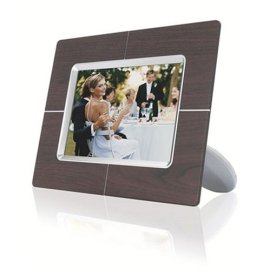
Latest 5 Reviews Here is what people are saying about the Philips 7" Digital Picture Frame (6.5" Viewable) (Wood)
"Dital picture frame"
2008-02-08
- Reviewed By User: ARTZ8XGNMWZZ2
This is a good present day capability digital frame. It has virtually no internal memory. The resolution is okay. Overall, it makes you want what you get on your computer, but hey it is far cheaper. We don't turn it on often but others see and love it when they visit.
We've all seen these frames in a variety of places, so I really knew what to expect. Never the less, I was surprised by how easy it was to operate, copy photos from a memory card to the frame's memory, and to change some of the options. It's really working out of the box, which is a nice thing as I purchased this one as a gift. By the way, if you are buying this to take overseas, you will have no problem. I just had to add a European jack as the transformer is included. A good purchase.
"Nice picture"
2008-01-07
- Reviewed By User: A1Q3OO2R8RD4VS
I bought the product based on the good reviews and am pleased with the product. If I had to do it over again, I would have purchased the same brand, but a larger display.
This picture frame has a most vivid and perfect picture view. Bought two, one for for my mom and one for my mother-in-law. They were both super happy. My brother-in-law bought one for his mom of a cheaper model and when he saw this phillips he realized the cheaper frame had a horrible view.
So for a perfect picture viewer I recommend this model or larger size. Next frame I would choose a 9" for myself.
"Not bad so far"
2007-12-26
- Reviewed By User: AAKZL8DGIESBM
The quality of the displayed photos if very nice. My wife loves it. Its a great way gain access to all those photos that have been sitting on the PC. Setting the resolution of the photos to match the native resolution of the frame (720x480) lets you store a lot more in the frame's memory or an external memory card. It also makes the transitions between photos smoother since the frame doesn't have to do convert the photos on the fly.
A couple of issues though...
The software supplied provides a method of accessing CF card which doesn't seem to work, so I couldn't download photos from PC to the a CF card in the frame using the supplied USB cable & software. The manual didn't provide enough information to get past this issue.
I fell back to copying my photos to the CF card via a card reader/writer attached directly to the PC (no frame). This works fine except windows doesn't seem to be giving me access to the full capacity of the CF card. This is not an issue with the frame itself. I tried two CF cards (1GB, 128 MB), two card reader/writers, and two XP PCs with the same result. So it seems to be an XP issue. XP shows the capacity of the CF cards correctly, but writes fail after about 36 MB on both. If anyone has any insight into this issue, I'd appreciate some assistance.
Last updated: Nov 07, 2009 at 17:04 EST. Pricing information is provided by the listed merchants. GoSale.com is not responsible for the accuracy of pricing information, product information or the images provided. Product prices and availability are accurate as of the date/time indicated and are subject to change. Any price and availability information displayed on amazon.com or other merchants at the time of purchase will apply to the purchase of this product. As always, be sure to visit the merchant's site to review and verify product information, price, and shipping costs. GoSale.com is not responsible for the content and opinions contained in customer submitted reviews.

