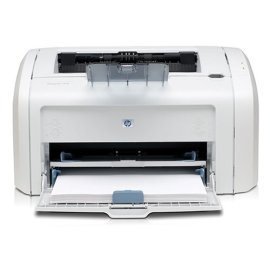
"HP 1018 Happy Camper" | 2009-08-11 |
| - Reviewed By User: A2MD6ZC1DS8ACX |
I have had this printer for about a year now. I am pleased with it overall and I am so happy to be done with Ink Jet printers. I got a great [...] price [...]. I have printed card stock with success. I have printed two sided (manually) with success. I have use after market toner cartridges and have seen no difference between that and the more expensive OEM cartridges.
However, I must point out a few things.
1. I have had the driver curruption with Printspooler.exe using up all my system resources. This happened once and I never connected it to my HP driver until I read about it in someone else's review. It took me a couple of days of searching the internet to figure out how to clear the issue. I thought I had a virus.
2. When printing heavy card stock, I found that the toner did not fuse well. I think I fixed that by changing the setting on both the printer and the software. Changing the setting to card stock in only one place is not good enough.
3. If you are going to print card stock you must use the correct tray (the manual feed tray not the traditional paper tray). |
| |
"THIS IS THE BEST EVER - SORRY IT ISN'T COLOR" | 2009-05-29 |
| - Reviewed By pussycats2 |
| I've been amazed at this printer. It was given to me by a friend who tired of it and wanted color. I have had many types of printers, but always black and white AND COLOR. The ink leaked out of some and the powder spilled. This has never had a paper jam unless I really caused it; and then it's easy to clear. The cartridge drops right in if you put it in properly. I've had only one cartridge for two years and use it very often. If color is not important to you, don't waste your money on a more sophisticated printer. But, it will print colored pictures in black and white. Only thing I haven't figured out yet is to stop printing if I hit the print button more than once. I just purchased a HP Photosmart printer to use for color prints and photos, hoping that it will be just as reliable as this one. This is the first printer that has never caused a problem. |
| |
"Great for the home! Great price for a laser printer." | 2008-10-18 |
| - Reviewed By User: A1BVKL1PY6AE86 |
| I bought this item on Amazon almost a year ago and it has and still is living up to my expectations! I don't print a large quantity of documents (it's just me and my hubby) and I don't print photos at home, so the toner hasn't even run out yet! This is saving me so much compared to all the ink cartridges I had to keep buying when my ink dried up from lack of use. I did a bit of research, and the replacement toner is definitely cheaper than the $60 in ink I had to buy for my previous Canon inkjet printer. Very easy set-up! The paper tray is not covered and is a bit small as far as capacity. However, this is an overall winner for the average Jane! |
| |
"Great Printer for Office Use" | 2008-09-22 |
| - Reviewed By User: A1E9WEFKEU85OH |
| This printer is awesome for use with a direct USB connection to a PC. It is economical with the toner consumption rates, takes up little space for a LaserJet and is very fast and clean. The only issue we have is trying to use it with print servers for use with workgroups. But, if you can use with a direct connection, this is the printer for you. |
| |
"Problems with drivers corrupting" | 2008-08-20 |
| - Reviewed By User: A250AXLRBVYKB4 |
The HP 1018 is a serviceable, inexpensive laser printer. It works great, the toner is reasonably priced, and it prints at a pretty brisk 12 pages per minute.
However, I've had to reinstall the print drivers three times in the last year, because they go corrupt frequently. When this happens, printspooler.svc fails, and you have to manually stop all print jobs, then stop printspooler.svc using msconfig.exe, then uninstall the drivers, reboot, and then reinstall the drivers. The first time this happened it took me several hours to fix at a time when I really needed to print something. It was frustrating.
These driver corruptions seem to happen when printing from a large PDF file. (Two out of three times the drivers corrupted during a PDF print job). I've learned how to fix the problem quickly, and even have the HP driver installer stored on my hard drive. However, it seems that this should be fixed by HP, but even with the most up to date drivers, it still happens.
If you don't print many large documents you may never run into these problems. If you want an inexpensive laser printer that will get the job done, this printer is a good choice, but driver corruption seems to be a common problem with this particular model. Judge for yourself if it's worth putting up with driver corruptions every 4-6 months. If not, pick another printer.
|
| |
"Couldn't be happier" | 2008-06-14 |
| - Reviewed By vi_luong |
I had an HP 6L years ago. I remember paying about $400 for it and it lasted about 2 years before the paper feeder went bad. I had to manually feed page by page. After that experience, I went through a few Inkjet before I decide to go back to laser printers again.
Even though I didn't buy mine through Amazon, I got my HP 1018 for $15 after rebates. How can you beat that?! I was skeptical and didn't expect the printer to last long, but now, after more than 1 year, it's still cranking away. It's small, quiet, and fast. It's a shame that toner cartridges cost more than the printer itself. I hate to contribute to the our greenhouse problems by generating more waste, but it does not make sense to buy toners when it's cheaper to buy a new printer. Maybe when the toner runs out, I will donate it or put it on Craigslist. |
| |