

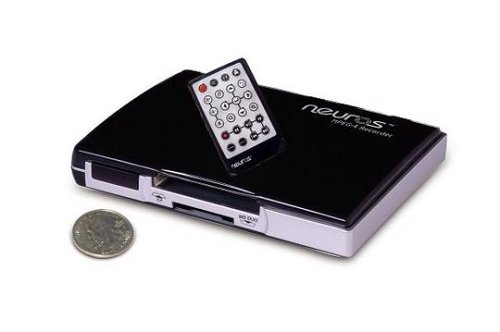
Neuros MPEG-4 Recorder 2 Digital Video Recorder
Neuros MPEG-4 Recorder 2 Digital Video Recorder

Manufacturer:
NEUROS

UPC:
180106403025

Retail Price:
$149.99

#Deals:

Avg. Rating:

Available from 2 stores
Click any of the offers below to purchase and view accessories on the merchant's website.
StoreRatingBase PriceShipping Your PriceAvailabilityBuy Link
Buy it now
[Store Info & Reviews]
Covered by A-Z Guarantee
GoSale Trusted Store$93.37
New
$0.00 $93.37 In Stock. Usually ships in 24 hours Buy from Amazon.com
from Amazon.com
Buy it now
[Store Info & Reviews]
Covered by A-Z Guarantee
5 Star Rating
11997 Reviews
$136.75
New
$7.28
Expedited Shipping Available Expedited Available
$144.03 In Stock. Usually ships in 1-2 business days
18 Available
Buy from Antonline
from Antonline
* Shipping estimates are based on Ground shipment within the continental U.S.
   To report a pricing error or problem, Click Here.
Overview of current deals for the Neuros MPEG-4 Recorder 2 Digital Video Recorder:
  • 1 merchant is offering Free Shipping.
  • 1 merchant has Express Shipping options.

Product Specifications
Product NameNeuros MPEG-4 Recorder 2 Digital Video Recorder
ManufacturerNEUROS
Product Number MPN4030200
Retail Price $149.99
EAN-130180106403025
EAN-1400180106403025
UPC180106403025
Weight1 lbs.

Tags

Find other products that have similar tags to the Neuros MPEG-4 Recorder 2 Digital Video Recorder
Electronics video Handheld television portable digital Remote Control Compact Flash Memory VCR Manual Card Watch favorite file stick resolution CF Recorder iPod digital video recorder MPEG4 MPEG-4 PSP Microdrive Neuros Neuros MPEG-4 Recorder instruction manual Neuros Recorder Records directly Sony PSP conversion hassles RCA interface cables video source Memory Sticks first VCR's Record Menu manual isn't 4030200 180106403025
Similar Products
TiVo TCD652160 HD Digital Video RecorderTiVo TCD652160 HD Digital Video Recorder304.25$231.96Check Prices on TiVo TCD652160 HD Digital Video Recorder
at 11 stores
TiVo TCD649080 Series2 80 Hour Dual Tuner Digital Video RecorderTiVo TCD649080 Series2 80 Hour Dual Tuner Digital Video Recorder249.99$129.99Check Prices on TiVo TCD649080 Series2 80 Hour Dual Tuner Digital Video Recorder
at 6 stores
Panasonic Pro AG-DV2500 Proline DV/Mini-DV RecorderPanasonic Pro AG-DV2500 Proline DV/Mini-DV Recorder2095.00$1613.99Check Prices on Panasonic Pro AG-DV2500 Proline DV/Mini-DV Recorder
at 7 stores
TiVo TCD648250B Series3 HD Digital Media RecorderTiVo TCD648250B Series3 HD Digital Media Recorder799.99$504.00Check Prices on TiVo TCD648250B Series3 HD Digital Media Recorder
at 2 stores
TiVo TCD540040 Series2 40-Hour Digital Video Recorder - 40 HourTiVo TCD540040 Series2 40-Hour Digital Video Recorder - 40 Hour209.99$199.99Check Prices on TiVo TCD540040 Series2 40-Hour Digital Video Recorder - 40 Hour
at 2 stores
TiVo TCD540080 Series2 80-Hour Digital Video RecorderTiVo TCD540080 Series2 80-Hour Digital Video Recorder317.95$124.99Check Prices on TiVo TCD540080 Series2 80-Hour Digital Video Recorder
at 2 stores

Reviews
3 Star Rating  "Silent Movies Are Back"2008-09-11
- Reviewed By User: A23LQZD25J8OV1
Gotta admit I was truly excited when the Neuros MPEG4 Video Recorder 2 finally arrived. I actually found more value in my Palm Treo 650 smartphone. Yes, I can now watch my favorite movies while be mobile. That when I found I hit one those solutions unresolved... Since I use SD cards for extended memory I needed to get a SD/MMC CF Adapter, very hard to find since most locate Computer Stores are no longer brick and mortar(I ordered one through Amazon as well).

Once you do everything up running the process is really simple. As you're recording you can preview the playback on the TV. Great resolution and audio.

The same though does not hold true for the playback on my Palm Treo.
You'll need to download the TCPMP Core drivers for playback and audio (does not work with the Real Player software). Once loaded there is an error message, "Player: MPEG4 AAC Audio decorder not included! It was ermoved from the official install package because of intellectual property considerations".

So now I'm thinking maybe I should have gotten the Neuros MPEG4 Video Recorder 2 Plus, maybe they've worked out the audio decoder matters.
 
2 Star Rating  "Flimsy connectors and grainy MPEG compression"2008-08-08
- Reviewed By musiclover1966
I find this unit not very reliable for recording - the flimsy 1/8" connectors for A/V on the back cause video to come and go and I have to jiggle it to get a picture for recording - them sometime in the middle of recording it'll move just enough and leave me with a blank video screen with audio. OR I'll get the video channels but one of the audio channels will be off - just the left channel is recorded.

Additionally on the highest level of Quality (TV mode) the video compression is still poor and very blocky - I was expecting much higher quality at this setting then I get.

If you're considering buying this I recommend considering instead a A/V capture card for your computer - which should not have the flimsy connectors to it to cause you grief.
 
5 Star Rating  "Great unit"2008-07-30
- Reviewed By bubbadog4
I plugged it in and it worked...It was soooo much better than trying to record on my PSP
 
5 Star Rating  "great mini dvr"2008-05-09
- Reviewed By arlavell
has all the strength of a large unit, but u can hide this one anywhere.. covert
 
3 Star Rating  "Works well, but for now is best for early adopters"2008-05-08
- Reviewed By ricky_racer2
Does the MPEG-4 Recorder 2 need a technical makeover, i.e becoming the Recorder 3? Yes. Are there errors in the instruction manual that can confuse the new user? Yes. Is the tiny remote easy to lose, transforming the Recorder 2 into an expensive paperweight? Yes. Is the remote one of those horrendous membrane type remotes without real buttons or tactile feedback to the user? Yes. But....

The Recorder 2 reminds me of the first VCR's; a new technology with a clumsy interface. But just like the first VCR's, it is so much fun to use! It gives us so much power to record the content that we want and to watch it when and WHERE we want. Before the Recorder 2, I burned TV shows onto a DVD and then ripped the content into MP4 files on my PC and then transferred them to PSP and IPod. Obviously, an extended process. The Recorder 2 does all this directly in one step and I never have the audio/video synchronization problem that I sometimes have with ripped files.

But the learning curve is a little steep and that may scare off new users, especially since the manual has numerous errors. A prime example is in the Recording Video section of the manual (page 24), selecting Resolution. Resolution is Neuros' word for the video recording parameters. Settings like length of recording, quality of the recording, timer recording, manual recording, Little things that a user might want to access!

The manual states to "Highlight the record section and press to access the Record Menu." Well, the new user can press all they want, that Record Menu isn't going to show up. There is another button on the remote that looks like stacked file folders, THAT button accesses the Record Menu. The correct information is buried elsewhere in the manual.

So should a person buy the Recorder 2? Maybe, as long as they don't expect DVR ease and functionality. The interface reminds me of programs from the nineties and it really needs updating. But for the person who really wants portable video content and is willing to work a little (the Neuros user forums are very helpful), the Neuros Recorder 2 can be a great machine.
 
1 Star Rating  "Does not work well"2008-04-16
- Reviewed By User: A94EBZUE9V5SF
I have tried this product on different TVs. It simple doesn't work. Very difficult to set up. The manual is vague and the help isn't great. I have just put it in the box and don't think I will be able to use it. The firmware needs a lot of improvement. GUI is rubbish and the remote is not very responsive.

Not recommended until they come up with something much better!!!!
 
4 Star Rating  "How cool is Star Wars on your iPod?"2008-03-11
- Reviewed By User: ATEKPEKPQ1ADX
Works as advertised. Very cool. I'm recording my 6-year old's older VHS animated movies and transferring them to an iPod for an upcoming trip. This is one of the best applications for this because the 4:3 TV format fills the screen on a classic iPod, and animated movies are more forgiving of loss of detail. Widescreen DVD's are fine but getting a little small (on the iPod). Playing back to a standard definition TV from the iPod gives a "near-DVD" result in the best resolution file size, at least given the limitations of a 19" CRT screen. The next lower resolution is only slightly worse at half the file size. I was amazed at the result, however it is only barely watchable on a large LCD HDTV, and passable on a computer LCD screen. I will SO love not hauling around a bulky DVD player and expensive DVD's on our next trip!

The cNet review is right on, see:

http://reviews.cnet.com/digital-media-receivers/neuros-mpeg-4-recorder/4505-6739_7-32068978.html?tag=prod.txt.2

Caveat emptor: A hardware limitation means the maximum file length is 2 hours, so it will record an entire movie that is longer than 2 hours, but it will be broken into two files. The interface (programming screen), remote control and owner's manual are a little sketchy. If you buy this, be sure to use the "Setting" button (cascading windows icon) to access the necessary recording settings AFTER you've chosen the recording section in the top level menu. This is NOT explained in the manual. The "previous menu" (u-turn icon) button is also very helpful. Fear not, young Jedi, with patience and experimentation it can be successfully mastered.
 
4 Star Rating  "A unique solution"2008-02-18
- Reviewed By paul@emergentc.com
I work in a college setting, and there are many times when professors want to record student presentations for immediate review. After each session, our tape based systems required a real time transfer, some editing and then encoding to a format small enough for electronic distribution. This time and effort is eliminated with the Neuros recorder, plus it records directly to a small, standard MPEG-4 file. Even when looking at non-tape cameras, none record directly to MPEG-4. We use our regular camcorders, add a small monitor to the Neuros output, and professors have deliverable files at the end of class.

The user interface causes me to drop a star on the rating.
 
4 Star Rating  "Great for YouTube, So-So Otherwise"2008-02-06
- Reviewed By lightguybs
I bought this product intending to use it to capture video from various sources that I could then edit and put on youtube and other video sharing sites. For that purpose, it works very well.

However, don't expect anything near DVD quality capture here. This thing was designed for recording video optimized for small-screen viewing.

Also, the passed-thru AV signal to your TV, even when not recording, has the same low image quality as the recorded footage. The remote is also tricky to use and if you lose it, the Neuros Recorder itself becomes 100% useless; you can't even turn it on without the remote.

Despite it's limits, for only $100, it's a pretty handy little gadget. It can definitely be improved and I eagerly await future models.
 
4 Star Rating  "Outstanding device.....once you figure it out"2007-12-15
- Reviewed By litespeedlover
I love this recorder. I've been using it to put my VHS/DVD movies onto my laptop, ZUNE, and Sansa View (need conversion software for the ZUNE and Sansa).

It's simple to use (once you figure it out)and the video quality is fine for smaller screens.

Those are the positives, NOW the negatives...

The instruction manual is POORLY written and omits info. The box the recorder came in had an extra paper and it turns out it had the info for changing the recording resolutions. Without that sheet I doubt I'd figure it out.

The menu screens initially were confusing. I had to figure them out on my own.

There's a small green LED inside the unit that is hard to see. I initially thought the unit was dead but it's in there. The red recorder light is easier to see.

The remote is the ONLY way to control this recorder. If you loose it the recorder is useless.

Having said all that.....

After several attempts and some deciphering of the manual I've figured it out and now find it easy to use. All that needs to be done is get to the correct menu screen, start the VHS or DVD, and hit the record button on the remote.

(I haven't tried to record TV and I haven't used the timer record)

If you decide to get this, remember it takes some time to figure out since the manual isn't well written and the recordings are not for larger screens.

 
Quick Links


Pricing information is provided by the listed merchants. GoSale.com is not responsible for the accuracy of pricing information, product information or the images provided. As always, be sure to visit the merchant's site to review and verify product information, price, and shipping costs. Product and merchant reviews are submitted by online shoppers. GoSale.com is not responsible for the content and opinions contained in these reviews.
© 2008 GoSale.com (S1)


Home > Electronics > Television & Video > TiVo & Digital Video Recorders

