"Best Card Scanner I've Used" | 2008-09-30 |
| - Reviewed By User: A1ZBN2DVSJKJPH |
| I have had other card readers in the past (I usually bought the cheapest one I could find), but when my second card scanner bit the dust, a friend recommended the CardScan. The price was a little higher than the ones I have purchased in the past, but in this case it is true, you get what you pay for. The interface is very intuitive and easy to learn. It is small and easy to pack (I travel a lot) and reads the cards with out error. I highly recommend this device and will recommend it to everyone. |
| |
"CardScan Executive v8" | 2008-09-16 |
| - Reviewed By User: A1EI8GK8Q66RAS |
| I bought the product based on reviews already with Amazon. I am not disappointed. The set up is a breeze and the performance is good. There were some hitches in recognizing the letters in a smaller font. All in all, I am very happy with the integration with MS Outlook and the fact that I don't have to key in all the contact details laboriously myself. I am yet to use all the features, but I managed to load, edit and verify about 200 cards in about 3 hours time. I look forward to working with this more and discovering other productivity benefits in future. |
| |
"Best Organizing Tool and Best Investment" | 2008-09-11 |
| - Reviewed By 96black |
I used IRIS CardPro on Win XP but I upgraded to Vista Business and thus had to use CardPro on Virtual PC or buy a new card management software/scanner. As I already have a file that contains more than 1,000 contacts, I was reluctant to buy a new one due to the initial switching cost. However, I was not satisfied with the IRIS product and bought this one. I have to say that this produuct is working much better than I thought. Scan speed is faster and sequential read process is very efficient. Software is not perfect but much much smarter than the IRIS with regard to the accuracy of OCR capability. Verification process of the read card information is intuitive. Editing is much easier than IRIS. Its free web back-up feature is nice and useful. Only downside I found for this product is its limited multi-language capability. I have not encountered any issues yet and I cannot confirm the quality of their support, but I feel that the product quality and the added value to my business are more than offsetting any (including possible) downside.
VERY highly recommended!! 6 stars. I am serious.
|
| |
"Great product" | 2008-06-09 |
| - Reviewed By User: AV3LC429CHRGZ |
| Bought this card scanner for my husband. He loves it. It is very easy to use and the card information is stored correctly. |
| |
"Terrible Tech Support" | 2008-06-02 |
| - Reviewed By User: AU1FQ4JB13K5I |
| The product worked for three days and then stopped working. CardScan is one of these companies that asked not to return the product to the store but to contact their customer service if the product has a problem. I was on hold with customer service for 35 minutes before giving up. I wrote their tech support an email regarding the issue. Two days later I received a response asking me what scanner I had purchased and what color the light was showing (even though all this information was provided in the initial email). After sending this information again they determined that the unit I had purchased was defective and they would send me a new unit. The unit they sent me turned out to be refurbished. I was incredibly disappointed that it took so long for their tech support to respond and that they did not keep to their commitment an exchange the defective unit for a new unit. Considering I had spent close to $300 on a NEW unit and not refurbished one and the unit I purchased only worked for three days this was the least they should have done. This company does not stand by their product. |
| |
"awesome time saver" | 2008-05-29 |
| - Reviewed By User: A3I8QD5E7HG2XX |
I purchased this in order to scan our CEO's business cards into a digital format. It worked great and I was able to export all the cards into Outlook. I had no problems with setup or using it. It recognizes most of the characters on the cards.
Only minor complaint, is their software constantly tells me to update my online preferences anytime I open the software. |
| |
"A must buy for any Personal Assistant!" | 2008-05-08 |
| - Reviewed By achudi |
| Compact & efficient. I've pushed over 1,000 cards thru this puppy in the past few months and have had NO issues. It works well with Outlook - even if you are using multiple contacts folders. The only complaint I have is that the software should be a bit more intuitive when it comes to batch editing. ie - if you scan multiple cards for the same company and there are subsidiaries: Company Name, Inc. , Company Name LLC, Company Name Ltd, it would be incredibly helpful if you could select multiple cards from the scanned list and batch edit them. Auto populate - as in if it's already in the database would be a stellar expansion as well. |
| |
"Time-Saver" | 2008-03-22 |
| - Reviewed By User: A1S6EZQU7PQ6SL |
This is my 2nd one. the first one was returned, as it didnt work. (cardscan customer support was horrible. Called 3x to see if i did something wrong. they told me that sometimes the scanner does fail and to return to the seller).A Very easy install process...once it did work, it is easy to use. Takes about 30 sec/card to scan and correct any of the mis-filed fields and incorrect spellings.
The exchange software with V8 to a CMS system can be a little difficult to use, as the directions are somewhat vague, but it is easy to figure out.
Also gets all the business cards and various business card folders off your desk. |
| |
"Works as expected" | 2008-03-20 |
| - Reviewed By User: A3068LJWGKCYB6 |
| We purchased this for our VP to use. I tested it and it works just as expected. No problems installing the software or configuring it to sync with Outlook. The scanner was properly detected as plug 'n' play in Windows XP and there were no issues. |
| |
"One of the most useful office accessories I've ever used" | 2008-03-10 |
| - Reviewed By sankarson |
I've used a Cardscan scanner on and off for number of years, and recently acquired the newest one. The package is in two parts, the scanner and the software.
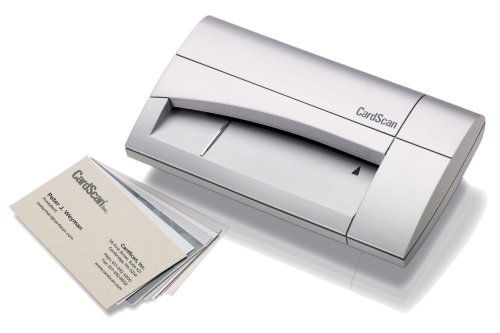
The scanner is light but slightly larger than the smallest scanners in the market. Unlike the older Cardscan models, however, it no longer require a power cord (which is a huge improvement in portability). It scans in colour and works perfectly well even with heavy continuous use. Looks nice the desk too.
The software is the real heart of the Cardscan package and in addition to being a great software for scanning and recognition, it does some really nice things; like integrating to an Outlook address book without having to export the records to Outlook. Included also is Cardscan At your Service (the online service for storing and managing your scans). That has proved really convenient; my assistant scans the cards, and I can access them almost instantly at home or on travel. The setup is pretty seamless and the recognition, as usual, very impressive.
|
| |