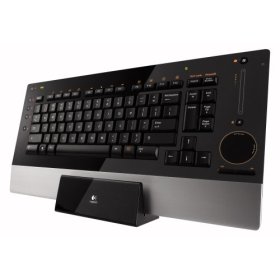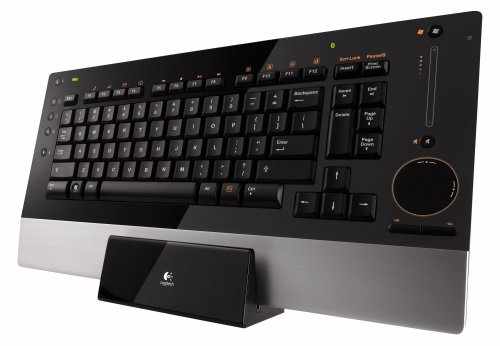
"Logitech diNovo Edge Keyboard" | 2009-11-20 |
| - Reviewed By User: A2FU6WIC9ETKNM |
| I bought this keyboard to connect to a PC that is connected to the Family TV. We wanted to be able to view and control You Tube and Hulu videos, Facebook and other items on the large LCD TV. This keyboard is perfect for this type of activity. If you intend to use it for all other PC use you may not be as satisfied and may want to add a wireless mouse. Also purchased from Amazon.com at a substantial savings over the local stores. |
| |
"Works fine with windows 7" | 2009-11-19 |
| - Reviewed By User: A3OLVU7PT0FL78 |
| I bought this keyboard because I wanted to go wireless. I love it. Mouse wheel on the side is convenient. Works fine with Windows 7. I just plugged it in and it played! No need for the driver cd or any bloatware of Logitech. Construction is great, and battery life has been hard for me to judge since it's been exactly a month and a half and I haven't needed to charge it (consistent daily use). The only cons are no numberpad and no backlight. But i can't complain, this keyboard was worth the price. |
| |
"Its hard to think of anything negative about this keyboard" | 2009-11-19 |
| - Reviewed By User: AA3JRVY550WSA |
| Its been two years since I purchased it from amazon for like $70 after rebate and am not surprised to see the price is still the same except no rebates any more. well, it deserves 1st place in htpc keyboards. quality is still top notch even after two years of almost everyday htpc use and whoever sees this keyboard at my house WANTS the EXACT same one, once they see the price they start rethinking if they need a keyboard that costs as much as a desktop pc from black friday sales lol. but if you are on the edge on buying this, don't think twice if money is not a factor. The look and feel is extra high quality and battery life is great. I only charge it once every two months, maybe because I don't use it like a computer keyboard, rather used as a htpc controller. A+ job logitech. |
| |
"Perfect for my needs" | 2009-11-08 |
| - Reviewed By User: A26MZ8VK5ZZ9CS |
I bought this keyboard because I was looking for something to use for my Home Theater PC. As it's not intended to be used on a desktop, I needed something that was both wireless, and included a pointing device.
This pulls off both of those requirements perfectly. It's also far thinner than what I was expecting to wind up with when I went shopping for a wireless combo, which is perfect for my application.
Installation was 100% plug and play. I inserted the dongle, walked across the room, switched on the keyboard (it has a mechanical power switch on the right edge,) and it was working instantly. I later installed the included software, which gave me the ability to program the buttons and fine tune the mouse, which I didn't feel the need to do.
I read several reviews on various sites condemning the "Touch Disk" for it's inaccuracy and difficulty of use. I find quite the opposite to be true. Yes, it took a couple of minutes to get the hang of it's scroll features, but once I learned how it functions, I find it to be VERY forgiving. As long as you start with a tap on the home point of either the vertical or horizontal scroll, it doesn't really matter much where your finger is, as long as it's moving in a vaguely circular motion. As for accuracy, it's about the same as most other touch pads I've used. It's perfect for navigating websites or operating the computer, precise enough to place a cursor between characters in a document every time, though I'd not recommend it if you're looking for something to do graphic design work or FPS gaming. One possible weakness/possible strength, depending on your point of view, is that the mouse buttons below the touch pad are a little less sensitive that I'd like, given their size. You have to be very deliberate when operating them. Of course, this also means that accidental clicks are less likely. Pressing the "Fn" key will reveal an ON/OFF above the mouse buttons that will turn the touch pad and touch sensitive volume control on and off.
The volume control is very responsive, but operates more like a volume wheel rather than a fader (which I would prefer.) It seems to require about three strokes of the control to traverse the entire range of the fader in Windows' "Volume Control."
As for the Fn keys, despite other reviews, F1-F4 and F9-F12 are programmable. Only F5-F8 are locked, and they function as the typical media function keys (play, pause, rewind, etc.)
I miss the number pad, but I can do fine without it. Then again, I learned to type when changing fonts meant changing the daisy-wheel. :)
The rest of the keyboard is just fine. It's quiet, and the keys have a shorter throw than what I'm used to (I'm not a laptop user), but I can type quickly and accurately with it.
Overall, I'm 100% satisfied. |
| |
"Keyboard Heaven" | 2009-11-07 |
| - Reviewed By User: ATM8O6YZCK9XC |
| Just love high quality keyboards from Amazon ... I am very fast typer and some keyboards just can not keep up and feel Klunky, this definitely does Not, however, prefer the MS8000 now as the charger base has built in USB hub and slicker, as it charges both the mouse and KB together. Logitech diNovo Edge with MX mouse are not matched pair and require separate cradles ... Love this keyboard but desktop space is important ... so give nod to MS8000 as I do not need number pad. |
| |
"Logitech diNovo Edge Keyboard (Black)" | 2009-11-04 |
| - Reviewed By User: AAUBTEV0B6ZDF |
| I love this Keyboard and Mouse combined. It looks cool the way you see it in pictures...keys and mouse works good. It's very ease to install. very good battery life because it uses Bluetooth technology and you do not have to point your keyboard to USB plugged... you could be sitting in any direction and still can use it...I think this is the best keyboard I have ever bought...I still have my old wireless keyboard sitting in corner. Now I use computer more because I want to use this this Keyboard... |
| |