"fine colour renditiob cleaR PICTURES" | 2009-10-02 |
| - Reviewed By User: A1EPSCZN9ZO64O |
| i aM VERY MUCH AN AMMATEUR PHOTOGRAPHER I enjoy having my holiday snaps up on the screen. While I work they flip thru their sequence I look up from my boring desk work and recall the moment I took the picture.So I am happy with the product I have not tried to show a film or test the sound quality on the unit yet |
| |
"La función aleatoria" | 2009-09-08 |
| - Reviewed By User: A4Y6755NUJFY7 |
| La función aleatoria no es la mejor, ya que en realidad parece que las fotos van apareciendo en orden, no exactamente consecutivo, pero tampoco aleatoriamente. |
| |
"Limitied capabilities" | 2009-09-01 |
| - Reviewed By User: A2D3MRAYUU76VG |
| Aside from a clearly visible grid on the screen, the products has many limitations. To do a slide show of pictures, you have to have all the pictures in the same folder. Besides, you can not have more than 500 pictures per folder, or the last ones will not be shown. So if you have lots pictures organized in folders (like most of us do), you have to copy them into a same folder, which is very troublesome; and most likely you will have to split them in different folders of 500 pictures each, and every once in a while select a different folder. I wish there was a firmware upgrade so the product could randomly display pictures in any folder in a memory device. ...Oops, almost forgot, even though you have different options for memory devices, they cannot be more than 1GB in size or they wont work, another annoyance since nowdays is difficult to find devices of less than 2GB. |
| |
"Coby DP350 Review" | 2009-08-17 |
| - Reviewed By User: A2CANC6JMRDJ34 |
| This is a nice purse sized photo album with good quality pictures. I found setup a little awkward and the ability to select individual pics cumbersome, needing a software upgrade, I think. Still, I haven't seen anything any better in this size at any price making it a reasonable choice to carry a bundle (up to 1000) of pictures for a proud parent or grandparent. |
| |
"DP350 Good and Bad" | 2009-07-31 |
| - Reviewed By User: A2PXS86K28ZCT3 |
It looks as if reviews for various Coby photo viewing products have been mixed together. This review is for the Coby DP-350. It covers only the picture viewing capability, because I have not used the MP3 playing capability. The only type of memory cards I have used with the DP-350 have been SD's.
What I like most about the DP-350 is that if you have your photos divided into folders, you can move through the folders and select a specific folder for viewing. This means you don't have to move through perhaps hundreds of photos to find the ones you want. You can create the folders in the DP-350's internal memory (about 1 GB) or on an SD memory card. (Perhaps other memory card types as well. I used only SD's.)
The SD-350 will not let you choose subfolders within a folder. If you do have pictures within subfolders, the pictures will all appear in the parent folder.
When you connect the DP-350 to your computer with the USB cable, Windows Explorer treats the DP-350's internal memory as one more drive. If you have a memory card inserted in the DP-350, it is treated as yet another drive. Using Windows Explorer, you can create or delete folders, copy folders from you hard drive (or maybe a CD), transfer pictures to the folders and delete pictures from the folders. If you want slide shows to be in a certain order, you must transfer the pictures to the folder in that order.
What I most dislike about the DP-350 are it's 5 buttons. Push them a bit too slowly or not quite hard enough, and the button push is not recognized. Also, it would be nice if the buttons were a bit wider and a bit more rounded; if you use the buttons to move through pictures instead of running a slide show, your fingers will become slightly sore.
Another problem with the DP-350 is the delay between button push and response to the button push. This is not much of a problem if you are working with photos in the internal memory but can be annoying if you are working with a memory card with many folders and pictures. As you wait for a response, you wonder if perhaps you didn't push the button just right. (The brand of SD memory cards I use come in different speeds. Using a faster memory card reduced the waiting time, but internal memory still worked much faster.) (Note: Another 3.5" viewer I have is much faster when working with memory cards but does not allow the selection of folders.)
There are two features I wish the DP-350 had. The first would be the ability to jump from one page of 9 thumbnails or folders to the next or previous page without having to move through the folders or thumbnails one at a time. The other would be the ability to rotate pictures so that portrait oriented photos could be viewed in a somewhat larger size. |
| |
"Slightly goofy interface, but clean pictures" | 2009-06-28 |
| - Reviewed By User: A2V7OAINYLZD69 |
My siblings and I got this for our mom's birthday. We decided to be sneaky and preload it with pictures of the family before giving it to her, because really who gives a picture frame with the generic pictures in to their mom on her birthday? No one I know who doesn't want to hear about it until judgment day.
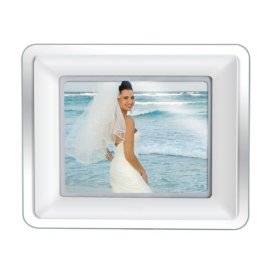
The frame itself looks just like the picture. What you don't see is the power cord you'll have to hide though. This take regular AC power from the wall outlet, no batteries. All of the connections, memory slots and USB connections are behind the larger frame. So with some work, the slots and power cord can be hidden from view.
I grabbed the manual and started trying to follow the instructions for adding new pictures to it. That's where my problems started. The instructions didn't seem to follow what the frame and my laptop were telling me. The screen was supposed to have some instructions to follow once the USB was plugged into the laptop. It didn't. It was stuck with a generic info screen that you couldn't navigate away from as directed.
Oh well. Thankfully, since it's a USB drive you can bypass the frame's directions and just drag and drop like you would any other USB drive. When hooked to a PC, you'll find a multitude of new 'drives' on your computer from the frame. These are the different card slots for extra memory. It comes with 128mb in the frame, so if you don't want to drop the money for an extra card, you'll be fine.
Once I narrowed down the internal drive for the frame, I delete the generic pictures and started putting on the ones I wanted, that was the easily part of the entire job. After putting all the pictures I wanted, I renamed the internal drive to make it easier to find later for my parents too.
From there, we started working to organize the pictures for a more random slide show when it was turned on (it has an on/off switch). It was frustrating to figure out how it read the pictures for the show and how it 'randomized' them. Basically we had to rename the picture files, then move them around in the internal drive and then we just told the frame to show them in order.
Mostly these are minor quibbles for me. The pictures looked just fine, the price range was affordable, the screen isn't too small and even my parents have figured out how to add new pictures. |
| |