"Great recorder, but have to pay extra for Player Plus 7" | 2008-09-30 |
| - Reviewed By kimurasl |
| I have to write minutes and don't take shorthand so a good recorder is a must. So far, Olympus recorders have proven to be the best. I purchased this recorder for its ability to export wav files playable in br /Windows Media Player. My boss and I are able to share the meeting recording with my colleagues and the recorder has been able to capture the voices around the room. I use it on lecture and the highest quality because the women often have a habit of speaking softly in meetings so it can be difficult to capture their voices. The size of the rooms for our meetings vary, but most of them seat around 15-25 people along long tables and some seating on the sides.br /br /I like the option to make podcasts. I agree with the criticism about the speaker on the back, however most of the time I am using ear phones to listen to the recording as I type minutes so this is not such a big issue and the speakers don't give you the best sound for listening anyway. Plus if you record anything in stereo you don't want to use the built in speaker.br /br /The included DDS Player 7 software is supposed to be compatible with IBM Via Voice and Dragon Naturally Speaking, neither of which I have tried yet. My only gripe so far is that you have to pay $10 extra to upgrade to DSS Player Plus 7 to access some additional features such as file splitting and binding and seamless connection to Via Voice 10 and Dragon 8.br /br /Overall I am satisfied with the quality of the recording and features, but a star off for making customers pay an extra $10 just to access a few extra features. |
| |
"Outstanding Voice Recorder" | 2008-09-27 |
| - Reviewed By User: A149D2HQAWI9BG |
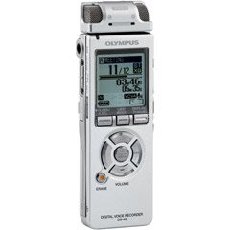
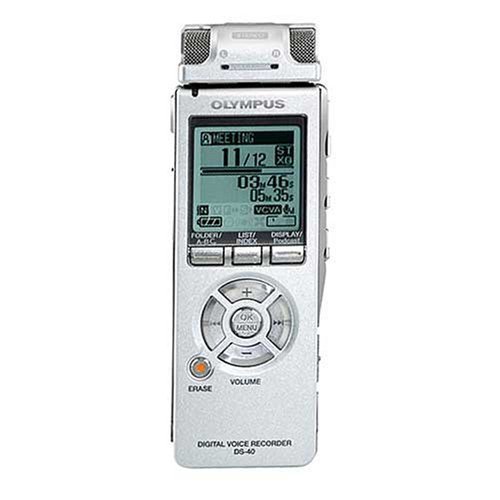
| I've only had mine for 2 days now and it's so easy to use I feel like a pro at it. You simply plug in the included USB cable, go to My Computer, and copy and paste your audio files onto your hard drive. It's as simple as that! I use Windows XP and did not need to install any drivers or the included software to do this. I haven't even opened the included CD yet and everything is working great. I was also able to copy mp3 music files from my hard drive to the recorder with no problem, and the sound is actually not bad!br /br /The audio quality and mic sensitivity are excellent. You can adjust the contrast and the playback volume which can actually get somewhat loud considering how small the speaker is (the speaker is on the back).br /br /It uses .wma file format which will not work with Audacity freeware, but I found a freeware called WinFF that batch-converts .wma's to .mp3's and it works great. Be sure to download the online .pdf manual as it is far more detailed and informative than the included paper manual.br /br /My unit came with earpiece-style headphones and 2 generic brand AAA alkaline batteries that are really lasting! I have about 6-8 hours of overall use into it and the 3-notch battery meter still shows completely full. The included USB cable is 5 feet long and is the exact same style plug used by digital cameras. The unit has a metal chassis that feels cool to the touch when left in an air-conditioned room. The upper left-hand corner has a red-green dual color LED light which can be completely disabled in the menu settings. It lights up red while recording, green while playing back, and will blink red 3 times fast if you do something wrong.br /br /By disabling the LED light and the voice guide (the unit talks to you in a British female voice) via the menu settings, you can make the unit completely inconspicuous so that you can secretly record someone with it in your pants pocket. It's about the same size and thickness of a Nokia cell phone, except that it's narrower, so it's quite small and fits your pocket easily. After you press the record button, you can then slide the power switch (on the lower right surface) to HOLD, which will lock the unit so that your record won't accidentally be stopped while it rustles around in your pocket. This rustling however can cause a very loud noise to be recorded, so you have to sit still!br /br /The plastic stereo mic is detachable and then there's another permanent mic on the top right surface of the recorder. Both the stereo mic and the permanent mic seem to be equally as clear and sensitive. I haven't been able to notice any difference in the sound, and because the stereo mics are so close to each other, there really doesn't seem to be any right versus left audio difference. But the stereo mic looks kinda cool though.br /br /PROS: Ease of use, battery life, audio quality, compact size, record time, I could go on and on.br /br /CONS: High $$$ price tag, .wma file format. The display uses a small thin font that is hard to see. The contrast doesn't seem very crisp, no matter how you adjust it (Don't be fooled by the photos. That is just the product display sticker that you peel off). The backlight is rather dim and should be twice as bright. Most cell phones nowadays have nice bright backlights with clear, crisply-contrasted displays, but this recorder lacks in those areas. A longer (or even adjustable) backlight timeout would be nice. My unit arrived with a noticeable dent on the front bottom where it has "DIGITAL VOICE RECORDER DS-40" printed on it. The detachable stereo mic feels flimsy and cheaply made. The 1/8-inch stereo plug that sticks out of it wobbles, and even when the stereo mic is attached (plugged in), it still wobbles a bit. I once got my unit stuck in slow playback mode by accident somehow (which makes people sound very slow and drunk), and it was very difficult to figure out how to get it OUT of this mode and back to normal! |
| |
"A novice got excellent results" | 2008-08-31 |
| - Reviewed By rklawton |
I wanted a something I could use to make recordings of our 45 minute Sunday school class to send to one of our class members serving in Iraq. Our classroom is the size of a regular conference room but with terrible acoustics. The last time I used a voice recorder was back when cassette tapes were popular, so I'm a total novice.
Here's what I found: a 1) Learning curve: 1 hour to read the whole manual, configure the device, and make some tests 2) Effort to record: easy (turn on, press the record button, press the stop button when done, turn off) 3) Download & conversion to mp3: 10 seconds for me, 2 or 3 minutes for the computer. 4) Sound quality: excellent - very clear with very little background noise. 5) Overall experience (usability, etc): excellent. The manual and interface were both easy to read and use.
|
| |
"Great all in one recorder" | 2008-08-16 |
| - Reviewed By User: A1O2JE5ABQDE30 |
| This recorder is great for those who need to take voice notes and also want to record music at a decent quality. My only complaint is that there are only three microphone sensitivity levels, which is the only thing that makes this thing not all that ideal for music. |
| |
"Does Everything We Need" | 2008-08-11 |
| - Reviewed By User: AMPASCO069THH |
| The Planning Office needed a reliable, quality unit to tape public meetings and hearings. The DS-40 replaced one that recorded well, but had tiny, multi-function, hard-to-operate buttons. The DS-40 has been a terrific unit. It records well, whether it is a small group meeting or a larger public hearing. Its operation is intuitive, which is a blessing when we're using temporary employees. It arrived at 4 p.m. in the afternoon, and it operated flawlessly for recording a meeting at 6:30 p.m. that same evening. For doing minutes, download the file and listen from the computer as it is easier to do the forward and reverse. I would recommend this unit to anyone who has to record meetings. |
| |
"Easy to get great recordings at my church" | 2008-07-29 |
| - Reviewed By skyseer |
I bought DS-40 to record the sunday sermons on my church. It's a small church, so I figured a digital voice recorder will be enough and let me tell you that it is enough. Pastor wears the Olympus ME-15 Microphone (purchased separately) around his chest, then delievers the message as usual through another microphone which is connected directly to an amp.
After the service I get the recorder from the pastor, then copy the file to my computer, use Switch(ver 1.33) to convert the wma sermon file to mp3, and edit the file using Audacity to trim away any unwanted noise/beginning/end, adjust the volume. After that, my wife records the reading of the passages on the bible and the title of the sermon and I combine the two files and it's ready!
Recorded voice quality is very good! |
| |
"Olympus ds-40" | 2008-05-29 |
| - Reviewed By aballard@csc.albany.edu |
| This is an excellent voice recorder, but don't get it if you wish to record live music or your practice sessions with a guitar or piano. I tried it and the resulting sound was just plain awful--just one mushy sound. I returned it to Amazon and bought the LS-10 which just arrived today. I've already tried it out and it's a hundred times better than the DS-40 for the purpose of recording live music. |
| |
"Excellent item - louzy Olympus Support" | 2008-05-16 |
| - Reviewed By panagiotispapagapiou |
I purchased this item on Feb 2008 and on May 2008 it started having problems with recording. I bought it from the States and I live in Greece so I went to local Olympus service to find out that I had to ship it back to US in order to get support otherwise I would have to pay about 70 USD in order to get it fixed. One way or another I contacted US Olympus support via email and after a week I still have no reply what to do. One more example on how excellent products are buried by companies who do not respect the consumer. Get a Sony / Panasonic or something else. At least they reply to emails. |
| |
"Amazing!" | 2008-05-10 |
| - Reviewed By fairwinds_trading_company |
| I LOVE it! Whenever I play back my recordings on the stereo, my wife says it's like having two of me in the room because the sound is so amazingly clear! I can't imagine how this product could have been made any better. |
| |
"Olmpus DS-40 Digital Recorder" | 2008-05-04 |
| - Reviewed By manifestor |
This recorder is a first rate choice. It is priced mid-range for products of its type, but its quality of performance is extremely high. It has different playback speeds so you can speed up or slow down what you have recorded. The sound on playback speed is not distorted. Battery life is very good.
The most impressive attribute of the Olympus DS-40 is the sound quality of what you are recording. I have had other digital recorders and this is by far the best.
It has three recording mode selections - dictation, lecture, or conference. Most frequently I use lecture and I can pick up voices with excellent clarity.
Given its weight and small inconspicuous size, the quality of the recordings is outstanding. If I had to repurchase another mobile recorder, this would be the one I would select. |
| |