"The best Cycling computer on the Market" | 2009-06-03 |
| - Reviewed By User: A3L9MOG9T3MNHS |
I am a tech guy. If you are too you, are going to love this Garmin bike computer, easy to set up, accurate distance (I set it to automatic, not tire circumference) set up the auto stop to go on after 3 MPH so when you stop it will not go on until you go over 3 MPH crossing street with bike it will not throw off average speed, under training. Tech support great I needed to change my Garmin connect user name they contacted me right back. Oh if you buy this, make sure you upload to [...] And check out other rides that you can download to your Garmin edge and the best price I found was on Amazon.com
|
| |
"Mapping function is HORRIBLE!" | 2009-06-01 |
| - Reviewed By User: AA2W2PZYLL89D |
Bought the 705 Bundle for use on my bike. Of particular interest was the mapping/routing function while enroute.
The Good: Nice package, easy to use/edit, good interface, nice mount, good battery life, nice real-time mapping. The unit routes quite well for trips under 5 miles. So, in the last few turns it was a help on a trans-California tour.
The Bad: Horrible, horrible, horrible mapping/routing program. As stated in other reviews, the unit has a hard time generating bike routes over 10 to 15 miles. The has three routing settings: car, bike, and pedestrian; using the bike routing function the routing program tries to keep you path off of any and all major streets. For example, the 6 block route to my grocery turns into a 10 block tour. Also, a 65 mile tour turns into an 88 mile trek. There are several toggles in the routing program to avoid highways or toll roads; Garmin customer service is quite good but was not able to rectify these routing issues.
I plan to screw around with the unit for another month and then return it if no learing/progress or updates are provided. This is simply a horrible product for routing.
Summary: This is a horrible product for routing which was the main marketing promise and reason for my purchase.
|
| |
"Almost completely unusable" | 2009-05-22 |
| - Reviewed By User: A3JQ1UW76A9XY4 |
Trying to get directions with this thing is nearly impossible. First, it takes a very long time for it to calculate the route. It gets to 100% then you wait like 5-10 minutes for it to finish. Then on top of that, the route doesn't even end at your destination. It is beyond frustrating.
Just using the map to see where you are barely works as well. I use this in the NYC area and the map gets completely covered with icons that I don't want to see in the first place that the map becomes unreadable. It is laughable broken.
So,the only thing I can use this for is for setting up a preset route that I create using their navigator software. The navigator software is so tedious to use that I've simply given up.
Finally, it sometimes the thing just dies in the middle of a ride and there goes all your data and if you're lucky you end up completely lost with a useless $400 gps.
Defintely do not buy this. |
| |
"The (nearly) everything bike computor" | 2009-04-27 |
| - Reviewed By User: A1XHOYYYH0R3KH |
The Garmin Edge 705 has two basic functions; 1) to provide you with data while you ride. 2) to store data and allow you to analyze it later on a computer.
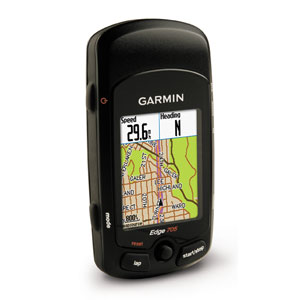
It is nearly perfect for displaying data while you ride. The screens are easily customizable to display up to 8 pieces of ride data simultaneously such as current, average, or maximum speed, cadence, heart rate, and power (providing you purchase and install a compatible power measuring device separately. The Edge 705 provides no power data without one). It can also display things such as calories burned, heading, altitude, and current grade. The map screen is customizable to display the map only or map combined with ride data. It's very flexible and it legible day or night thanks to the backlighting. Wearing sunglasses detracts from the readability, but I've alway been able to read the screen easily. My only complaint is that when you are browsing the map screen the lesser roads disappear from the map screen when you zoom out, and only the main roads are displayed. This makes the maps a little difficult to use because he have to remained zoomed in to read the street names translates to a lot of screen scrolling. I can understand the limitation however because I think the Edge 705 would need a higher resolution screen alleviate this, which would be awesome, but add to the cost of an already pricey item.
When it comes to storing and analyzing the ride data the Edge 705 collects, it is both good and bad. The Edge 705 can store a lot of data and I have yet to delete anything in the 200+ miles I put on with it. The only thing the Edge 705 doesn't store is grade. It will display current grade while you ride, but it does not store that data in any way. No maximum grade, no average grade, and no way to view the grade of the hills you climbed via software. The only way to get grade information is to look down at the screen while your riding. When you plug the Edge 705 into a computer it is effortless to get data transfered using the Garmin Training Center software. Your ride data will be displayed in both spreadsheet and graph format and you can export the data should you want to. Unfortunately, you can not really interact with your ride data with the Garmin Training Center software in a meaningful way, it's just static what-you-see-is-what-you-get. Overall I am underwhelmed with it.
The Garmin Connect website is a different story altogether. The Garmin Connect website can also easily grab data from you Edge and display it via your web browser, but in a much more useful manner than the Garmin Training Center software. You can interact with the maps and the charts to see where on your ride you where when different events happened simply by clicking on the chart or on your route. You can also "play" back your ride using the Player, which is very slick. The ride route is laid over an interactive Google Maps view, which is also way better than the Garmin Training Center. The website lets you name your rides, add a description or comment to your rides, and you can share you ride data for other to view. You can not do any of those things with the Garmin Training Center software. The Garmin Connect website is a real selling point for the Edge 705 and I strongly suggest you visit the Garmin Connect website (you can google it), click on the "explore" tab and view some of the data shared there. As a note, your can make all or just particular rides private, so you can still use the site for yourself and not have others view your data. It's your option. Just keep in mind that the website in much much better than the Garmin Training Center software.
I have no complaints about the mounting bracket (which I have mounted to my stem), however I don't know if it would survive a hard crash (and hopefully I'll never find out). By mounting the 705 to my stem, I don't experience the rotation problem other mention from mounting it to the handlebars.
The speed/cadence sensor has to be mounted VERY close to the wheel and the pedal. On my Trek, the chain stay is oddly shaped and the sensor seems to mount a little precariously because of that, but I have not had a problem yet .
The speed/cadence sensor and heart rate monitor have always been automatically detected by the 705 and worked as expected.
The battery lasts a long time, even with backlighting on. The longest I've had it on is 4 hours. I believe that under normal use the 705 will last over 10 hours, but I have not actually tried it.
I don't think that the odometer reading is inclusive. It only counts the miles you ride while the timer is running. If you ride 10 miles before you hit the start button, those 10 miles wont show up on the odometer for the bike, which is a shame. I'd like to know how many miles are on my bike regardless of whether I recording it or not. What other purpose does the odometer serve?
All-in-all I love the Edge 705. It has exceeded my expectations. |
| |
"Really Fun gadget to have" | 2009-04-27 |
| - Reviewed By User: A2828RCY0L456L |
| I bought this device mostly because I am starting to take longer and more scenic rides. Now that I have it I have found that it is great even to have on just the short routine rides as well. It allows me to track my mileage on up to 3 bikes as well as upload any routes to the internet for sharing with friends. I can also create routes on 3rd party websites and upload them to the device with turn-by-turn directions, Great for trying to add new flair to an old route or if a detour is going to be needed. Overall I love this Product. The only con I have about it is that it goes a little strange in downtown areas where it is constantly changing satellite coverage. |
| |
"The Garmin 605 Shines Off-Road." | 2009-04-04 |
| - Reviewed By User: AZVD603OP1CXV |
I must start by saying that I don't live in a big city, so I'm not exactly using the 605 as a commuting tool or for directions. I live in central Florida (a place with few elevation changes) and cycle cross country. The altitude has always been spot on, as have the speed readings, % grade, and positioning. The training function is a GREAT tool for those who intend to use it for its intended pupose - training. Every ride I go on is saved into the history with detailed information on each ride - elevation graphs, average speed, top speed, etc. I can race a blip on the GPS map of a stored trail to better my lap times. Marking all of the 16-35 mile off-road loops is so nice and neat to see exactly what the trail is shaped like and what to expect right ahead of you. The only reason I can see how this can be bad in ANY way is if you plan on using this for primarily on-road purposes. If so, you'll have to buy a programmed SD card with updated road maps. Otherwise, you can trust Garmin to uphold is reputation in accurate satellite positioning. |
| |
"Worth it" | 2009-04-02 |
| - Reviewed By User: A9AMA87F62UID |
The 705 is one of those devices that does many things very well. I was able to connect a PowerTap wheel in no time at all (It took me longer to navigate the Garmin menu than to have the 705 connect to the hub). One reason I really wanted the 705 is to have a device that can handle power, HR, cadence and use multiple intervals in the same workout. I found it very easy to track multiple workouts and also have different targets for each workout. For example during the 1st half of my ride my coach might have be working on cadence based drills then during the second half of my ride work on power or HR based drills. With the 705 I can track all of this in one workout, whereas in other computers I'd have to stop the workout and start another, having 2 different files, averages, etc.
Also being able to customize the screens, track up to 8 measurements per screen, setup multiple bikes. Battery life is good and using a mini-usb cable means I don't have to travel with a charger all the time (just use the same cables/chargers as my other devices) Memory has been good on the unit as well both for longer and multiple rides plus I can expand the memory with a SD card if need be.
Mapping will come in more handy when traveling but I really don't need maps around when in my hometown. Although being able to upload my ride to www.mapmyride.com is great to review a course, see a profile and mark points on a map. I still think the included Garmin maps and waypoint manager are ugly (compared to Google maps), difficult to setup a route (MapMyRide.com is so much easier to setup routes) so I think it's ridiculous to have Garmin charge extra for their maps where there are solutions like MapMyRide.com that do it better for far less money or even free. Plus with MapMyRide or Google their maps are updated more often than Garmin.
Aside from the high initial price and extra cost of the maps the last downside is the Garmin Training Center software, frankly the software sucks in my opinion and this is the weakest link to the package. So I'm using TrainingPeaks WKO+ (http://trainingpeaks.com/) to track my workouts. |
| |
"Amazon's deceptive pricing" | 2009-03-31 |
| - Reviewed By User: A1OJWBV892CULM |
I've been researching this product for personal purchase for a while. Amazon says the List price is $709 for the bundle (The -40), but on Garmin's website they list the MSRP as $649. Edge 705, Heart Rate, Speed/Cadence & Data Card with Street Maps 010-00555-40 $ 649.99 USD
Check out Garmin's website before thinking you are going to save any money on this item at Amazon. I've found it cheaper elsewhere and won't be buying it here. |
| |
"A cool gadget but beware of shabby software" | 2008-12-04 |
| - Reviewed By User: A3ULY7L5K65UXN |
As a bike computer, it works kind of OK.
It displays two screens of data, each screen can be custom configured to show up to 8 fields. For those 16 fields (8 + 8) you get to chose which data item to display and the list is impressively long - speed, average speed, average speed per lap, max speed, cadence, altitude, etc, etc. 49 total. So how do you fit 49 data items into 16 fields to be displayed on the screen? Well, you can't. There is no way to cycle or scroll through the data. So you'll never be able to see any of the remaining 33 data items. Not unless you go into setup and reconfigure the display to show a different set of 16 items. Totally lame.
As for the display itself, numbers could be bigger and/or more legible, the font is horrible. Example: on my first ride I was trying to read my speed and saw "195." What the heck is that number? Then I understood, it was "19.5 mph." The 1/10 digit is the same size as the other digits (on a good bike computer it would be smaller) and the dot is hard to see while riding a bike.
Goddess forbid I wanted to read my power or cadence or whatever while riding at 30 mph in a tight bunch of racers banging elbows with each other. The display could be much more legible (for instance by making use of colors). In comparison my Powertap computer looks primitive but does a much better job displaying the numbers I want to see. The Powertap aside for it is an expensive device, there are cycling computers that cost 1/15th of the 705's price but execute basic cyclocomputer functions much better.
As a GPS the Edge 705 falls flat on its face.
Sure it'll do basic GPS functions, like navigate you to a destination. It's even intelligent enough not to send you on an interstate on your bike. But finding a destination point is challenging unless you know the exact address. Trying to find a point on the map is, if perhaps not quite hopeless, certainly tedious. The screen is small and the map is rendered pathetically ugly and stupidly unreadable. As for zooming and scrolling, it is painfully slow. Calculating a route takes an age. Arm yourself with ample patience and goodwill when operating this thing, it looks and feels like a GPS from the stone age. Something as basic as orienting the map north or according to your direction of travel requires that you go into setup - there is no quick and easy way to do it.
As for trying to program a custom ride into this unit (a cue sheet) and have it give me turn by turn directions, it has been a total fiasco for the first 12 hours of trying (the route would look fine in whatever mapping software I was using but once in the Garmin it would inexplicably become a succession of U-turns)... until I got advice online to try Bike Route Toaster. That actually worked pretty well on paper. Why on earth couldn't Garmin provide such a tool to those that have paid quite a bit of money to buy one of their products? Oh, I get it! They want you to use MapSource which requires the purchase of City Navigator on DVD at an extra expense of $100 or so (even tho the Edge 705 model you just bought comes with City Navigator on a micro SD card). Brilliant.
So how does it work on the road? So and so. It's prone to recalculating your route which would not be a problem if it did it promptly. But it doesn't - it can take minutes. Or it'll simply crash (sometimes repeatedly) and you have to reboot it. And if while it was taking all its time recalculating the route you have been riding in a direction it didn't want you to ride, then it will start recalculating all over again. As for following a route (a cue sheet you have programmed), it just doesn't seem to work all that well more often than not. But you can just display the course on the map and do your own navigation without depending on the Edge to tell you where to turn. That actually works much better... but after loading a dozen routes my device consistently crashes 100% of the time. Why can't this device actually work and give you accurate turn by turn directions I'll never understand?
In a pinch you can also use your Edge 705 in a car and it does have a routing profile just for that purpose (it won't avoid highways as in bike mode). But inexplicably Garmin has failed to include a simple suction cup attachment so I'm not exactly sure how you are supposed to use it in a car other than holding it in your lap. Stupid.
As a power meter... well I'd rather not try. The Edge 705 is ANT+Sport compatible and can be paired to a power meter - for instance a new or upgraded Powertap hub. But here again the Edge is far from perfect. To begin with, it'll record your power data (or any other data for that matter - location, speed, etc) only if you have started the timer. In addition, at the recording interval of 1 second (which is what you need in order to get meaningful data for WKO+), it'll record for only 4.5 hours. Finally, it'll apply some custom algorithm to the data it saves so when you import it into WKO+ you will not get accurate numbers. So I've decided to save myself $100 on upgrading my Powertap hub to ANT+Sport standard and I'll just keep the Powertap computer on my handlebars because the Edge 705 is not a viable replacement.
So far I have mixed feelings about the Edge 705. Sure it's a cool gadget and having a GPS on your handlebars is fantastic (I don't have a car so finding places on my bike is important to me). But Garmin could learn how to do software better because what they have delivered miserably fails to match the potentials of this unit and crashes all the time to boot. The only people that could possibly give this unit a 5-star rating are those that haven't tried to use any of the more advanced features.
As for the so-called "owner's manual", it completely fails to document the majority of this unit's features leaving you totally bemused. Tech support is equally useless in my experience - after I complained about a couple of issues, they declared my unit "defective" and sent me a replacement one with the exact same problems. How smart is that? BTW, as I later found out, the unit was not defective, the software was. And still is.
So, simply stated, the biggest problem of the Edge 705 is that it is a niche product without any competition whatsoever so Garmin can get away with delivering inferior software that hasn't even been debugged. I can only wish Apple would come out with an iBike GPS and teach them how it's done.
If you don't need a bike computer with GPS functionality right this very instant, you would be much better off waiting for a more mature product to come along. Otherwise you have no choice but the buy the Edge 705.
Verdict: 2 stars out of 5, ample room for substantial improvements. Any device whose users go to online forums to compile long lists of issues and bugs is a device that should be avoided if anyhow possible. |
| |
"Wife really likes it" | 2008-10-12 |
| - Reviewed By cav2108 |
| My wife really likes this. She wouldn't let me install the cadence device though.... She didn't want to change the appearance of her bike. SHe downloads the info to her computer and keeps track of all her rides. Began with a PC but recently transferred everything to her Mac, now that Garmin discovered that Macs exist.... About the same time that PC users discovered that Vista PCs are shi......... If you use Vista, you should be aware that Garmin has the same software for Macs now. Get it. You won't be sorry |
| |