

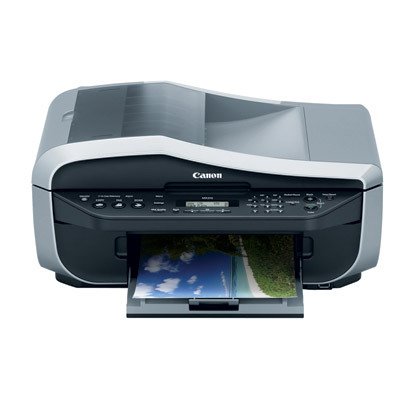
Canon MX310 Office All-In-One (2184B002)
Canon MX310 Office All-In-One (2184B002)

Manufacturer:
Canon

UPC:
013803081282

#Deals:

Avg. Rating:

Available from 2 stores - Select your deal and buy the Canon MX310 Office All-In-One (2184B002)
"Where can I buy a Canon MX310 Office All-In-One (2184B002)?" At all of these merchants listed below. Click any of the deals below to buy now on the merchant's website.
StoreRatingBase PriceShipping Price + ShippingAvailability
buy_4_less_shop

[Store Info & Reviews]
Covered by A-Z Guarantee
5 Star Rating
1005 Reviews
$159.99
New
$16.99
Expedited Shipping is available Expedited Available
$176.98Buy from buy_4_less_shop
In Stock. Usually ships in 1-2 business days
Just 1 Left!
TRUSTED Amazon.com seller | New and SEALED | Ink is included, BONUS USB cable ($19.99 value) is included for FREE | Fast FEDEX Shipping with tracking number | All Packages are Insured | Orders are shipped within 24 hours, usually the same day
smrtech

[Store Info & Reviews]
Covered by A-Z Guarantee
5 Star Rating
565 Reviews
$199.99
New
$19.80
Expedited Shipping is available Expedited Available
International Shipping is available International Available
$219.79Buy from smrtech
In Stock. Usually ships in 1-2 business days
Just 2 Left!
* Shipping estimates are based on Ground shipment within the contiguous U.S.
   If you notice a problem, you can report a pricing error or problem.
Overview of current deals for the Canon MX310 Office All-In-One (2184B002):
  • 1 merchant offers International Shipping or Worldwide shipping.
  • 2 merchants have Express Shipping options.
Canon MX310 Office All-In-One (2184B002) Specs:
Product NameCanon MX310 Office All-In-One (2184B002)
ManufacturerCanon
Product Number MPN2184B002
Retail Price $129.99
EAN-130013803081282
EAN-1400013803081282
UPC013803081282
Weight1 lbs.
Deal first added on:26-September-2007

Tags

Find other products that have similar tags to the Canon MX310 Office All-In-One (2184B002)
Color Office color ink Canon Document Printer fax dpi copy Page Fax Machine All-In-One Automatic Document Feeder print quality small office Good printer printer drivers desk space default setting seconds per page 2184B002 MX310 Canon MX310 Office All-In-One Canon Pixma MX310 delicate flower Printing quality month ago didn't need Fax Priority changing settings home phone line
Similar Products
Canon Pixma MX850 Office All-In-One PrinterCanon Pixma MX850 Office All-In-One Printer $449.99Check Prices on Canon Pixma MX850 Office All-In-One Printer
at 3 stores
Canon Pixma MP970 Photo All-In-OneCanon Pixma MP970 Photo All-In-One $463.50Check Prices on Canon Pixma MP970 Photo All-In-One
at 1 stores
HP C7280 Photosmart All In One PrinterHP C7280 Photosmart All In One Printer367.00$187.00Check Prices on HP C7280 Photosmart All In One Printer
at 6 stores
Canon Pixma MP610 Photo All-In-OneCanon Pixma MP610 Photo All-In-One $397.88Check Prices on Canon Pixma MP610 Photo All-In-One
at 2 stores
HP Officejet 5610 All-in-One Printer, Copier, Scanner, FaxHP Officejet 5610 All-in-One Printer, Copier, Scanner, Fax $288.97Check Prices on HP Officejet 5610 All-in-One Printer, Copier, Scanner, Fax
at 3 stores
HP Officejet 4315 All-in-One Printer, Fax, Scanner, CopierHP Officejet 4315 All-in-One Printer, Fax, Scanner, Copier319.39$99.17Check Prices on HP Officejet 4315 All-in-One Printer, Fax, Scanner, Copier
at 3 stores

Accessories
Tripp Lite USB 2.0 Cable USBa/USBb Gold Connectors (10 FT)Tripp Lite USB 2.0 Cable USBa/USBb Gold Connectors (10 FT)16.99$0.19Check Prices on Tripp Lite USB 2.0 Cable USBa/USBb Gold Connectors (10 FT)
at 9 stores
Home Theater Surge Protector - MP AV600Home Theater Surge Protector - MP AV60029.99$10.03Check Prices on Home Theater Surge Protector - MP AV600
at 8 stores
Monster Camcorder-to-PC USB CableMonster Camcorder-to-PC USB Cable29.99$29.95Check Prices on Monster Camcorder-to-PC USB Cable
at 2 stores
Borderless Photo Paper Pro - 1029A014Borderless Photo Paper Pro - 1029A01411.95$0.76Check Prices on Borderless Photo Paper Pro - 1029A014
at 5 stores
Latest 6 Reviews
Here is what people are saying about the Canon MX310 Office All-In-One (2184B002)
5 Star Rating  "a good, easy all in one"2009-11-11
- Reviewed By gprindle
When my HP all in one died after many years use, After much research I settled on the Canon and couldn't be happier. It is very easy to use, makes scanning a breeze and faxes well. I use a separate laser printer for most of my printing needs, but the couple of times I used this to print it was an acceptable quality.
 
2 Star Rating  "nice idea, but UNRELIABLE"2009-10-18
- Reviewed By rhythmdance
I've had this about a year. On paper the features looks great. When the machine is in a good mood it prints and copies ok.

However, the printer frequently misreads the ink cartridge level as "Low" and then COMPLETELY QUITS WORKING, even with a new ink cartridge. The only way to get around it is to do some voodoo like Reset process that I found online (see below). It is extremely frustrating and I would not recommend it to anyone.

How to reset Canon MX310 printer low ink signal
1. Power off the printer.
2. Holding the stop/reset button, press and hold power button also. Hold both buttons together for 5 secs.
3. Still holding the power button, release the stop/reset buton, then press the stop/reset button twice.
4. Release power button (the screen should now say 'Service Mode').
5. Wait until the power button lights steady green, then press the stop/reset button three times with a 3 sec space between each press. On the 3rd press the indicator should turn steady orange.
6. Press the power button once, (the orange light should go off).
7. Open the printer and remove both cartridges. Wait for 10 seconds. Replace the cartridges and close printer. Wait for 30 seconds.
8. Press the power button, and wait until printer has shut down.
9. Press power button to power up. The printer will feed one piece of paper, then ask you to set the language.
10. The page counter is now reset! Enjoy.
 
3 Star Rating  "Fax Capabilities are Not Good"2009-10-04
- Reviewed By faith1101
I just want to let people know the facts about the fax feature of the PIXMA MX310. The printing quality of this machine overall is fine, but I found out too late that the fax capabilities are not good. This is mostly due to the fact that you cannot see a fax or faxing info on your computer screen. Info about faxes and faxing only appears on the tiny screen on the front of the computer!

I have my own business, and didn't realize this until it was too late to return or trade in. I will think thrice before buying another Canon printer. I'm not too happy with my Canon camera, either, but that's another story...
 
4 Star Rating  "GREAT PRINTER"2009-08-14
- Reviewed By User: AN2Q2OSE8BD9L
VERY NICE,REALLY WORKS WELL.LOVE THE WAY ITS FAXES AND PRINTS.REALLY PRINT OUT GREAT PICTURES WOULD RECOMMENT TO EVERYONE.
 
2 Star Rating  "Disappointed in Canon!"2009-08-14
- Reviewed By User: A9ZF95DDRTY2G
I'd been looking for an inexpensive all-in-one for my home office. Boy, am I disappointed with the Pixma MX310! Everything hinges on the "always empty" ink cartridges.
My main complaints:
1. The ink cartridges are ALWAYS empty! I don't print much. I have the settings at "draft quality". I can get maybe 30-40 pages before it wants more ink. I understand that I'll have to replace the ink occasionally in any printer, but it is frustrating to go through ink faster than I go through milk!
2. This printer will not function unless the ink in both the black and color cartridges is full. Even though it requires no ink to scan a document and save it as a PDF file, it will not budge. Even though it comes with a setting to print from "only black" or "only color" cartridges, both must be full in order for the printer to function. What kind of technology gives you a ton of great options, then leaves you hanging because it wants another $20?

Other than the ink issue, this is a great little machine. The scan quality is good. I've used it to scan old photos into iPhoto without any problems. I love being able to copy at home. The price on this printer is tempting, but ultimately not worth it. I will stay with an all-in-one machine, but I think my Canon days are done.
 
4 Star Rating  "An OK printer"2009-08-06
- Reviewed By trishpilon
The Canon PIXMA MX310 is designed to be used by one or two people in a small office that requires only a few small print/copy/scan/fax jobs per day. In that realm, it performs very well. Having print, scan, copy and fax functions in a single device simplifies operations and saves a lot of desk space.
I found it to be a great little machine in our study room at home. It has been pretty good to use. The PRICE of the printer ink is expensive, however, I am not running out every week to replace it like the KODAK 5100. I can go months without replacing the cartridge. Overall I am happy with the printer. I wish the quality of the print were a little better. The print speed could be better. It is a noisy printer.
 
Quick Links


Last updated: Nov 22, 2009 at 15:11 EST. Pricing information is provided by the listed merchants. GoSale.com is not responsible for the accuracy of pricing information, product information or the images provided. Product prices and availability are accurate as of the date/time indicated and are subject to change. Any price and availability information displayed on amazon.com or other merchants at the time of purchase will apply to the purchase of this product. As always, be sure to visit the merchant's site to review and verify product information, price, and shipping costs. GoSale.com is not responsible for the content and opinions contained in customer submitted reviews.
© 2009 GoSale.com (S2)


Home > Computers > Printers > Printers > All-in-One Printers