"Nice" | 2009-11-18 |
| - Reviewed By User: A37TPQ9YQSKAJ5 |
| I bought this for my husband and he loved it. His first IPAQ was a cell phone also, so the learning curve was slight. Internet setup was a breeze. His friend like his so much that his wife bought him one too. I would tell anyone though that depending on what you use it for your may want to get a differant model with more memory. Over all though, my husband was very pleased with the purchase. |
| |
"Not as good as 5-year-old iPAQ 3715" | 2009-11-17 |
| - Reviewed By millersdsmiler |
I had an hp RX3715 iPAQ that lasted nearly five years, so I'll compare to that one. I've used all the built-in features, especially the Calendar with its reminder feature. Using Word was my second-most used program. I also bought other software such as a dictionary.
A battery charge on the new iPAQ 111 doesn't last nearly as long and it takes a lot longer to recharge the battery.
It doesn't have infrared communication ability and one of the great features of my old iPAQ was its spectacular "universal remote" capability.
The volume isn't nearly as loud on the new iPAQ. Putting it on its highest setting is about the same as medium on the old unit.
The new iPAQ's screen is much brighter than the old one. Nice for being in the sunlight, but it uses up the battery much faster. I set it to a dim setting because I'm usually indoors. When I'm outside, it takes too many screen taps to access the brightness settings, which is nearly impossible when I'm in the sun and can't see the screen, so I still have to find shade (my hand isn't enough.) They should've made one-button access to the brightness control.
The buttons on the bottom of the unit are larger, but they don't have solid space around them like my old one did. Thus I frequently hit them with my hand while I'm writing on the screen, throwing me into some other function and losing the words I'd just written on the screen.
I am happy the new iPAQ has a commonly available USB cable. I like that the SD slot and power button are no longer on the top. Dirt could easily get into my first iPAQ and one of the things that gave me trouble with it was an erratic power button. Unless you frequently remove the SD card, I suggest you put tape over it to keep dust and water out.
The new iPAQ apparently has a feature to allow it to connect via Bluetooth to my cell phone so that I can access the Internet when I'm not in a hotspot. I'll like this, but I haven't tried it yet, so I can't comment further on that.
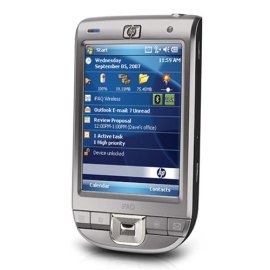
The new iPAQ is about half the size of my old one, with the same RAM, memory and screen resolution. The old one also had a camera, but my cell phone had a better camera, so it wasn't really worth the extra $200 (but it was a lot easier to transfer photos and videos to my desktop.)
-------------------------------------
I'm having terrible trouble getting my new iPAQ to sync with my desktop, via ActiveSync. It takes 45 minutes to synchronize whereas my old iPAQ would easily sync in five. Then when the iPAQ is attached via the USB cable, the desktop extremely slows down with ALL software. AND it stays that way even after I disconnect the iPAQ--I have to reboot the desktop. Thus, I recharge the battery with the separate charger instead of the USB cable--resulting in backing up my iPAQ data less often. I can put the iPAQ's SD card into my computer to back that data manually, but... I put an 8 Gb SD card into this new iPAQ, but it seems my hp m7070n desktop can't read SD cards larger than 2Gb--but that might be a problem with my Windows XP.
-------------------------------------
My second iPAQ has the newer Windows Mobile 6.0 version, and as so often with "latest and greatest" from Microsoft, it's primarily different for the sake of different--I have to learn how the heck to find things that aren't any better than the previous version. Many of the changes are for the worse. For example, when Calendar gives a reminder, I have very few "Snooze" options. I'd GREATLY hoped the handwriting recognition would've improved in five years, but it didn't.
I feel many of the "improvements" on Windows Mobile 6.0 was an attempt to compete with iPods and other music devices, and it still isn't as good as them.
-------------------------------------
I bought an hp foldable keyboard to go with my new iPAQ 111. I bought it directly from hp and they told me they no longer had the tri-fold model that had been available. (I didn't buy that tri-fold when it was available, but wish I had. LATER, I discovered some retailers still have that smaller model.) The new keyboard is Bluetooth only and with the way my new iPAQ eats up battery charges, and Bluetooth needs power, I have to keep the unit plugged in. The older keyboard allows the user to run via a cable. The new keyboard has a slide-out stand to hold the iPAQ, but it's so flimsy I'm sure it'll soon break. Plus, the bottom of this stand is rounded and my iPAQ slips off--they should've given it a lip to actually hold the iPAQ. The keyboard also has something to lock it in open position so we can lay it on our lap without it collapsing down between our legs. Again, this is so flimsy that it bends and folds anyway.
-------------------------------------
I had a metal case from RhinoSkin for my PREVIOUS hp RX3715 iPAQ, but they don't have one for the model 111, so I got one from BoxWave and I'm NOT happy with it. First, it has a clear plastic face that provides limited protection. I'd accidentally stepped on my old RhinoSkin case, dented the face slightly, but it saved my iPAQ. The BoxWave case wouldn't stand up to that. Second, the clear face lets me read the screen, but I have to open the case to do any screen-touch anyway, so it's impractical. Third, I don't like letting other people read what's popped up on my screen when I get a Calendar reminder when the iPAQ is on my belt.
The new case makes it difficult to reach the power button when the front cover is closed and impossible when the cover is open. It also has useless access holes in the faceplate. The holes apparently allow me to touch various buttons, but again, I have to open the cover anyway to then use the device, so these holes only weaken the case and allow more dirt to get in. It even has a hole just to see the "hp" logo on the iPAQ.
The belt clip isn't as good as the RhinoSkin's. I had the same type on a cell phone I lost because the clip doesn't easily lock into place.
Unless RhinoSkin provides a case for the iPAQ 111 soon, I plan to epoxy a metal plate over the clear plastic on the BoxWave case to make it stronger.
All considered, I liked my previous hp RX3715 iPAQ much better. |
| |
"Very good tool for serious user" | 2009-11-13 |
| - Reviewed By User: A39GX8KMHHN04 |
I bought this item to track my tasks, manage "to-do" lists and keep the calendar up to date. The important thing was to be able to quickly access to my stuff from anywhere and being reminded about upcoming events. Another option I considered was to have iphone or blackberry, which would give me all those options too; However, they require pretty expensive (in my opinion) data plan. Paying $30 per month just made me crazy. With Ipaq having WIFI and bluetooth nowadays I can go to internet from anywhere. (and I realized that I dont' need access to internet that often anyway)
I'm glad I chose ipaq. It meets all my needs, has all the features I wanted an even more. If you need this for business, or serious personal use (not simply a toy - i highly recommend this product. |
| |
"Drain Battery Before First Charge" | 2009-10-30 |
| - Reviewed By User: A37M5SC4MY9P6F |
| Like a fool, I listened to the instructions and the first thing I did was charged the battery. I already knew better than this, but I was anxious to do the right thing with my new unit. So, now the batt only lasts ~ 0.75 -1.5 hrs (hard to say because its not in continuous use). I recommend to deplete the battery completely, as with any other device, before charging. Otherwise, its exactly what I wanted. |
| |
"Great product, but watch our for hidden shipping charges." | 2009-10-22 |
| - Reviewed By User: A64CDVPJ5V2VX |
| I ordered the iPAQ111 to replace an old hx2795b that was giving up the ghost after many years of great service. The unit is great, and seems to weigh about half of the old iPAQ, and is about 1/3 thinner. However, in placing my order I was not careful to check out the shipping costs from the outside Amazon sellers. Their prices were outrageous. The $33 desktop cradle in particular, from Boxwave Corp, cost $14.35 to ship by regular mail (6 days)while the overnight shipping of the iPAQ from Amazon was only a little over $11. Boxwave's prices are listed on their web site, so before you order, make sure you check out the charges. |
| |
"Good Windows Mobile PDA (Palm TX replacement)" | 2009-10-17 |
| - Reviewed By User: A2VTT2A301UY1L |
| I bought the HP iPAQ 111 after my Palm TX died. The Palm TX was an unreliable PDA, it constantly crashed and never synced properly, it was my last Palm OS PDA. I've had the iPAQ 111 for almost 1 month and I'm happy with it. Windows Mobile 6 is great so far; it syncs perfectly with Google calender/contacts/gmail through any wireless network using Windows Mobile Active Sync. If you've been looking for a way to ditch Outlook, this is your answer; import your contacts, calender, and e-mail to Google, then just sync with Active Sync (you can choose how far back you want to sync your calender and e-mails). I like keeping my cell phone and PDA separate, so the iPAQ 111 is a good value for the price. I mostly have medical applications installed (epocrates essentials, uptodate, medcalc, and eponyms all on a SD card) on my iPAQ, which run fine, except for a little delay when you first open the application. The built-in bluetooth and wi-fi are good. The display is crisp. My only complaint is the short battery life, hence 4/5 stars. On the plus side, the battery is user serviceable and will be easy to replace when needed (unlike the Palm TX, which is not user serviceable/replaceable). |
| |