"Great Product!" | 2009-10-14 |
| - Reviewed By User: AN1CUZRJIHZGI |
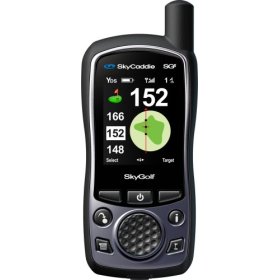
| The Skycaddie SG5 is a fantastic device. It is dead accurate, the maps are detailed, and it is easy to use, and their technical support is first rate. Shame that Bandon Dunes Golf Resort doesn't identify with this device, because that was the original reason why I bought it - to enhance my experience there. Oh well, I love it all the same on the myriad of courses I play here at home. |
| |
"Newsflash, I'm a golfer not a computer programmer" | 2009-10-13 |
| - Reviewed By User: A33583SKZHVE2P |
I bought this for the simple purpose of measuring the yardage when I am playing golf. You would think that for the $50+ annual fee they charge, you could just plug the Skycaddie in to your PC's USB port, pick a course from the website and it would just download it automatically, unplug it and go play....But no, this is one of the most frustrating products I have ever owned.
First, it can only hold 10 courses. If you travel a bit, you have to remove and then add courses. When I go to download a new course every few months, it first requires that I update the device software multiple times. Or it requires that I update my PC software. I have never had a product which requires so many manual updates. This is after they completely redid the PC synchronization software last year, which took me another hour.
Just when you think you are done, it says there is yet another update available. There is no progress report such as "You have completed 3 of 4 updates." It just keeps saying "Another update is available."
It has taken me 45 minutes tonight just to add a single course to play and I'm on a fast broadband connection.
Then frequently the PC software cannot find the Skycaddie. So I have to start again. It is very finicky about whether the Skycaddie is connected or not, whether it has restarted or not and you cannot even tell when it has restarted, since the Error messages do not correspond to the words on the Skycaddie screen.
How is this for a help message?
Connect the SkyCaddie to an available USB port on your computer.
The tab on the USB cable should face up with the cord going down.
Click Start on your Windows desktop (computer screen).
Select Control Panel.
Click Classic View if items are shown in Category View.
Click System.
Click Hardware , then click Device Manager.
Continue to the next steps for SG3 and SG4 or SG2, SG2.5, and SG5 models.
SG2, SG2.5, and SG5
Click the plus sign next to Ports and you should see CP2101 UART to Bridge Controller.
If the CP2101 UART to Bridge Controller is not listed under ports, click the plus next to Universal Serial Bus Controllers and look for anything that starts with CP210. If CP2101 UART to Bridge Controller is not listed, connect your SkyCaddie to another USB port repeat the above instructions.
If CP2101 UART to Bridge Controller is listed only under Universal Serial bus controllers, follow the next steps.
Right click CP210? and select update driver.
Select Yes, this time only.
If you don't see Yes, this time only, choose the advanced option that usually allows you to install the driver from a list or a specific location.
Select Include this location in the search and click Browse.
Click the plus next to My Computer, then click the plus next to Local Disk or (C:) drive.
Click the plus next to Program Files, then click the plus next to SkyGolf.
Click the plus next to SkyCaddie Desktop. Click the Drivers, then click OK.
Click Next to update the driver.
If you get a message that the driver has not passed Windows logo testing, click Continue anyway.
Click Finish when the update process is complete.
And the process of picking the courses and then downloading them is clumsy.
This product is very poorly designed for its end user market and I would never buy this product again or recommend it to anyone. All of this updating could be done in the background without so much complexity. AS soon as I have time to switch to a different product I will. |
| |
"Better GPSs are out there" | 2009-08-26 |
| - Reviewed By User: ABJU3MYLBAJ20 |
I was one of their early adopters (way before USGA and R&A made them legal) and had their original SkyCaddie. Back then, it was a technological breakthrough and I benefitted (and my buddies) on the course. And last year I started my quest to find the latest golf GPS. Of course, the first place to look was at SkyCaddie. SG5 was their first color display, improved GPS reception, bigger display...but nothing really new in terms of features. I guess they figured they had the market cornered as their competition was range finders. Meanwhile, I was starting to get tired of their limitations such as I can only load 10 courses at a time, their customer service (or lack of) and their annual membership.
However, while they sat on their rear, this product sector evolved and other competitors jumped in. This year there are whole suite of new GPS with next generation features. I looked at uPro Golf (now owned by Callaway). Cool flyby like what you see on TV, but noticed from other users that it had several common issues mostly with their display and battery life. So my search continued. I then looked at OnPar Golf. It looked like my iPhone with the similar touchscreen and icons. That UI works for iPhone, but not for golf GPS. Then I looked at Bushnell Yardage Pro XCG. I thought this was it. It had everything I wanted, no major issues mentioned by other users/reviewers. One of my buddies bought one and I had a hands-on experience on a course. I was actually one click away from owning it (from Amazon, of course) and I decided to make one last google...and then I found Garmin's Approach G5 unit. Yup, it's most expensive GPS unit but it's made by Garmin, the GPS expert. I've been very happy with their Nuvi GPS units. They currently have 9,400+ courses and they're FREE. NO ANNUAL MEMBERSHIPS! You simply download new courses from their web site and you can load all those courses on your unit so no more shuffling courses onto my unit. Best of all, it's waterproof! Unlike Skycaddie, you're not limited to the 40-targets on each hole (though,I typically only see a handful). You just drag a circle with your finger on a birds-eye-view and it will tell you how far you are to that. It also keeps scores up to 4 and you can download it to your PC afterwards. I also like that you use batteries instead of rechargeable. I lost count of time I forgot to charge my SkyCaddie and when my buddies call me last minutes I couldn't use it the whole round. Now, I just keep spare batteries in my bag.
So, the bottom line is before you consider SkyCaddie units, research the other GPS models before plunking down your hard earned money. I'm confident that you'll find one with much better features for a similar price. If you're interested in the Garmin G5, there are ton of videos on YouTube so check them out! If money is not an option, then definitely go with Garmin Approach G5. Otherwise, the Bushnell Yardage Pro XCG is your best bet.
Also, for those that own iPhone 3G/3GS there are quite a few apps you can use to make your iPhone into Golf GPS. I've been tinkering with Golfshot (the $29.99 version. Don't bother with their 99 cent version) and I have to say it's damn good app. It even comes with statistical report so you know which part of your game you should be working on. But I'm sticking with my Garmin G5, because the Golfshot depletes my iPhone battery like crazy. My iPhone is not rugged and waterproof either so I'll use it as my backup, but not as my main golf GPS. |
| |
"Has never failed me" | 2009-07-30 |
| - Reviewed By User: A1ATCQE0WCYXRU |
| The SG5 has been all it's cracked up to be. The initial set-up took only minutes. The re-designed web site is much cleaner. It has never not had a course I was looking for. My game has improved, and now that most of my buddies have one also (or poach off mine), we get around faster as well. One star taken off for the $50 annual fee for access to the N.A. library of courses. |
| |
"Long time user review (SG2)" | 2009-07-09 |
| - Reviewed By User: AIUN77FVO93PW |
I bought the SG2 in the first months that it was available, almost four years ago. It worked very well then and I it still works great. I had to replace the battery ($30 at Batteries +), but that it true of any electronic device.
Yardages are accurate and fast - can't ask more than that. I used customer service to download the new software and they were great - I used the chat with a customer service tech feature and they got me on track very quickly.
I do agree with some that the expense is a bit much, but for me it is worth the dollars - it really will lower your scores. They have almost all courses mapped too. |
| |
"Lower your scores" | 2009-06-29 |
| - Reviewed By User: AD52LSZT7QE09 |
| Using the SkyCaddie SG5 has lowered my golf scores from 5 to 7 strokes per round. It makes me more confident with my club selection and my swing. For the price it makes more difference than any club I have ever purchased. It may be me or my mental processes but it takes some getting used to and seems at time complicated. BUT IT WORKS!!! |
| |