

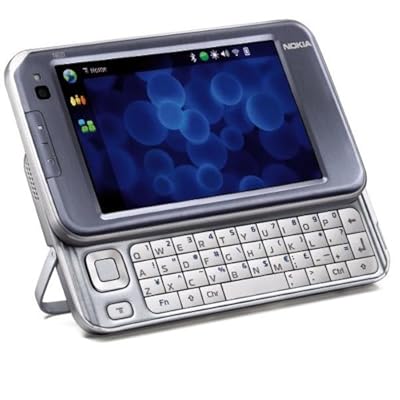
Nokia N810 Portable Internet Tablet
Nokia N810 Portable Internet Tablet

Manufacturer:
Nokia

UPC:
758478011195

Retail Price:
$479.99

#Deals:

Avg. Rating:

Available from 2 stores - Select your deal and buy the Nokia N810 Portable Internet Tablet
"Where can I buy a Nokia N810 Portable Internet Tablet?" At all of these merchants listed below. Click any of the deals below to buy now on the merchant's website.
StoreRatingBase PriceShipping Price + ShippingAvailability
spddys

[Store Info & Reviews]
Covered by A-Z Guarantee
5 Star Rating
595 Reviews
$399.99
New
$0.00
$399.99Buy from spddys
In Stock. Usually ships in 24 hours
Just 4 Left!
Brand New Factory Sealed Pkg. Very hard to find genuine us sales package. last few left.
Action Packaged, Inc.

[Store Info & Reviews]
Covered by A-Z Guarantee
5 Star Rating
2863 Reviews
$499.99
New
$29.99
Expedited Shipping is available Expedited Available
International Shipping is available International Available
$529.98Buy from Action Packaged, Inc.
Usually ships in 1-3 weeks
Just 5 Left!
* Shipping estimates are based on Ground shipment within the contiguous U.S.
   If you notice a problem, you can report a pricing error or problem.
Overview of current deals for the Nokia N810 Portable Internet Tablet:
  • 1 merchant is offering Free Shipping.
  • 1 merchant offers International Shipping or Worldwide shipping.
  • 1 merchant has Express Shipping options.
Nokia N810 Portable Internet Tablet Specs:
Product NameNokia N810 Portable Internet Tablet
ManufacturerNokia
Retail Price $479.99
EAN-1400758478011195
EAN-130758478011195
UPC758478011195
Weight2 lbs.
Deal first added on:5-March-2008

Tags

Find other products that have similar tags to the Nokia N810 Portable Internet Tablet
video Multimedia Personal Internet Digital audio Computers memory email PC Series card Out PDAs Keyboard FULL Assistants Pull GB Tablet Cell Phone Nokia memory card connectivity miniSD playback microSD QWERTY N810 3GP Nokia N810 iPod touch Integrated GPS receiver video playback Nokia N810 Portable Internet better choice QWERTY keyboard microSD cards Far Away No need music playback onscreen keyboard slide-out QWERTY keyboard Nokia N800 02703R1 758478011195
Similar Products
Nokia N900 Maemo Mobile Computer (Unlocked)Nokia N900 Maemo Mobile Computer (Unlocked)649.00$529.99Check Prices on Nokia N900 Maemo Mobile Computer (Unlocked)
at 5 stores
Kindle DX Electronic Reader with Massive 9.7 ScreenKindle DX Electronic Reader with Massive 9.7" Screen $489.00Check Prices on Kindle DX Electronic Reader with Massive 9.7 Screen
at 1 stores
Franklin Speaking 11th Collegiate DictionaryFranklin Speaking 11th Collegiate Dictionary199.99$107.47Check Prices on Franklin Speaking 11th Collegiate Dictionary
at 6 stores
HP iPAQ 111 Classic HandheldHP iPAQ 111 Classic Handheld299.99$269.95Check Prices on HP iPAQ 111 Classic Handheld
at 13 stores
Sharp Electronic Dictionary / ThesaurusSharp Electronic Dictionary / Thesaurus149.99$68.75Check Prices on Sharp Electronic Dictionary / Thesaurus
at 10 stores
Palm TX Handheld PDAPalm TX Handheld PDA353.99$169.99Check Prices on Palm TX Handheld PDA
at 3 stores

Accessories
6GB MicroSDHC Card with Adapter & Micromate USB 2.0 Reader / Writer6GB MicroSDHC Card with Adapter & Micromate USB 2.0 Reader / Writer99.99$29.99Check Prices on 6GB MicroSDHC Card with Adapter & Micromate USB 2.0 Reader / Writer
at 3 stores
Microsoft Office Home and Student 2007Microsoft Office Home and Student 2007183.99$95.03Check Prices on Microsoft Office Home and Student 2007
at 8 stores
Dragon NaturallySpeaking 9 StandardDragon NaturallySpeaking 9 Standard99.99$54.99Check Prices on Dragon NaturallySpeaking 9 Standard
at 5 stores
Nero 8 Ultra EditionNero 8 Ultra Edition99.95$84.95Check Prices on Nero 8 Ultra Edition
at 1 stores
Latest 6 Reviews
Here is what people are saying about the Nokia N810 Portable Internet Tablet
5 Star Rating  "Amazing Device!"2009-09-26
- Reviewed By User: A1IF95IUVNHKD5
The Nokia N810 is a great device for browsing the web, Listening to music, or sending emails. The screen is large and high quality. It even has a gps. The ipod touch can't do halve of the stuff the N810 can do. I would really recommend this device over the ipod touch.
 
5 Star Rating  "Excelente Producto"2009-09-15
- Reviewed By User: A2Q56KBVCS8WD8
Excelente producto, no es una ultraportatil y tampoco es una netbook, simplemente es el intermedio que te permite navegar, ver documentos, hojas electronicas, oir musica, en lo particular la utilizo para conectarme a la maquina de mi trabajo, muy recomendable por la movilidad que tiene.
 
4 Star Rating  "Keyboard not user friendly."2009-08-29
- Reviewed By toberts2
I bought this to use as an alternate method to do e-mail and SMS on my phone. I did not want a new phone or all in one phone. It does what it says very well, connects to internet using wifi with little or no difficulty, is very well made, and has a great feel to it. It has the quality I have come to expect from Nokia. The limiting factor is the keyboard. The top row of keys are too close to the screen and are difficult to use, to use the number keys, you have to hold a function key down, and the keys are quite wide so you cannot hold the device in your hands and type. I ended up returning it as the keyboard was too hard to use and did not give me the functionality I was looking for. I even considered using it with an alternate (bluetooth) keyboard, but mine was not compatible.
 
5 Star Rating  "I love this device!!!!!!!!!!"2009-08-13
- Reviewed By User: A2RYWJMMS08S29
I bought this a few months back and have been very happy with it. I didnt want an iPhone to get wrapped up in bondage with a 2 year contract and an extra "mandatory" $30 a month for data rate. The n810 is a nice device, can play my media on it, use it at essentially any wi-fi hotspots, use Yahoo, Google, make Skype calls. I bought it with a need for a development platform to use the device as a speech augmentation device for my son with autism to allow him to communicate better. Its an awesome device. I may even get the n900 when it comes out, regardless of the screen being a tiny bit smaller and it being on T-Mobile. The device rocks though.
 
3 Star Rating  "Very disappointing"2009-08-09
- Reviewed By annsjunk
I dreamed of buying this for months. I needed my contact information in my pocket, and needed to be able to pull up to a Starbucks or Panera and get information off the web. My thought was that that level of internet access would get me by, without having to pay for an expensive data plan.

I finally got the Nokia N810 for $200. I'm trying to make it work for me, but it is a disappointment. It is deadly slow. Web pages take so long to load that it really isn't worth the trouble. I find myself giving up and waiting until I can get to my laptop. Applications are free, but extremely limited. An iPod Touch would have similar functionality, but with thousands of apps. The GPS takes a very long time to sync with the satellite. The screen has excellent resolution, but is still too small to display a web page well. If you try to scroll, you're in for another long wait. The built-in contact manager only holds emails and phone numbers...no addresses.

I am a technical person, and like Linux. I am not living the kind of life where I can spend two hours finding a good contact manager, or days search web boards to make my GPS work.

So, sadly, this has not turned out to be a good purchase for me.
 
4 Star Rating  "Versatile device with upgradable software"2009-08-01
- Reviewed By User: A2SGWDGBPJ6VA2
The n810 is a unit that takes time to learn to use well. The more time you spend researching it, the more it can do. Even now, over a month after receiving this, I know there's still more it's capable of. Being a stay-at-home type, I mostly find myself using this for midnight movies and web browsing, when I don't want to get out of bed and boot up my computer. It's also good during thunderstorms or when waiting in an office or restaurant, or when my desktop has other things to do. The n810 has the form factor of a hefty calculator, and has a refined feel to it - a third generation device that's had a lot of thought put into its design. Sadly, I suspect that Nokia isn't interested in continuing the internet tablet line, but prefers to stick with cell phones and their ongoing fees.

Processor: 400Mhz
Memory: 128MB DDR RAM
Primary Storage: 256MB Internal Flash RAM
Secondary Storage: 2GB Internal Flash Card, non-removable
Tertiary Storage: Removable Mini or Micro SDHC Flash card, up to 8GB, possibly 32GB
Battery: Nokia BP-4L (2-3 hours battery life at full usage)
Display: 800x480, 16 bit color, 15:9 aspect ratio (odd size)
OS: Maemo Linux

CPU and memory: These are definitely the weak points of the n810. Oddly, that's a form of compliment. It means that Nokia has designed the n810 well enough that the available technology is the device's choke point. If I were to pick the first things to improve in the next generation, it would be this basic hardware. (Sadly, the next generation did come out - but it was in the form of a cell phone, and these items were not significantly improved.)

Data Storage: The 256MB of flash memory used as the device's primary storage seems to be a holdover from older designs. This is inconvenient because the applications are downloaded to and stored in this primary (and smallest) flash device. Those who are either very bold or knowledgable in Linux can reassign another device to be the n810's primary storage. However, I've yet to work up the courage to try. Different sources list the maximum size of the removable flash card as 8GB or 32GB. I suspect the device can handle 32GB cards once installed with the Diablo firmware upgrade.

Ease of Use: The basic functions - music, web browsing, playing small videos, playing games, and downloading applications - are fairly easy to use. There's also a catalog of useful third-party applications online that are reasonably easy to use and install. However, if you want to get into more complicated things like third-party beta applications, converting videos for the n810, using the command-line interface, and partitioning your flash drives, then you hit a learning curve. On the negative side, explanations by Linux-users tend to assume you're fluent in Linux (I'm not). On the positive side, the n810 is -very- adaptable and rewards your efforts to understand it. Once you scratch the surface, it's more of a pocket-sized PC than a dedicated media player.

Battery Life: Fully active, the original battery seems to have about 2-3 hours of life to it. I find myself recharging frequently, but at least the n810 can be active while it's charging. I've considered picking up a spare battery and charger, simply so I can go longer between recharges.

Touchscreen: This thing picks up fingerprints very easily, so I tend to stick with the stylus. Items onscreen also tend to be a bit small for finger-tapping. Most of the time, the touchscreen is sensitive enough, but occasionally I have to press a bit harder than I'd like near the edges. Most of the time when the touchscreen seems insensitive, it's because the CPU is busy, but there's one or two spots I use consistently that aren't as responsive.

Keyboard: A bit small, but useful for two-thumb tapping. A significant improvement over virtual keyboards.

Wi-fi: I haven't had any trouble with my home wi-fi network since I took a hammer to my old router and replaced it with a better quality second-hand router. The range seems to go out to somewhere in the backyard, so at least I can web-surf in the sun. The only wi-fi hotspot I tried out was at Borders, and that hit me up for a subscription of some sort so I left.

Web Browsing: A bit slow, but acceptable and quite versatile. Flash and Youtube work, although it tends to choke a bit on the larger flash files. You can save files and images to the n810, just don't install or run any executables not specifically for Maemo Linux.

Movies: The secret to quality movies on the n810 is finding a good video conversion program. It took several internet searches and trying three different programs, but I finally have one I'm almost completely satisfied with. The best resolution for playing videos on the n810 seems to be around 560x312 (or 520x312 if you want to crop to the native 15:9 aspect ratio). The media player included with the n810 only handles resolutions up to 352x288, despite the screen resolution of 800x480. The downloadable MPlayer app can handle resolutions up to 800x480, but any more than about half that and you can run into performance issues. It may seem a pain to have to convert movies myself, but experience suggests that all portable media players need their videos downsized for them. Doing it myself means I'm not at the mercy of someone else's selection and marketing schemes, but have full control over my own media library. Tip: MPlayer is controlled through the keyboard rather than the touchscreen. The keyboard commands are included in its instruction file.

Music: Transferring files to the n810 is easy and no-fuss. Playback is simple. The hardest part is organizing the music files. The weak link here is the output device. Investing in a good set of headphones is recommended.

Word Processing: I haven't gotten much out of this as a text-editor, mostly because the available text editing applications don't support Rich Text Files. I switched over to .rtf after Microsoft Office quit working in protest over my desktop upgrades.

Bluetooth: I got a bluetooth dongle for my computer just to see what it can do. The dongle works, but bluetooth data transfer turned out to be slow and unreliable.

Instant Messenger: I've managed to tie the n810 in to my MSN Instant Messenger account, so this is a go.

Games: A while back, Nethack started working again as mysteriously as it stopped. Battle for Wesnoth is impressive, but the game itself is fairly difficult. Star Control 2 looks like a complicated download, so I've held off on that.

Built-in camera: It functions, but the images are rather poor quality, especially in low lighting. The camera is also oriented toward the person looking at the screen. Definitely not a substitute for a digital camera.

Telephony: I really, really didn't care for Skype's terms of service, so I uninstalled this software rather than risk dealing with them. One of the main reasons I chose the n810 was to be relatively free of corporate paranoia (I have my own, thank you).

Upgrades: Install Diablo operating system (tip: Attatch the n810 to your computer before running the update wizard.), Create a swap file (control panel -> memory), Partition the internal memory card and set it for use as the primary storage device, Load Applet (monitors CPU and memory usage, and allows you to kill running processes), Brightness and Volume fine adjustment.

GPS: Untried.
 
Quick Links


Last updated: Nov 22, 2009 at 19:46 EST. Pricing information is provided by the listed merchants. GoSale.com is not responsible for the accuracy of pricing information, product information or the images provided. Product prices and availability are accurate as of the date/time indicated and are subject to change. Any price and availability information displayed on amazon.com or other merchants at the time of purchase will apply to the purchase of this product. As always, be sure to visit the merchant's site to review and verify product information, price, and shipping costs. GoSale.com is not responsible for the content and opinions contained in customer submitted reviews.

© 2009 GoSale.com (S1)


Home > Computers > PDAs & Handhelds > All PDAs
