

"Nice printer" | 2008-10-01 |
| - Reviewed By User: ATCH63HH43QP6 |
| This printer is quiet, quick and high quality. The set up is reasonable but not foolproof. It works well in a wireless environment shared between several printers. |
| |
"Awesome printer..." | 2008-09-24 |
| - Reviewed By vanessaem |
I think the Canon Pixma MX850 is great. There's a bit of a learning curve to figure out some of the features and somethings you may have to refer to the manual in order to use them until you familiarize yourself with the printer. I made sure I used all of the functions of this printer and everything works well. I'm really impressed with the speed in which all the functions are carried out and the print and scan quality. The Canon Pixma MX850 has a lot of positives but this product is not perfect so of course it has some negatives.
Positives: - All the controls are in the front. You don't have to get up out of your chair to do anything. Everything is at your fingertips. - It's wireless. I've got my MacBook hooked up to this printer wirelessly, though it wasn't an easy setup. However, the Canon rep. I talked to was very helpful in walking me through the process. Once it was set up, documents print out flawlessly just as if it were connected to the printer via a USB connection. I also have my HP desktop computer hooked up via a wired network connection. - It takes most types of media cards so if you don't want to hook up your camera via USB cable and you would rather take out your media card and view and print your pictures that way, you can. - Prints quietly - The printer has a bright color LCD screen, which is especially useful when you put in your media card and you want to view or make any adjustments to your photos before you print them. - Fast 20-22 sec. 4x6 photo prints - Photos print out beautifully - Prints documents almost immediately, no long thinking or waiting time and they print out fast. One color documents print out fast even in the standard setting. - The text prints out clear and crisp. The ink drys fast so there isn't any smudging. - Auto two-sided printing(Duplex printing) - Comes with software that allows OCR(optical character recognition) meaning you can scan a document then the program will translate it into editable format. In other words, the document you scan in will become a text document that you can edit. Instead of having to type over a whole document, you can scan it and make changes to it once transformed into text format. This program is a part of the Canon Utilities bundle that is included with this printer. The bundle also contains other neat programs with a variety of features. - Too many other great features to numerous to name
Negatives(a very short list): - The size. The Canon MX850, as has been said, is enormous and very heavy. This printer takes up quite a bit of space on my small desk. Though this wasn't a deal breaker for me, I do wish it was smaller. Canon really has to work on reducing the size of their all-in-ones. - I also don't like the fact that when I open the lids of the print, whether it's the scanner lid or the cover that you have to open to put in the ink, doesn't slam down softly or smoothly. I always feel like I'm slamming them down even though I'm not plus the lids are not exactly light either.
Despite the size of the Canon MX850, it's very attractive looking and pretty easy to use. There are plenty of menu options for you to adjust the printer the way you want it to function. I even got it to work as a CD label printer by hooking up a a removable CD label tray. This can be purchased on the net. All in all, this is a fantastic printer with excellent features and I'm glad I decided to purchase it.
|
| |
"All-In-One " | 2008-09-23 |
| - Reviewed By User: AFU3ZZB2DSIZT |
Canon Pixma MX850 Office All-In-One Printer (2436B002)
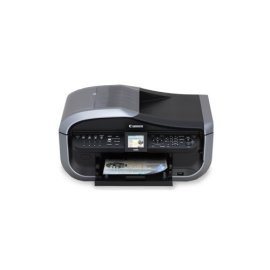
Canon Pixma MX850 multifunction printer is outstanding. Regular print quality and photo printing are excellent. Scanning and copying are great. |
| |
"Great All in One Printer" | 2008-09-23 |
| - Reviewed By User: A3NP137CEQ0YS7 |
I am a fairly heavy user and have been very happy with this product. I print about 1500-2000 pages a month including fax. I have had the printer for about a month and have not had any problems. Set up was very simple. Print quality and speed are both great. It goes through ink pretty quickly - I just put in my 3rd black ink cartridge - but I don't think it's any worse than most ink jet printers, and definitely better than some.
The only negative I have found is the auto-doc feeder is incredibly noisy and sounds like it is falling apart. But it works fine.
This is by far the best All in One printer (in this price range) I have owned in the 10 years I've been in business. |
| |
"Surprisingly versatile and speedy" | 2008-09-19 |
| - Reviewed By User: A332BYQPKF8NEV |
| I bought this printer for my home office. I was frankly surprised how well this product is designed and works. It prints on copy paper speedily and also makes superb photographic prints on appropriate papers. The scanner, fax, and other functions all work great on macs. I'm thinking of getting another one for work. |
| |
"Cannon MX850" | 2008-09-19 |
| - Reviewed By User: A2PKKKY1LGU642 |
| So far, this printer is great. Tops anything HP could ever come up with. This printer was easy to install. I like the extra paper trays. The ink cartridges are reasonably priced. Only time will tell if this printer lives up to the hype. I am betting it will. |
| |
"Couldn't be more satisfied!" | 2008-09-16 |
| - Reviewed By User: A1WTRNOQR2KQ85 |
| It's rare that you come across a product that actually lives up to the marketing hype (and I'm in marketing...so I know!!). Being a small business owner, it was important that the all-in-one I purchased was everything it promised to be and more. Although the first machine I purchased through Amazon was broken, I must APPLAUD Amazon for their quick remedy in providing me with a replacement within 24 hours. The print quality is excellent (although I have yet to print photos) and fast! The control panel is very intuitive and this machine has certainly lived up to the Canon brand. Wouldn't hesitate to recommend this to a small-, medium-, or large-sized business. You won't be disappointed! |
| |
"works as expected" | 2008-09-15 |
| - Reviewed By User: A3SLIV1QMHIUH4 |
| I am a fan of Canon printers and this is my first all in one. I use it for my small business. The copier and scanner work great, the fax is fine. It works as promised. I'll probably have to upgrade to a laser printer before too long. The printer is the most user friendly I have ever used. |
| |
"OK, but doesn't work on Linux" | 2008-09-14 |
| - Reviewed By wtcorrea |
The Canon MX850 does NOT work on Linux. It's an OK printer, if you use Windows or Mac OS X, though. |
| |
"Good quality, functional faxing capabilities" | 2008-09-08 |
| - Reviewed By User: APD4MF0L1I9D5 |
While I found the manual to be a bit cluttered and wordy, the device works exactly as I expected it would. Unlike many of the other reviewers, I actually purchased this primarily for its faxing abilities. I use it as a scanner / printer as well, but I wanted a all in one device with good and reliable fax device. While my fax needs are not complex (I don't do mass faxing or the like), I have to fax (send and receive) several a day and that functionality is key in my business needs. This unit has not dissappointed me yet.
I have it networked to three LAN workstations (2 are wireless) and all can fax and print large files quickly. The device has worked flawlessly for 2 months now and I would recommend it to others. The ink is somewhat expensive, but I have not seen it pour through it faster than any other printer I have used. The ink catridges are nice and easy to insert and offer immediate visual confirmation when they are in correctly. This is handy because as with most printers, changing the ink requires a trip inside the unit and that can be considered tedeous at best :)
I am deducting a star for the ink cost, but all in all it is worth the money even with the ink factored in. |
| |