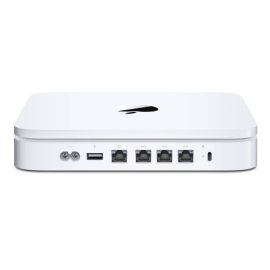
"Time Capsules are dying - Check Apple Support forums" | 2009-09-25 |
| - Reviewed By User: A38CXK8POE9AS3 |
I bought a Time Capsule in March, 2008. 500GB. The first one I got at the Apple Store in NYC did not work. I brought it back to the store about two days later and they replaced it, no questions asked.
Since then the Time Capsule has been functioning well. There was one point where it would not back up and after trying a few fixes I had to erase the entire drive and start over. I was not thrilled, but I understand that with computers, there are hassles from time to time.
For the past few weeks the connection would drop at random times and the Time Capsule would reboot. Annoying, odd, but I was not certain about what to do.
Yesterday it died. Fully dead. I brought it to the Apple Genius Bar today and they told me, "Sometimes things break." Nonsense. These are not supposed to have an 18 month shelf life.
If you go to the Apple Support forums you will see loads and loads of people reporting this exact same issue. There are two threads of about 12 pages each. CNet, tuaw, etc. have now all taken notice and written about the plague of dying Time Capsules.
It seems the units run hot and after a while the electrics are cooked and the power source fails. As I understand it, the drive is still fine, but the electrics are shot.
Until Apple publicly addresses and solves this problem do not buy this or any Time Capsule product. In 18 months you will be looking a a very expensive, very white paperweight, and Apple will 'fix' this for you by encouraging you to buy a new one. |
| |
"Great router, good backup device, ok network disk" | 2009-09-05 |
| - Reviewed By mitbooks |
This product is basically three products: an airport extreme wireless router, a networked drive, and finally, with Leopard, a networked backup system. Overall, it's a very good product, but there are some serious limitation one should be aware of.
As a router, it is fantastic. Typical Apple ease of use, with all configuration done by a very intuitive GUI application.
Unfortunately, it's not a great network drive. The drive appears to be internally connected using a very slow USB connection. You will find that even with a computer connected via Gb/s ethernet, transfer speeds will be limited to around 5-6 MB/s, tops. If you connect two Macs via fast ethernet, you can often get over 40 MB/s transfer speeds, so this is a rather large disappointment, especially for a device which will be getting a lot of use if you use Time Machine.
Time Machine is great in theory, but has a few issues. First, it is a file-based differential backup. That means if even a single bit of a 1 GB file is changed, the ENTIRE file gets backed up. Not only does this take a lot of time, it quickly depletes your backup drive because the same data is added to the disk every regular backup. To get around this, you have to explicitly exclude backing up such files. Good candidates for exclusion are Mail and iDisk caches, as well as virtual machine disk images.
There have also been numerous reports of Time Machine backups being susceptible to corruption. I've experienced this once, myself, after a backup was cancelled, so I can vouch that it happens. However, the problems can often be fixed by deleting the last backup. The next backup will take a long time as the computer must scan the full disk again, but the backups then continue on normally after that.
Time Machine backups have their place, and come in very handy to recover accidentally deleted files. However, they should only be considered part of a larger backup scheme. They probably shouldn't be trusted for a full recovery, and won't be of any help if your computer's drive completely fails, anyway. (How are you going to run Time Machine if you can't boot your computer?) As such, you should image your entire drive regularly, in addition to using Time Machine. |
| |
"a little pricy, but worth it" | 2009-07-30 |
| - Reviewed By wompedy |
I upgraded my home network from a 802.11g Linksys wifi router / 4 port hub to this 802.11n Time Capsule. Not only did my internet connection get noticeably faster and more reliable, but my computer-to-computer networking speed increased DRAMATICALLY. They aren't lying about how much faster the 802.11n is!
Another great selling point is the Time Capsule's always-on network drive. I don't use it as a wireless backup the way it is intended as all of my computers already have their own dedicated local backup drives. But I do use the network drive a lot. You see, I also have an Apple TV, which I do not use the way it's really intended either. I store all the content that I download off the internets on the Time Capsule network drive, then the Apple TV connects to the Time Capsule and thus has access to everything all the time. This way even with my computers asleep my Apple TV can read data from the networked drive which is always there.
I have checked and haven't found any sort of increase in my utility bill, so I don't think it uses dramatically more power than my old wifi router did, despite including a server-grade hard drive. Also, it's lovely to look at, totally silent, and easy to setup. Win! |
| |
"My only Apple disappointment" | 2009-07-19 |
| - Reviewed By User: A1LYU7WJ6IXYFF |
| This is the first apple product I have ever bought that was a disappointment -- big time. The problem is that it will not work. I keep getting the dreaded "disk will not mount" message that means that it will not do a back up. I have spent hours working on this including time spent with the very nice folks at apple service. They were great, but could not fix the problem. I now need to invest a few more hours that I would prefer to spend on productive work. I have owned computers for 25 years, so while not an expert, I know a little bit about them. What is particularly galling is that this problem has been going on for a long time. Just google "Disk will not mount time machine" and you will find messages going back for years. Shame on apple! In fairness, I have friends who own the product and are very pleased with it, so it is a roll of the dice. I would not buy another and would not recommend it. |
| |
"Pretty white brick with a blinking light" | 2009-07-14 |
| - Reviewed By User: AQPSQOROAL5VD |
The time capsule is a great idea, and I'm very much looking forward to someone turning it into a working product. At the moment it seems that Apple has failed to do this.
First I tried to get it to back up my laptop wirelessly. So far it has not succeeded in doing this at all. It spent a lot of time copying things off my computer but didn't complete for some reason.
There was an issue of my wireless menu saying "not configured" which I resolved by going to system preferences | networking and clicking the minus button until all items went away. Then I clicked plus and added back ethernet and wireless. That fixed the wireless menu, which seems to have been broken by the installation of the Time Capsule software.
When I connected it to my cable modem it did not get the DHCP settings, so I could not use it as a wireless router. I tried holding the reset button for 5 seconds to restore factory settings, then entered my settings again but that did not work. I tried unplugging it and plugging it back in while holding the reset button as suggested in the manual, but that also had no effect.
After all that, I put the Time Capsule back in its box and dug out my old Netgear WPN824 wireless router, and set it up in maybe ten minutes. It works great. Of course it doesn't back up my data, which is too bad.
I am going to return the Time Capsule for a refund. It is disappointing because I spent the extra money thinking it would save me time and help me make regular backups, but it didn't. |
| |
"Great!" | 2009-07-08 |
| - Reviewed By User: A2EEVQDH10729J |
| All I expected. Make sure you are not trying to use air tunes with it. For that you need an airport express. |
| |