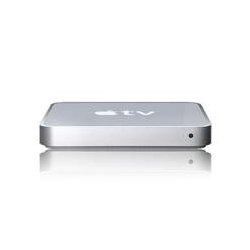
"Great Product. Typical Apple" | 2009-11-16 |
| - Reviewed By User: A3BPRTBASHSKYD |
My only complaint about the Apple TV is lack of a web browser and ITunes backup.
-It doesn't have a web browser although there are hack for Hulu that I have not tried yet. The big hurdle there appears to be that every-time you update your AppleTV the hacks get erased.
-I would like to have my entire media library on my AppleTV and clear some of it off my MacBook Pro. I have not been able to figure out how to gain more control of syncing yet.
It has the best picture quality out of any of my components and great apple functionality.
Highly recommend it, especially if you use ITunes and an IPhone. |
| |
"Great product!" | 2009-11-13 |
| - Reviewed By User: A33TQ6YL1EXCJU |
| Great interface! Internet Radio just added! What's not to love... Typical Apple quality and now a great price! Easy to set up and use. Apple Trailers are fun to watch. |
| |
"Great if you are Ipod / Itune user / collector" | 2009-11-11 |
| - Reviewed By User: AJQNB6694WJMG |
The thing with the Apple TV is that is first and foremost an Itunes/Ipod accessory.
If you have a large Itunes collection.
If you want to listen to your music/view Itunes content on your home theater rig.
If you have an HDTV suitable for photos / movie rentals.
If the idea of vast well indexed libraries of podcasts (both video/audio) appeals to you.
If a well catalogued comprehensive assortment of internet radio appeals to you.
Then Apple TV is a great addition.
The latest upgrade 3.01 with internet radio and a simple but attractive menu structure is the greatest. Everything you could want is graphically accessable in the first or second layer of the menu. I love it.
|
| |
"Nice device with a few errors" | 2009-11-05 |
| - Reviewed By User: A1901NTE8LFJF6 |
I waited for the Apple TV until the software upgrade the the price dropped on the 160GB version. There are a few problems that should be brought up.
I have a PS3 that I use to stream videos to my television. My library is over 1000 videos strong with several hundred being 30 to 60 min. TV shows, 800 plus movies and 10 HD movies. None are in a format that Apple TV will play. converting 200 plus TV programs will take 30 min each to put into a format that Apple TV will play. The regular movies take about 1.33 hours per movie and the HD movies take 27 hours each. It will take around 1400 hours, or about 2 months to convert my media for Apple TV, and that is with a dedicated computer.
The times above are with using my couple years old laplop. I have a quad core desk top that will take a far less amount of time, but I cannot connect that computer running Itunes with the apple TV. i have worked over ten hours on the problem with no luck. Since the Apple TV works with the lap top, the problem is going to be with the desk top, I tries to contact apple support, but you have to make an appointment for them to call you, or for you to call them. IM support would be nice.
Another draw back is the small click remote that comes with the Apple TV. Entering user names and password is a real pain in the rear.
As far as operating the Apple TV, the new software update make operating it very easy. The secret is in setting up the Itunes correctly with movie name, season, type, and genre. With careful set up of Itunes, the Apple TV is very easy to use.
Some people complain that the Apple TV will only do up to 720p, unless you have a TV of 55" or larger, the 720 will not make that much of a difference.
Apple does have a large selection of movies and television programs to choose from and access to a very large selection of pod casts, plus you can add all the pod casts you want. It would be nice if Apple would give you access to services such as Hulu and Netflix without having to hack the Apple TV.
The lack of support for anything else but Apple may turn out to ne the downfall for a great device.
Video play back has been smooth so far. |
| |
"Great if you know what you're getting & looking for." | 2009-10-12 |
| - Reviewed By User: APODJZHD9UHYM |
Let me start this off by saying I understand there are a lot of different ways to achieve the same outcome as Apple TV. I get the argument some people have of "what's the point?" I'm also not an Apple blowhard who worships everything they do. And I was able to pay a sizeable chunk of this with some Amazon credit from trade-ins.
That said, I was looking for a way to get some of my (2-year old) daughter's favorite shows available in the most convenient way. And no we don't just sit her in front of a screen 24/7. I noticed we had started gathering DVDs of kids shows at $10-$15 a pop with only a few episodes on each disc. Not only that, but she is wanting to start up the DVD player & PS3/Blu-Ray player by herself. Discs were getting dirty, scratched, and being put in the players upside down, etc...
I wanted to eliminate the discs and go digital. I considered just using my PS3, but currently their online store collection is sparse and it isn't compatible with Amazon downloads (at least the one I tried). And obtaining certain shows via other methods wasn't looking good. I looked into the Roku player but read mixed reviews on the quality since the picture is based on your internet connection. Our DSL isn't the greatest and from what I read it wouldn't have cut the mustard. A HTPC wasn't really in the cards either.
After some research I jumped on the Apple TV. Getting everything set up is a breeze. One cord for power, one cord for HDMI that's it. Simple, no buttons on the unit itself for little fingers to mess with. Getting it hooked up with my iTunes was easy as well, although I had to stop it from immediately syncing EVERYTHING in my library. It's very eager to get all of your media onto it. Once everything was set-up it grabbed all of the shows I wanted on it and it was ready to go. Navigating the iTunes store from it is also easy. It's basically everything I was looking for.
Pros:
Easy & quick start up, no hassles, large selection of content from iTunes.
Easily streams everything from my PC that I don't want copied over to the ATV unit itself.
Allows me to use my pc speakers & my home theatre speakers at the same time to play music from my library. (Really cool since our stereo equipment is in another room).
Eliminates discs, also able to lower my cable costs since we don't need certain channels now.
Able to take the shows with us anywhere with an iPod and some tv cables.
Works with my Logitech Harmony remote.
YouTube compatibility
Cons:
Lack of HD content, I understand the large file size, but come on...
No "stretch" option. Yes I know this is a a/v no-no. But when you're dealing with children's television I don't really care if it's not in it's original aspect ratio.
The short and sweet of it, know what you're getting into with it before making the jump. It's not going to be for everyone. I can't say I would've paid full price for it out of pocket, but it is a very nice product. If you're a big do-it-yourselfer a HTPC or even hooking up a laptop & HDD to your tv may be a better option. I personally didn't feel like doing all that when I could add this to my set-up. If you don't like paying for digital media, stay away (though you can still put outside media on this with a little basic knowledge). But for ease of use and convenience this is your typical Apple product and a really good option.
|
| |
"Works Great for My Needs" | 2009-09-23 |
| - Reviewed By User: AJRWW4EHYX0O9 |
I recently purchased the 160GB Apple TV after Apple discontinued the 40GB model and lowered the 160GB to $229.99. I got a great deal on Amazon with a one day special; it was going for $199.99. The main reason I purchased an Apple TV over a full HTPC is because I only want to stream the media from my iTunes library to my 40" Samsung LN-40A550 1080p HDTV.
* Compatibility: I have a black MacBook and early 2008 iMac both running Snow Leopard and iTunes 9.0.1. There have been no compatibility issues between ATV v2.4 and the new OS/software updates. In terms of video format compatibility, I don't really have any complaints except it won't play .avi/divx files out of the box unless the user converts the video formats or installs software hacks to the Apple TV. I knew this when I purchased the unit, but it would be nice to have included support for other video formats than just MPEG4 and H.264 (which is a very popular standard). Music compatibility is perfect as I had my entire library encoded as AAC/MP3 before purchasing ATV.
* Ease of installation: Installation was simple; open the box and plugged in via HDMI. And of course the power cord needs no explanation.
* Ease of setup: I ran into a few issues with my AirPort Extreme network when setting up the ATV. I have my network hidden and it took several tries before the Apple TV discovered and connected properly to the network. After connection it works great. As noted above, I am primarily using ATV for media streaming and not media sync. I plan on using the internal HDD for TV shows that I have converted and will store all ripped/purchased movies in my iTunes library.
* Ease of use: The remote that comes with the ATV is simple and true to Apple design. For more tech saavy users, however, the Remote app available for iPhone and iPod touch is a more featured remote with full keyboard/search functionality. I was able to configure the ATV to work with my iPhone quickly and easily. Navigating the menus is simple, however there is at times a noticeable lag. Setting the sync settings through iTunes is easy and controlling what to sync is as simple as syncing an iPod/iPhone. I will say my only concern is the sync takes FOREVER, even over my AirPort Extreme 802.11n network. My iMac is set for 802.11n as well as the AirPort Extreme, but the wireless sync was so painful I only transferred one episode of a TV show to the internal HDD. Apple recommends users first time sync be done over Ethernet rather than Wi-Fi.
* Features: The Apple TV performs perfectly for my needs. Streaming has a short delay based on the size of the video file, however audio streaming is instant, and YouTube video streams take a few seconds to buffer. Apple TV supports output up to 1080p, however, videos are not scaled to 1080p because the unit cannot properly decode 1080p content. The 1080p output is for the menus and for photos and video will play at a max resolution of 720p. It would be nice if the ATV supported 1080p but I suspect that will require a hardware/software revision as the ATVs processor and memory is limited by today's standards. Integration with the iTunes Store is seamless for browsing new content (music, movies, podcasts, TV shows, HD content). It should be noted that HD movies purchased from iTunes are 720p which fits perfectly for the video output resolution of ATV. 1080p video files are killers on HDD storage any way.
* As of the time of this review, iTunes LP and iTunes Extras WILL NOT work on Apple TV 2.4. There is much speculation and hope that a future software update from Apple will enable these features to work on ATV.
* Video Quality: Overall, I am very satisifed with the video output quality of the Apple TV over HDMI. I have gone back and re-encoded several movies because they looked poor due to lower bit-rates and resolution. After setting Handbrake to encode using the Apple TV preset the files looked much cleaner and more pristine on a HDTV. YouTube video quality is poor and needs a major update from Apple/YouTube for support for the HQ/HD formats now available. YouTube videos are watchable, but in most cases unbearable for everyday use.
I have been looking at purchasing either an Apple TV or Blu Ray player for quite some time, and after reading all the user reviews on Blu Ray players I was put off by technical issues and noisy/innefficient equipment. I will wait a while longer before jumping on the Blu Ray wagon. In the meantime, Apple TV will hold me over for all my digital/HD content needs. With the debut of iTunes LP and iTunes Extras (again iTunes 9 only), Apple TV will be a more viable option compared to DVD/Blu Ray. I give Apple TV 160GB with ATV 2.4 **** stars. Not perfect, but does exactly what I need.
Thanks for reading my review.
Also, I'll share with you my Handbrake video encoding settings: Apple TV preset, H.264, constant quality 62%, loose anamorphic, decomb filter (default). Enjoy your encoded movies! |
| |