"Workes great with Linux Ubuntu 9.10; $100 cheaper than logitech's diNovo Edge" | 2009-11-10 |
| - Reviewed By User: A24VG3L2TSN7FG |
Using it on a Fujitsu Laptop for my theater. etc from the couch :) No PS3 here just a computer with tons of cables coming off of it.
I sold my diNovo Edge which I loved with my theater when I sold my house. I like this keyboard better though; good thing I wanted to save a couple bucks!
Pros:
-Works just as well as the Logitech diNovo Edge keyboard but $100 cheaper.
-Works in about 1 1/2minutes with Linux Ubuntu 9.10 (the bluetooth is flawlessly easy)
-No charging needed (2 AA batteries have lasted a week so far and I'm typing with it now; also I have left it on over night half the days so it's been on for well over 100 hrs so far.
-No charger to place near the couch so I can reach the keyboard easily like with the "edge". I set the keyboard anywhere, which I think is my favorite thing about it so far.
-Mouse pad is exactly like a laptop or the diNovo edge keyboard PERFECT
-Way lighter than the diNovo
-batteries won't cost a fortune when the diNovo's lithium goes bad.
Cons:
-You have to use the shift key for Capital letters or keep track bc no light on the keyboard shows you when caps is on. Operating system can be setup to notify when CAPS is "on"
-No volume buttons so I set up hotkeys e.g. (ctrl & up arrow) under keyboard settings
-No built in hotkeys except PS3 stuff but problem solved above
-No back-lighting obviously to save battery life.
All in all I give it a 9.75 out of 10. Minus .25 because of the CAPS issue, but an LED would run the batteries down so I understand why there is no signifying caps light. I just have to trust when I come back to the keyboard it's not on caps. My best purchase rating of 2009 so far goes to this couch-man's dream machine. |
| |
"Works well, small trackpad though." | 2009-11-05 |
| - Reviewed By User: A385Z2WCZSCTE7 |
PROS
- Works well. Good range.
- The built-in trackpad really makes things easier.
- PRICE
CONS
- Left- and right-click keys by the space bar are useless to me, but they aren't necessarily a bad idea. I'd rather have a windows key though (or an option key if you own a mac)
- Small trackpad. (of course, I'm used to a huge trackpad on my laptop - literally almost four times as big as the one on this keyboard.)
I bought this one mostly because of its price. It's definitely a good deal for just a little over $30. |
| |
"Use as Directed? Nah! Great for PCs, Not Just Playstation!" | 2009-10-17 |
| - Reviewed By User: A33NUVKG22QKRE |
I needed a wireless keyboard to use with my jury-rigged home theater PC (HTPC) setup, which is a Samsung NC10-14GB Netbook connected to a Sony Bravia L-Series KDL-32L5000 32-Inch 720p LCD HDTV. It's not a cutting-edge setup, but I pretty much just use it for streaming video, so it works fine. I didn't think that it would be so hard to find something that met my requirements, but my search did take longer than I thought it would.
I definitely wanted something with an integrated trackball or touchpad, to eliminate the need for a separate mouse. The keyboard could not require line-of-sight, so IR/laser options were out. The netbook already had built-in Bluetooth connectivity, so I wanted to take advantage of that, and really did not want deal with interference issues common with standard 2.4GHz wireless. Something made by a company I know and trust would be a bonus. Clearly, I had already limited my options.
I'm already a big fan of Logitech's products, happily using their Illuminated Ultrathin Keyboard and MX 518 Gaming Mouse with my desktop PC setup, so I figured looking at their offerings would be a good place to start. I found their Bluetooth keyboard selection, however, to be lacking. Their diNovo Edge Keyboard was too expensive, and required the use of docking station for recharging, and their diNovo Mini was too small. I also eliminated a bunch of no-name brands from here and other web sites, since none had really stellar reviews from other customers.
When I stumbled on Logitech's Mediaboard Pro here on Amazon, I was sold! Sure, it was designed for the Playstation 3, which I don't have, but Bluetooth is Bluetooth, right? It had an integrated touchpad, was from a reputable company, and wound up being same price as the no-name brands I found elsewhere. At this point, purchasing it was pretty much a no-brainer.
I've been using it for about a week now, and the performance has been great. It has worked perfectly from a range of about eight feet (not in line-of-sight) with no dropped keystrokes when typing. The touchpad is smooth and responsive. I was also happy to notice that it uses regular AA batteries (I'll be using SANYO eneloop Rechargeable Batteries when the included ones die out), and without a docking station like the diNovo Edge, it's easy just to stash away anywhere. I couldn't be any happier with this keyboard's performance!
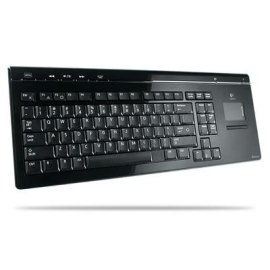
But, if I had to find a fault with this keyboard, it would be that the glossy surface picks up fingerprints and smudges pretty easily, but they are easily removed with a soft cloth. Also, there is no numeric keypad, but I don't plan on entering data into spreadsheets with the thing, so no big loss there. Neither of these issues warranted the loss of star.
Since I don't have a Playstation 3, I have no way of testing this product for its intended use. But I can say that Logitech's Mediaboard Pro keyboard is a great choice for your HTPC! |
| |
"Perfect For PCs" | 2009-10-12 |
| - Reviewed By User: A1KB01E9TKK5TC |
| I've wanted to get this keyboard for a while and decided it was better to get it used because it's too expensive new. I have to admit it's the best keyboard I've ever used. It's so versatile. The keyboard was intended for the PS3 and it works great with it but I prefer to use it with my laptop instead. I did have to buy a Bluetooth USB adapter for an extra $20 but I can use it with every computer I get from now on. I'm one of the few people that prefer finger pads to using a mouse and that's what makes this so worthwhile for me. The additional scrollbar on the pad is really neat too but sometimes it interferes with my pointer. They probably should've put that in a seperate window right next to the finger pad. Another small complaint is when I use it with the PS3. I have to generate a code to match it to the PS3 and when I go back to the PC I have to rematch it to the Bluetooth network on that. If they only had a fixed code for this keyboard as opposed to having randomly generated codes I could have it mated to both units at the same time. Logitech should include a Bluetooth adapter with this thing and start selling it for PCs. They'd probably sell a lot more of them. |
| |
"Okay product. Worth it cuz it's cheap" | 2009-10-11 |
| - Reviewed By User: A2H20VZ29HI48W |
I mainly use this Keyboard for my Bluetooth laptop. It's the cheapeast bluetooth keyboard as of now. It's becomes unstable if you are using multiple appications on your laptop (I have a new $1200 HP laptop)I find myself having to reboot the laptop to get the Keyboarding working properly. I know it was design to use for the PS3, but I haven't use it for that purpose yet.
|
| |
"PS3 Bluetooth Keyboard with Mouse" | 2009-09-29 |
| - Reviewed By User: A36E9BF83I6WID |
| This keyboard is AWESOME! A+++++ I got it for my PS3. It has bluetooth so it has a much futher range then regular wireless. Initially I debated of this keyboard vs the Sony small keyboard that attaches to the controller. I'm very glad I got this one instead. This is a must have for anyone with a PS3. Also, many people use it for their computers as well. |
| |