"Defective Screen, Bad Service" | 2008-10-04 |
| - Reviewed By User: A2OAR12IMOAJ2D |
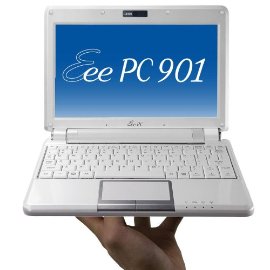
| I bought the PC through Amazon, but they delegated shipment through Beach Camera. The unit arrived with a pretty nasty screen problem - The glass looks like it's covered with dust, but on the *inside*. It's as if they dipped the screen too many times in the anti-glare solution at the factory.br / Needless to say, a cloudy screen is a fairly major problem when that screen is only 8.9" in size.br / Bad units happen, and I was just one of the unlucky .1% this time around. It's not like I couldn't return the merchandise for a full refund, right?br / I emailed Beach Camera, and was directed to their voice support line. I called them and was told, in no uncertain terms, that they did not accept PC returns under any circumstances. I hadn't realized this at the time of purchase since I'd ordered through Amazon, not the Beach Camera site.br / I filed a complaint with Amazon, but was ultimately told that the case had been "closed" because notification of the Beach Camera non-return policy was made clear during the checkout process. I couldn't recall seeing this policy while checking out, and Amazon support was unable to tell me where it appeared in the process.br / So now I'm stuck dealing with the manufacturer, ASUS. I've filed an RMA with them, so I'll see where that goes, but I'm not optimistic.br / I'm certainly not going to buy anything from Beach Camera again (who wants to buy something online that they can't return if there is a problem?) and Amazon won't be the first Web site I shop at anymore.br /br / The sad thing is that I've had really good dealings with Amazon over the years, including a similar dispute with one of their Z-shop dealers (another "we won't take back a defective product" issue). In the last case, Amazon settled the complaint - correctly - in my favor.br /br / As far as the ASUS 901 device itself goes, discounting the bad screen, it's a really great gadget. It's a little heavier and bulkier than the 900s I looked at in the local retail stores (I couldn't find 901s for sale in my neck of the woods), but also more professional looking.br / The installed Linux distro isn't that bad. The desktop is very functional and pretty intuitive for beginners.br / The keyboard is cramped, so touch typing won't be easy, but it's pretty usable. Given the space alloted to the keys, it's the best you could expect.br / The external speakers are okay, as is the built-in camera.br / It's a little more sluggish than I would have expected from an Atom-based machine with a solid state drive, but not too bad. It runs YouTube videos fairly well, with only a hitch here and there. It does all other, less-demanding functions (such as Web browsing, mp3 and podcast playing, email, etc.) fine.br / All in all, if the screen wasn't obscured, I'd be a very happy customer.br / |
| |
"Great portable machine" | 2008-10-03 |
| - Reviewed By User: A3AD0K95CHD0JJ |
| When looking for a portable computer to join me on the road, I was most concerned about:br /* (Exceptional) battery lifebr /* (Small) size and weightbr /* (High) exterior durability/build qualitybr /* (Solid) keyboardbr /* (Good) wireless hardware/softwarebr /* (Low) noise and heatbr /* (At least) a 1024-pixel-wide displaybr /* (Reasonable) disk spacebr /br /At the time of research/purchase, the EEE line seemed to meet these requirements better than the alternatives I read about, especially battery life. The units are small, the 6-cell batteries really are great in the Atom-based models, the power brick is tiny, a carrying case is included in the package, etc.br /br /The tough call for me ended up being whether to get the EEE 901 or the EEE 1000H. At the time, the 1000H was significantly cheaper, came with a larger (and more traditional) storage unit, had a larger keyboard and screen, with nearly the same battery life, and had Windows. (The the Windows version of the EEE 901 really did not sound appealing given the low storage space on it.) I got to try out the Acer Aspire One at a local Best Buy, and felt that the keyboard size was just right. The knowledge that the 901's keyboard was smaller than the Aspire One's worried me, though when I saw pictures online comparing the overall size of the 901 to the 1000 to a normal-sized laptop, it seemed almost pointless to buy something just a tad smaller than a normal laptop, vs something significantly smaller and still usable. Also, the 901's keyboard has been around for a while (used in all EEE models except the 1000 up until that point), and reportedly felt a lot sturdier, even if it were smaller.br /br /The Windows question: while I am a die-hard Linux fan, I felt that it might be more practical having Windows on a portable machine that has to go everywhere---on rare occasions, you might run into things where you really wished you had Windows for. Plus with the hard disk in the 1000H, it would be easy enough to partition and dual-boot. If you bought a model loaded with Linux and wanted Windows on it, (I guess) you could try VMWare or something similar or try dual-booting off of the internal SSD's, but you'd still either have to buy it or steal it, neither of which are good options. You really can't beat the value of having it come with the machine. br /br /Ultimately, I decided on the Linux version of the EEE 901. It has just the right amount of built-in storage space, is completely silent when using the battery, has a solid-feeling keyboard, easy-to-read screen/resolution, excellent battery life (5 hours when demanding a lot from the wireless non-stop) and overall is just right for my needs. The build quality is great---does not feel or look cheaply made. And it's so lightweight, and it fits everywhere---in the car, on a coffee table; produces very little heat; it's small enough to have two on your lap at once, if you're into that kind of thing. I only wish it were capable of playing MSNBC's and CNN's live video streams. YouTube, Hulu, etc work fine. This is currently my *only* computer, and I've been using it all day for a month. I browse the web, do email and write software (on a remote system). Though the keyboard is small, it doesn't suffer flex in the way that the 1000H's apparently does, and I can touch-type on it at a satisfactory speed---maybe just a bit slower than I would on a full-size keyboard. As a fair warning, I do have smaller-than-average hands. And even with that "advantage", I did buy an external full-size USB keyboard to use when I really have to do some serious typing. But the portability factor of this model is just superb, and the built-in keyboard is really satisfactory 90% of the time. It definitely beats having a larger machine to lug around, even if the built-in keyboard were a tad larger.br /br /Finally, a note about wireless: The included wireless software works fine and is easy to use. Reception could be better, but I have nothing to compare it to. So let me put it this way: whenever and wherever I have needed to get online, I've been able to.br /br /Way to go Asus, you really got things right with the EEE 901! |
| |
"Great mini-linux PC, not so great for Windows" | 2008-09-28 |
| - Reviewed By fzirdung |
| I've been looking for a small, affordable and highly portable machine for quite some time. For my needs, I really needed it to be Windows based. I bought the EEE with the intention of installing windows on it. I decided on the linux version because of the extra ram and ssd. br /br /As a linux machine, it runs great. It boots up quickly and launches apps without any delay. The battery life is nice too, I got almost 6hrs. I have large hands so it took a little while to adjust to the keyboard, but I was able to touch type on it with a little effort and some creative wrist maneuvers. IMO, it's fine for short docs, but if I was writing an paper, I'd probably get an external keyboard. br /br /Before going through the trouble of wiping the ssd, I wanted to make sure windows would run smoothly so I installed VMWare with a Winxp guest. This config ran really well. I was impressed! br /br /I considered leaving it in this way, but having to boot 2 OS to get to the apps I wanted just wasn't worth it. Also, I wanted to run things like Reason and running in VMware caused noticeable audible blips in those cycles where the host OS had control of the CPU. Aside from this inherent side-effect of running under VM, the actual processor performed well. It was able to play every project I had previously created - and some of those had maxed out my CPU on the desktop PC originally used to create it. Nice!br /br /So why am I giving it only 4 stars? Well, after installing windows, the PC became unbearably slow, so much so that I restored it back to linux and returned it. br /br /This thing doesn't have that fast of an IO sub-system (another reviewer commented on this). For linux this is fine because disk access is pretty efficient. Not so under windows, where the OS seems to want to read little bits of info from hundreds of files. Yeah, it only takes about 30-40 seconds to boot windows, but it takes another 5+ minutes for post-boot disk processing to end. During this waiting period, the machine is basically a paper weight. br /br /I would have given it only 2 stars, but since I am not using it for it's intended purpose, I felt that was unfair. I highly recommend this product as a linux PC. |
| |
"Nice "Netbook" for First Time Linux User" | 2008-09-26 |
| - Reviewed By User: A7O1XESFWS0BB |
| What I liked: Compact size; quick boot time; long battery life; bright screen; simple and easy software interface; quick internet connection to wireless network.br /br /What I didn't like: Gets hot over time; small keyboard does take time to get used to; touch pad for mouse can be overly sensitive; Linux version may be too simple and limited for advanced users.br /br /Overall, I am pleased with my purchase and would recommend this netbook. I am getting used to the keyboard. I really like the small size and use it primarily for internet and email. |
| |
"Great Product that fits the bill" | 2008-09-25 |
| - Reviewed By User: A43KH2CCTJQIW |
| I was really excited to buy a netbook and did a whole bunch of research before I bought the Eee pc 901. I love this computer and I can't imagine how I got by without it, but there are a few things I would like to say about it.br /br /The profile is really small, which is awesome; but I do have to say (just like everybody else) that the keyboard bothers me a little. Let me preface this by saying that I didn't think I would mind and that I've gotten pretty used to it, but it still is a little bothersome to type on and I would have counted it as a bigger negative for the 901. br /br /My battery life is amazing (5 hours easily with full functionality); the wireless card gets great range; the multi-touch touchpad is awesome and I already try to 2-finger scroll on every laptop I use. br /br /I bought the 20G Linux one and right away wiped Linux and installed XP. XP boots quickly (1 minute-ish) and overall the experience is snappy (I did put in 2 gigs of ram). When I'm running Firefox with a ton of tabs, sometimes it starts to drag a little. br /br /I bought this right before the new Wind and the revision of the Acer Aspire One came out, and in hindsight I would have probably bought the Aspire One because the big negative when I bought my Eee PC was the lack of a 6 cell battery, which was fixed in the revision.br /br /I very much enjoy my 901, but if I could do it again, I probably would have bought the Aspire One in order to save 150 bucks. |
| |
"A Small Wonder" | 2008-09-15 |
| - Reviewed By User: A1IPS96B9SR1R6 |
I was in NYC this summer with my girlfriend and a small portable notebook to occasionally surf the web, check my emails and quickly review & edit my photos is really a must have. I bought a 901 because the MSI Wind was too big, the Aspire One lacked of autonomy and expandibility and so on. The EEEPC 901 is a bit bulkier than his brother 900 and noticeably heavier, but the 6 cell battery boost your digital life with at least 5 hour of autonomy (60% brightness and wifi on). I've chosen the linux flavour to enjoy the 20gb of SSD (fast 4gb SSD dedicated to the OS and a slower 16gb slave), I usually work with linux so it's not a big deal, however I really can't honestly recommend to anyone: it's stable, easy and it simply works out of the box, but if something goes wrong, it'll be a real pain to find the problem and fix it if you are not an above average user.
Pros: This EEEPC is rock solid and have a good glossy finger magnet finish on the top (white is much better than black), the Atom processor is just a tad slow compared to the Celeron 900, but in conjunction with the 6cell battery its autonomy is really awesome. Cons: The keyboard is small and crowded and flex a lot in the center. The multitouch touchpad is a mess: there are no drivers under linux to make it work and, under windows, it feels sometimes clumsy, with the cursor jumping around. A fix from Asus or Elantech is really wellcomed. The baby runs very hot under average load.
Conclusion: I'm very happy with the 901, which is far from gaining a perfect score, but indeed it's the best selection among the current generation of netbooks. It is expensive and overhyped, but with its recent price cut, you'll not regret buying it. |
| |
"Glad I went for it" | 2008-09-15 |
| - Reviewed By 2manybooks |
| This gadget was on my amazon wish list for a few weeks. I kept looking at the online information, and visited a local computer store which had a display model of a few other Eee models, in order to handle them and translate the written specs into 3D for myself.br /br /Finally, the price here dropped a little and on the last day of a rebate offer, I ordered it. I've had my Eee 901 for a few days now and so far, so great! I got the black one, with Linux. Don't have any experience with Linux so I'm on a learning curve; I figured that if I really want Windows, I can always buy an XP OS and install it. But since I mostly will use this to access the Internet, blog, download photos and upload them to my online photo service, and to work with documents and spreadsheets, I think the Linux software preloaded on this sweet little machine will be just fine.br /br /The reviews here prepared me for the small keyboard on the Eee, but I don't have large hands and I'm adjusting to it faster than I had expected. The touchpad is not so great, but I hate touchpads generally and I can't say I dislike it any more than any other touchpad I've used. Today I'm taking the Eee to my office where I left my USB notebook (small sized) mouse and will probably use that instead of the touchpad. br /br /I just completed my first charge/discharge battery cycle, and was impressed by how long the battery lasted. I charged it up on Friday when I unboxed it, then unplugged it. I used it a bit on Saturday and a lot on Sunday, and finally the battery capacity dropped below 25% on Sunday night. All of that was with wireless enabled, which I understand drains the battery faster.br /br /So far, this is a very portable (and cute, I have to say it) mini-notebook that boots up like lightning, has a user-friendly interface for this total Linux newbie, connects to wireless networks smoothly, and has a display that's big enough for serious internet browsing as well as working with documents and spreadsheets. I bought this to take with me when I travel, but I can see it's going with me around town as well.br /br /Bottom line: if you are not a geek, but a reasonably informed PC user who doesn't need to run specialized software on it, don't be afraid to consider the Eee PC 901 with Linux. You'll get more GB of storage in the machine than comes with the Win XP version of the 901, and a user-friendly interface. Some things about Linux are different but not enough to make me regret this purchase. Not at all! |
| |
"Asus EEE PC..an amazing computer!!" | 2008-09-13 |
| - Reviewed By User: A19L931EQUVLMJ |
| I bought this computer to take around to my classes at college, and it has risen above all expectations that I had for it. To begin with...its TINY..really tiny. However, the keyboard does not take that long to get use to ( I have really big hands and it only took me about a week). Also, the battery life on this computer is quite good. I get between 3.5 and 4 hours per charge using XP (im sure that it would be longer if you kept linux on it). finally, this computer is FAST! it boots my version of XP in under 30 seconds and runs a TON of programs including Morrowind, Solidworks, and Spore just fine. Overall I would HIGHLY recommend this product to anyone looking for a small computer to travel around with! |
| |
"Never Too Old" | 2008-09-13 |
| - Reviewed By User: A2NMRE2EPYSUFS |
| I've only had this fun little computer for a few days but it is doing everything I expected. For an old guy like me it's hard to believe that so much can be stored in such a small space yet make it easy to use. Since I hunt and peck (arthritis) anyway, the small keyboard has not caused any problem. The Linux system is new and fun....better than the boring XP. The wireless works great from my DSL. Do I sound satisfied or what! |
| |
"Asus 901" | 2008-09-13 |
| - Reviewed By User: A23YAS3VBMZ8IQ |
| Having and loving an 8 GB Asus PC, I ordered a 901 a couple of months ago. I was impressed with the size of the larger keyboard; however, the keyboard functioning was a disappointment. Each key had to be pounded in order for a character to register. Additionally, the computer frequently froze, requiring the user to restart the machine. After trying to overcome these issues for a couple of weeks, I returned the 901 for another. Unfortunately, the same problems occurred with the replacement computer, and I had to return it also. I will be watching for a later version of the Asus, one superceding the 1000. |
| |